


👑 K Font Generator
Transform your text and gaming names into royal Gothic, sleek Cursive, and killer aesthetic fonts instantly!
An online text-styling tool turns one letter into an experiment: mathematical alphanumeric characters offer varied looks, while decorative elements add personality without changing the message someone intends to communicate for everyday personal expression across apps.
Compare distinctive text styles through deliberate character selection, then test by copying each result into its destination; an unfamiliar symbol may look elegant yet behave differently across applications on different devices before choosing a favorite.
Table of Contents
What Is A K Font Generator?
A K Font Generator is an online tool that presents stylized versions of K and k using Unicode characters, letting you compare letter variations before choosing a look for profiles, names, or creative digital text.
Unlike installing a traditional font file, the generator offers useful previews of decorative elements and text styling; users can select a preferred design, then copy and paste the result into compatible apps when widely supported.
How To Copy And Paste K In Different Fonts
Choose a preferred K style from the available examples, then select character or tap the click character option when the generator supports it. Copy character and move to your chosen destination for sharing or saving.
Paste character into the chosen application, check how it appears, and test device compatibility before publishing. Some Unicode variations render differently across apps, so keep a plain-letter backup for usernames, captions, or messages if needed.
K In Different Font Styles
Choosing bold, italic, script, sans-serif, monospace, and double-struck options gives the letter K distinct moods while keeping it easy to copy for digital use across different creative projects and personal profiles.
An expressive look can come from Gothic styles, Fraktur, vintage styles, or bubble letters; compare each on your target app before choosing, because decorative Unicode may display differently across devices, apps, browsers, and operating systems.
Also Read: Aesthetic Font Generator – Create 1000+ Cute & Stylish Text Styles
Capital Letter K Fonts
Capital K designs can change a name’s mood without changing its meaning. Try bold script, sans-serif, monospace, or double-struck styles, then compare each character against the profile background before choosing one for an online profile.
Unicode offers 𝒦, 𝓚, 𝔎, 𝕂, 𝐊, and 𝗞, alongside Ⓚ and K. These K letter styles may display differently across apps, so test the copied result on your chosen social platform before posting publicly.
Small Letter K Fonts
Small letter K fonts give lowercase text a distinct look without changing the message. Try 𝓀, 𝓴, or 𝔨 for softer script-inspired details in bios, captions, usernames, and creative digital designs that feel personal online.
Choose 𝕜, 𝐤, 𝑘, ⓚ, or k when comparing compact styles; each may render differently across apps, so preview your chosen character before using it in a public profile or game name you share widely.
Where Can You Use K Font Styles?
On social media, a decorative K can distinguish Instagram bios, TikTok profiles, and Facebook posts without changing the message. Try styled letters sparingly, because readability matters more than decoration across different audiences and screen sizes.
Use gamer tags or personalized display names to test whether special characters survive game restrictions; Discord conversations and WhatsApp messages also reveal rendering differences before you reuse a style publicly across several devices and apps.
Features And Benefits Of A K Font Generator
A K font generator offers multiple style options without asking users to install anything. People can compare decorative styles, playful styles, and professional styles, then choose a design for a profile, project, or online identity.
With a browser tool, users test stylish lettering, copy a preferred K, update bios and captions, explore gaming name customization, and check platform support before sharing, since unusual characters may render differently on various devices.
About The Letter K In Fancy Fonts
Fancy letter K designs are more than ornaments: visual styles shape a name’s mood while keeping its identity legible. Cursive, Gothic, bubble, and fullwidth versions offer distinct looks for creators exploring stylized letters online today.
A capital letter K may feel bold and formal, while lowercase k looks compact in bios or tags. Decorative symbols and personalized letters add character, but readability should guide every design choice on each platform.
Where The Letter K Comes From
The letter K traces back to Phoenician kaph, a sign often associated with an open hand, before Greek writers adapted it as kappa and Latin scribes carried K into the alphabet used today in writing.
Although its ancient outline changed across scripts, the familiar upright stroke and angled arms still guide many lettering styles. Within a font generator, designers explore Gothic forms, script forms, and decorative lettering for modern names.
How K Behaves In Different Styles
Readers often recognize K through its angled structure, yet bold serif and italic serif treatments change its mood without changing the letter’s identity; spacing, contrast, and surrounding text influence the final impression across digital platforms.
An experienced designer may choose circled or squared lettering for compact labels, while superscript, strikethrough, and overline add emphasis; each effect works best when nearby words remain readable and the platform supports its characters reliably.
Unicode Characters For K And K
Unicode characters can show K in distinct forms, such as Ⓚ or K, while modified letters like K̲ add decoration. These options alter appearance, not necessarily the way apps interpret text during search or copying.
An uppercase symbol and a lowercase form may look related, but K is the Kelvin sign, not the ordinary letter K. Check character distinction when choosing a style for precise technical text or searchable names.
Where People Use A Fancy K
A fancy K often appears in gaming usernames, personal branding, and social media bios. Players choose distinctive character styles to personalize display names, while creators use decorative lettering to strengthen their digital identity.
Beyond profiles, people incorporate stylish variations into captions, messages, and gaming profiles. From ornamental lettering to bold designs, a carefully selected K adds personality, although readability and platform compatibility remain important considerations.
How Do I Copy And Paste A Stylish K?
In practice, K styles copy easily: open tool in a web browser and browse styles before you select design for your name. Click character, then copy character; keep text unchanged until ready to paste it.
Next, paste character into a social media profile, caption, or message; a gaming name also works when the supported application accepts it. Add it through the text input, then check the result on your device.
Are K Font Generators Free?
Many online generators offer free K styling because they transform text into Unicode characters rather than requiring a paid font package. Check whether copying styles, viewing options, or extra features involves charges before using them.
A web-based tool may still limit premium layouts, ads, or bulk options, so test its available styles first. Free access usually covers basic conversion, while paid plans depend on each site’s policies and feature availability.
Can I Use K In Different Fonts On Social Media?
For social media personalization, a stylized K can give a profile name a recognizable accent, especially when the surrounding text stays readable and the chosen characters remain supported by the app on common devices today.
Before posting, check platform support by viewing the letter on another phone and a desktop browser; unusual Unicode forms can shift, disappear, or become harder to read, so keep a standard K available as backup.
Do K Fonts Work In Usernames?
K font styles can work in usernames when a platform accepts the underlying Unicode characters. A name may look distinctive in digital content, but displayed result depends on the app’s character support and font rendering.
Test styled letters on target apps before saving your handle; character acceptance and rendering differences can affect visibility. For gaming or public accounts, keep an ordinary spelling recognizable so friends can still find you easily.
Will Stylish K Characters Display On Mobile Devices?
On most modern phones and tablets, styled K characters display when the app and operating system support their Unicode forms, although designs may appear differently across screens or show as empty boxes on older devices.
For mobile accessibility, test the copied letter in your target app before saving a username or bio; a generator’s preview cannot guarantee identical rendering on every mobile platform, especially after operating system or app updates.
Does Gothic K Work On Instagram?
Yes, a Gothic K can appear on Instagram when its design uses supported Unicode characters rather than a font. Paste the styled text into social media bios, captions, or comments and preview it before publishing.
However, platform acceptance varies: some Gothic forms may render as plain boxes, and character rendering differs across devices. Test your K fonts on another account and keep a readable standard version for accessibility when needed.
Do I Need To Install Software To Create Stylish K Letters?
You do not need to install software to create stylish K letters. A browser-based online generator offers convenience: choose from available character styles, preview the result, then use quick copying to place it wherever supported.
Software may help when designing downloadable font files, but ordinary Unicode K variants work differently: choose among stylized versions, copy one character, and test it across apps; font support and display differences can vary widely.
Can I Combine K With Symbols And Decorative Effects?
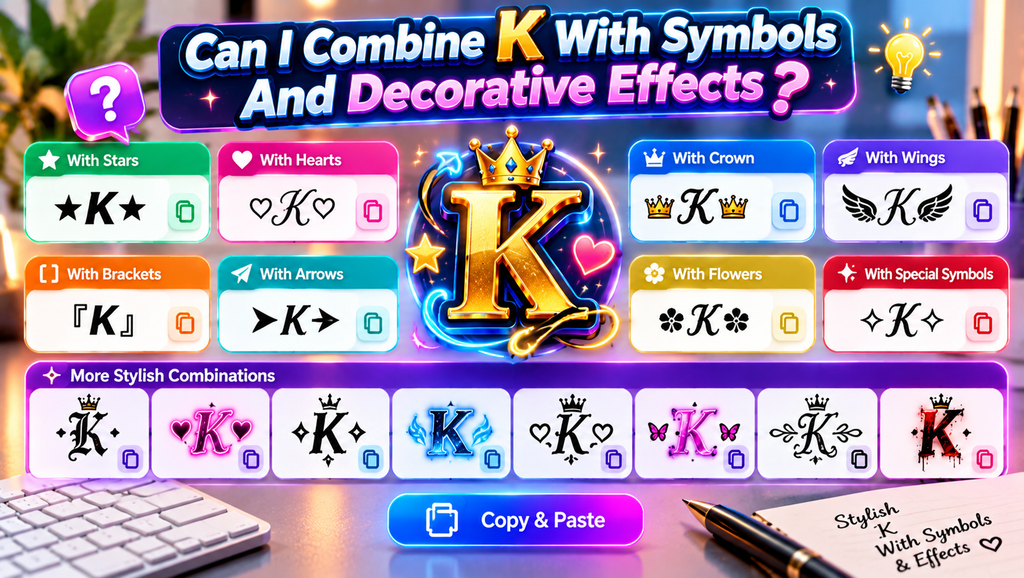
Yes, you can pair overlay effects with a K to add slashes, lines, or curves, but subtle choices remain clearer than crowded decorative wrappers. Try one accent first, then inspect the result at display size.
Brackets, boxes, arrows, and stars can frame a K; decorative designs add structure. Since Unicode combining marks vary across apps, test copying and pasting before choosing combinations that display consistently on phones and desktop computers.
Also Read: Ink Your Words: Free Tattoo Font Generator
Why Does K Mean One Thousand?
The K abbreviation signals thousands online, borrowing from kilo, a metric prefix meaning one thousand. Rather than writing 10,000, people use 10K as compact shorthand, particularly for follower counts across many social platforms and profile pages.
This meaning comes from the metric prefix kilo, derived from Greek chilioi, meaning one thousand; it is not a special property of K’s letter history. Thus, 10K followers means ten thousand followers on one account.
What Are Overlay Effects For K Fonts?
Overlay effects can change the presentation of K without replacing its underlying character. Apply borders, frames, or lines as a deliberate layer; restrained accent effects help the letter stand apart at a glance on screen.
For cleaner visual effects, keep one layer prominent: pair underline or double underline with restrained ornamental symbols, avoiding clutter that makes K harder to recognize across small screens or busy backgrounds for clearer profile previews.
How Are K Font Styles Organized?
A useful K collection is easier to browse when grouped by letter case, writing tradition, and visual treatment. A broad selection may separate script, Fraktur, bold Fraktur, Old Italic, and rounded examples for quick comparison.
A catalogue distinguishes uppercase characters from lowercase characters, pairing forms visually through Unicode style pairs and matching characters. Clear labels explain appearance but cannot guarantee identical rendering across every platform, app, operating system, and version.
Conclusion
A useful K Font Generator does more than decorate one letter; its style categories help people compare simple, modern, decorative, and symbol-based options before choosing a look that suits their name, profile, or design purpose.
Before sharing, test Unicode styles in real apps: character lookalikes may affect text matching and searching, while mobile devices and different operating systems can display characters inconsistently; choose clear copy styles for readability and recognition.
What Is A K Font Generator?
A K Font Generator transforms the letter K into decorative Unicode styles, including bold, cursive-like, circled, and symbol-based designs. You can copy a preferred version and paste it into supported apps, profiles, and usernames.
Is A K Font Generator Free To Use?
Many online K font tools are free to use and work directly in a browser. Features may vary between websites, so review the page for any limits, advertisements, or optional paid upgrades before choosing one.
Can I Use Stylish K Fonts On Social Media?
Usually, yes. You can paste many Unicode K styles into bios, captions, usernames, and messages. However, each platform may handle certain characters differently, and unsupported symbols may appear as empty boxes or ordinary text instead.
Do Stylish K Fonts Affect Searchability?
They can. Some styled letters use Unicode characters that resemble the standard K but remain technically different, potentially affecting search, tagging, or username discovery. Keep important searchable names and keywords in ordinary text whenever possible.
Do K Font Styles Display On All Devices?
Not always. Display depends on the character, app, browser, and operating system. Test your chosen K style on mobile and desktop before using it publicly, especially for gaming names, bios, profile branding, and captions.


