


✨ Discord Font Generator
Type your text below to instantly generate cool Unicode styles for your Discord nicknames, bios, server names, and chat messages!
A Discord font generator is most useful when subtle styling improves recognition. Unlike built-in options, it changes default text into character styles suited to server titles and profile statuses, without changing Discord itself at all.
Start with a browser-based tool rather than complex settings. Its stylized Unicode offers instant results with no downloads; simply copy and paste a short phrase, then check how other devices display it on different screens.
Table of Contents
What Is A Discord Text Generator?
A Discord text generator is a font changer in appearance only: it transforms plain text into Unicode lookalikes for display names, bios, and server branding. It cannot replace Discord’s default font inside the app itself.
The overlooked issue is device compatibility. Certain symbol styles display as boxes across older screens. My practical recommendation: favor recognizable nicknames, check a live result, then copy and paste only readable text into real conversations.
What Font Does Discord Use?
Discord’s gg sans is designed for readability, not a serious look. I find its friendly, inclusive character especially useful in crowded discussion threads, where consistent letter shapes clearly support Discord’s chat for everyone ambition.
Before this typeface, Whitney defined much of Discord’s interface. The Ginto-based logo arrived with its 2021 rebrand, while gg sans replaced Whitney in 2022, refining brand identity beyond its original 2015 chat for gamers roots.
How To Use The Generator (Steps)
Enter a phrase, and inspect the live preview before choosing anything. Compare bold italic with upside-down lettering, then move the slider to set an adjustable preview size that exposes awkward shapes or uneven proportions instantly.
Select Copy to Clipboard when the result looks balanced, and place it in the intended Discord field. Check the rendered lettering there, because the destination can display unfamiliar glyphs differently than expected across various devices.
Also Read: Cursed Text Generator
Where Discord Fonts Work
Discord fonts earn their place in voice channel names, styled role names, and text channels, where quick visual distinctions help navigation. They also work in DMs and announcements, although longer passages should usually remain plain.
Profiles allow more personality through display names, server nicknames, and a custom status. I favor shorter styles because uncommon characters can show as boxes on older devices; check both mobile and desktop before sharing publicly.
Server Names, Channel Names & Role Names
For online groups, role names earn trust before server names earn attention. Keep moderators and key roles instantly readable; use bold accents sparingly. In practice, clear labels consistently beat ornamental ones during fast-moving group discussions.
Channel names do different work: they guide navigation. Group plain channels beneath strong category headers, then test short names and symbols on narrow screens. Voice channels need clarity even when playful themes invite extra decoration.
Status & Bio / About Me Styling
An effective Discord profile separates quick updates from lasting details. Use a status line for current moods or availability, while About Me carries interests. A cleaner bio helps visitors grasp your personality immediately without distraction.
Matching every character across sections can hurt clarity. A stronger nickname style adds character, but simpler text and a readable profile serve introductions better. Test symbols before saving on different devices, especially on smaller screens.
How To Choose The Right Font / Best Practices
Choosing a Discord style starts with who must read it, not who might admire it. For server branding, favor short styles, readability, and recognisable names; elaborate lettering can obscure people in busy crowded member lists.
I preview styled text on Android and iOS before publishing because rendering varies. Reserve decorative text for an accent phrase, keep server rules straightforward, and check compatibility whenever unusual Unicode characters appear across different phones.
Discord Markdown Vs Unicode Fonts
Discord markdown is often safer than bold Unicode for important public messages: double asterisks create emphasis while preserving ordinary letters. That keeps instructions searchable and avoids confusing characters when members quote lengthy public server announcements.
Unlike markdown, Unicode offers decorative fonts for a display name, bio, or channel label where formatting cannot style the field. But device compatibility varies; preview symbol styles before copy and paste, especially across older phones.
Font Styles By Community Type
Competitive gaming communities need names readable at a glance. Bold fonts give clan tags presence, but aggressive-looking text often slows recognition. Save gothic styles for tournament announcements; everyday labels should prioritize scanning across busy screens.
Meanwhile, creative servers can mix script with small caps for galleries and discussions. In professional spaces, understated headings preserve visual hierarchy; consistent role names and welcoming channel names matter far more than flashy, distracting decoration.
How Do I Change My Discord Font?
Discord’s app font remains gg sans, so changing the entire interface is not a normal User Settings option. Instead, open Appearance and adjust text size through Chat Font Scaling; desktop zoom improves readability without extensions.
For personalized chat styling, use a generator to create Unicode fonts, then copy and paste the result into a message. With Nitro, Edit Profile also offers native display-name fonts and effects for individual user profiles.
Are Discord Fonts Free?
On Discord, decorative text generally costs nothing: standard Unicode symbols are displayed like ordinary writing. People with free accounts can use them in messages and profiles without purchasing a subscription or unlocking premium Discord options.
However, Discord’s official display name styles may require Nitro, and some online generators sell extras. Basic pasted lettering remains separate from paid features such as expanded custom emoji access, so compare options carefully before paying.
Can I Use Discord Fonts In Messages?
Yes, Unicode text works in direct messages and server messages because Discord treats these styled characters as ordinary text characters. I usually reserve fancy text for greetings, keeping the main conversation clear, accessible, and searchable.
Unlike markdown, these letters stay decorative after you copy and paste them, including in bot messages or short announcements. For important instructions, favor plain text; some Unicode styles may confuse screen readers and Discord search.
Will Discord Fonts Work On Mobile And All Devices?
Discord’s Unicode styles often appear on mobile and desktop, but platform support varies. On Android or iPhones, uncommon symbols show as empty boxes because device fonts lack the characters, even when Discord readily accepts them.
Before sharing a decorated nickname, check browsers, Unicode support, and visual width. I recommend testing fallback options across different devices first: ornate lettering may cause truncation or mobile cut-off, particularly in narrow sidebars and notifications.
Can I Use Discord Fonts For Usernames, Server Names, Role Names, Voice Channels And Status?
Most fancy font experiments belong in display names, nicknames, and status lines, not actual usernames. Discord restricts login handles, while ornamental Unicode can personalize profiles without changing the identifier friends actually search when adding contacts.
For shared spaces, try sans-serif bold on a server name, subtle accents for each role name, and clear labels across voice channels. In practice, legibility beats decoration, especially when moderators manage crowded communities and events.
How Do I Make Big Or Bold Text In Discord?
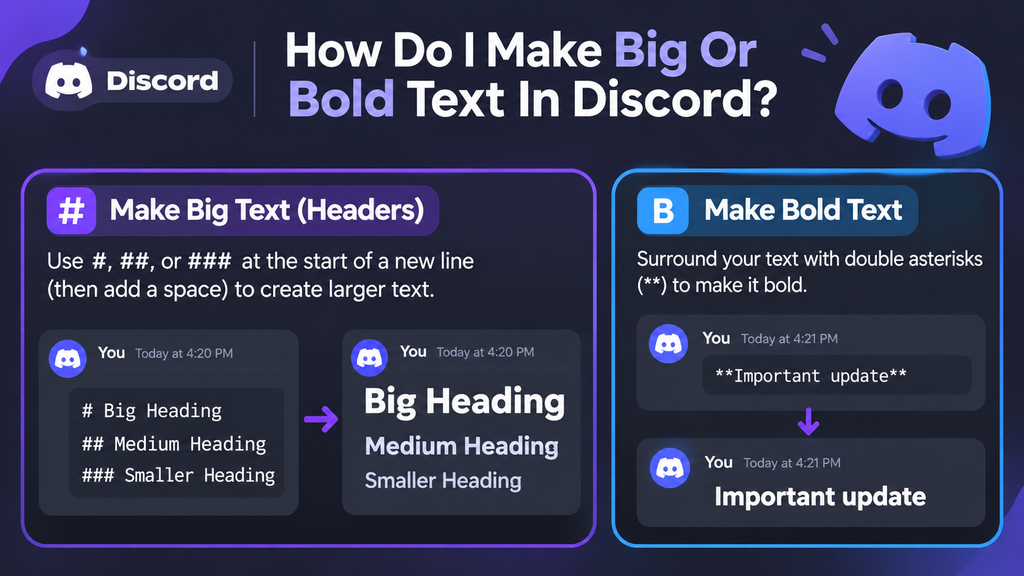
Discord headers enlarge prominent announcement lines directly without installing font files. Begin a new line using #, ##, or ###, then add a space. Unlike decorative Unicode style, these sizes rely on native text formatting.
For chat emphasis, surround words with double asterisks, such as **Important update**. This creates bold lettering without enlarging it. I generally recommend reserving oversized standalone titles for important announcements, keeping normal text comfortable to read.
What Are The Coolest Discord Fonts?
The coolest Discord fonts are rarely the loudest. For readable profiles, small caps and monospace bold feel sharp; wide text adds breathing room. I prefer these styles when a server needs originality without sacrificing clarity.
For something with more character, gothic lettering brings drama, while runes suit fantasy communities and script gives introductions a softer feel. Keep decorative names short; unusual Unicode characters may display inconsistently across different mobile devices.
Also Read: Chinese Font Generator – Stylish Text to Copy & Paste
What Font Does Discord Use?
Discord’s 2021 rebrand shifted its logo toward Ginto Nord, a humanist sans-serif family from Dinamo, the type foundry. Its customized Ginto wordmark complements Blurple, while website headlines reinforce its brand identity across marketing pages today.
From 2015 through 2020, Discord relied on licensed Whitney. After its rebrand, Discord commissioned gg sans, its interface typeface, announced in November 2022; users cannot install or cannot download it, and generators cannot override it.
Conclusion
On Discord, distinctive lettering earns its place only when conversations remain easy to follow. Good pairing matters more than novelty: 2–3 fonts are enough, and cleaner variants usually serve diverse communities better than heavy styling.
Before changing a name or channel label, inspect the live preview and try short text first. A decorative character may look striking on desktop yet render differently on mobile, so prioritize legibility over visual excess.
Can I Use Discord Fonts Without Downloading Anything?
Yes, an online Discord Font Generator works directly in your browser. Simply enter your text, choose a stylish font, and copy it into Discord without installing additional applications, extensions, or special software.
Why Do Some Discord Fonts Show As Boxes?
Some Unicode characters are unsupported on certain devices or operating systems, causing empty boxes to appear. Choose widely supported font styles and test your customized text across different devices before using it.
Can I Combine Emojis And Symbols With Discord Fonts?
Yes, you can combine decorative Unicode letters with emojis, stars, hearts, and special symbols. This helps personalize usernames, server names, and bios while creating unique combinations that reflect your personality or gaming identity.
Are Discord Fonts Safe To Copy And Paste?
Most browser-based font generators are safe when they simply convert text into Unicode characters. Avoid websites requesting Discord passwords, account tokens, unnecessary permissions, or suspicious downloads, and choose tools that require no login.
Will Discord Fonts Look The Same On Every Device?
Not always. Unicode font styles may display differently depending on device compatibility, operating systems, and available character support. Testing your chosen design on mobile and desktop helps ensure consistent readability across Discord communities.


[…] Also Read: Discord Font Generator […]