

✨ Symbol Font & Stylish Text Generator
Transform your text into gorgeous Unicode fonts, aesthetic symbols, and decorative styles instantly.
A symbol font generator turns text into expressive visual elements by combining Unicode, symbols, icons, and special characters. It helps users create symbol text for profiles, messages, designs, and social media without installing traditional fonts.
In practice, I find a good font generator useful because it balances creativity with consistency across devices and platforms. Users can copy-and-paste text, explore Unicode characters, and choose decorative styles while keeping communication recognizable and practical.
Table of Contents
What Is A Symbol Font Generator?
A symbol font generator is a browser-based tool that transforms normal text into styled text using decorative characters. It lets users experiment with visual forms without installing traditional font software for profiles, captions, and messages.
In practice, a symbol font generator can make ordinary writing more expressive by combining decorative Unicode characters with familiar text. After previewing the result, users can copy and paste it across many everyday digital platforms.
How Does A Symbol Font Generator Work?
Behind every polished symbol result sits an encoding process. A font generator accepts ordinary text, maps letters toward Unicode characters, applies stylish text patterns, then produces an output users can copy into profiles or messages.
In practice, the tool previews alternatives before committing one. It does not install a typeface; instead, it assembles supported characters, checks font rendering, and returns generated text ready for gaming or personal branding across platforms.
Also Read: Weird Font Generator – Create 1000+ Weird, Crazy & Unique Text Styles
How To Use A Symbol Font Generator
Start by entering your text, then review the selection of letters, numbers, and symbols available in different style categories. A practical online tool lets you compare generated results before choosing the most suitable Unicode mapping.
Next, use the copy and paste workflow to transfer your chosen output into a profile, message, or website. On mobile, tap the result, use the clipboard, and test it within the destination app for compatibility.
Symbol Text Styles And Types
Symbol fonts can be grouped by purpose: special symbols, decorative characters, enclosed characters, and mathematical styles offer different visual textures, while Unicode blocks determine which characters belong together in a coherent family for clearer categorization.
From my testing, standardized characters often work better than image-based effects because Unicode-based output remains editable; still, character support differs, so each category should be selected according to purpose and platform for practical publishing needs.
Where Can You Use Symbol Text?
Symbol text works well across social platforms, especially when Instagram bios, gaming usernames, and WhatsApp statuses need personality. For profile presentation, I frequently test X/Twitter profiles and Discord names before adding decorative text to them.
Beyond social profiles, digital art, design, and online messaging provide spaces for symbols, from signatures and decorative lines to emotional emphasis. I check destination device, platform, and supported character set before publishing content widely.
Copy And Paste Symbol Fonts
With a copy-and-paste workflow, symbol text can move from a text generator into social media, messaging platforms, or gaming profiles without installing anything. I preview the generated result first, then test its appearance before posting.
For practical copying, choose available symbols, select your preferred style, and paste into Instagram, Discord, WhatsApp, or documents. Check character restrictions and portability because a device may replace unfamiliar Unicode output, often displaying boxes unexpectedly.
Symbol Fonts On Mobile
On a smartphone, symbol text is practical when the mobile-friendly text field supports the character set behind each design. I usually check the browser first, because unsupported characters can appear differently across modern apps today.
For copy and paste, tap-and-hold can select generated output quickly, while copy-and-paste works smoothly inside messaging. I recommend simple styles when question marks or boxes appear, then test platform support before posting usernames or bios.
Symbol Fonts And Unicode
Unicode symbols receive numerical values, allowing Unicode characters to travel as text instead of images. From my observations, this approach keeps decorative marks usable in profiles, messages, captions, and supported fields across modern platforms today.
A Unicode standard defines how characters are encoded, while character encoding helps systems interpret them consistently. Decorative Unicode can create distinctive appearances, yet actual rendering still depends on available character support, software, and platform behavior.
Symbol Fonts Vs Traditional Fonts
Unlike traditional letters, symbol-based design can encode Unicode symbol text without packaging a font file. A browser-based generator lets users compare styles inside everyday text fields, making the visual distinction easier to judge before publishing.
With a font library, designers manage a downloadable font through font files and a conventional font library inside applications. Symbol text is different: styling remains character-based, while text rendering handles display across systems with support.
Best Practices For Using Symbol Text
Good best practices begin with readability: choose simple styles, limit emojis, and preserve clarity when symbols carry meaning. Test compatibility across devices, then adjust spacing and visual balance before publishing on usernames, bios, captions, comments.
For profiles and posts, follow platform rules and practice moderation when symbols might confuse audiences. Keep decorative choices purposeful, use short rules, and retain simple text wherever search, accessibility, or reliable display matters across platforms.
Troubleshooting Symbol Text
Troubleshooting quick fixes usually begin with the device and spacing: test simpler styles, then inspect browsers, operating systems, and apps when text rendering changes unexpectedly. I also recommend testing before publishing fancy text across platforms.
When symbols fail to copy, check the clipboard, application, and supported field first. On phones, use a tap-and-hold when needed, confirm text field, and replace unstable characters with standard characters to protect clarity and readability.
Font Generator Vs Font Library
Using Unicode-based font generators convert characters into styled Unicode forms, allowing results to travel as text without installing downloadable fonts. I use them when posting directly inside social platforms, chats, profiles, comments, and usernames quickly today.
Using conventional font libraries instead supports reusable resources across design software and broader applications. In my workflow, traditional fonts suit controlled typography, branding, layouts, and graphics, especially when precise type choices matter during client projects.
How To Use Fancy Text Generator Pro?
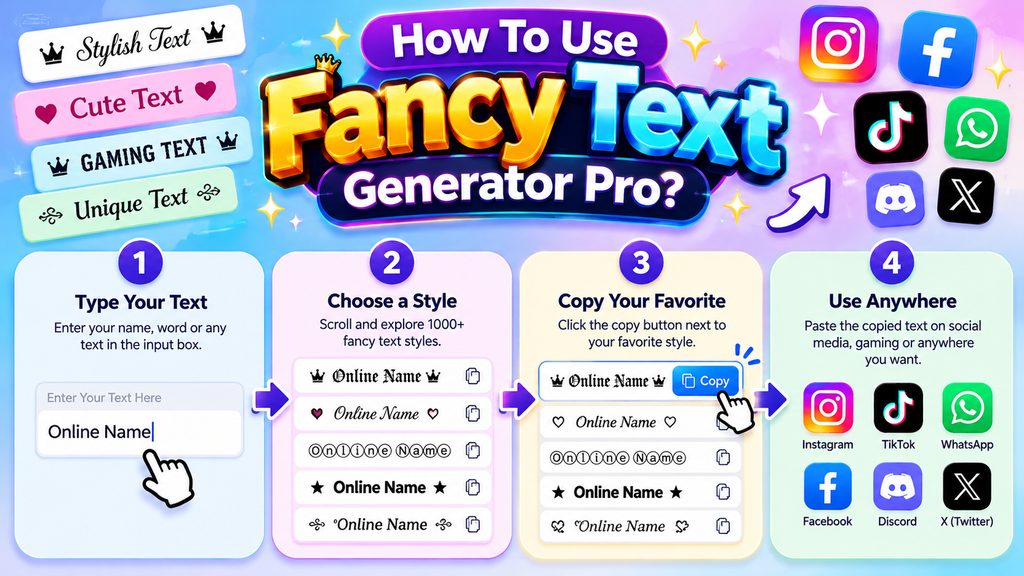
Start by opening a browser-based fancy text generator, enter your words, preview the characters, then choose a style. In my workflow, I test results on mobile and desktop before copying them into a supported field.
For practical use, keep the workflow simple: enter text, compare styled-text results, and choose readable formatting. I usually check compatibility first, then copy the finished fancy text into profiles, captions, chats, or other creative content.
Also Read: Font Generater – Change Your Boring Text To Cursive
Font Copy Paste Feature
The copy-paste workflow turns font generator results into usable text after you type a phrase, choose a style, and click to copy it directly. I use this method for message drafts and status updates daily.
On a smartphone, I recommend a mobile-friendly layout with tap-and-hold controls, because cramped buttons slow selection. For digital content, social media bios, and branding, instant copying reduces formatting mistakes and preserves the chosen appearance cleanly.
Is A Symbol Font Generator Free?
A symbol font generator can be free because Unicode-based generator tools create characters rather than selling downloadable font files. The practical cost appears only when an online service adds premium styling, exports, or advanced controls.
In my experience, free tools are most useful when they let you enter your text, preview symbol text styles, and copy your fancy text. That makes profile decoration practical without installing anything or managing files.
How Do I Copy And Paste Symbol Text?
Start with your text input, then scan the generated symbols before using click controls. I usually check the clipboard result immediately, because one accidental selection can change spacing, characters, or the intended profile appearance significantly.
For reliable sharing, select a font copy paste result, copy it, and paste directly where needed. Test several font styles first, especially when usernames, bios, gaming names, or social posts demand consistent symbol rendering everywhere.
Can I Use Symbol Text On Mobile?
Yes, symbol text is practical on a mobile device, especially when the text field supports Unicode characters. In my testing, a smooth mobile workflow comes from generating styles in the browser, copying them, and pasting.
The same approach works across messaging apps, TikTok, WhatsApp, and many social profiles, although each platform may render characters differently. I recommend testing unusual symbols before publishing a username, bio, or status on your phone.
Why Do Some Symbols Show As Boxes Or Question Marks?
Boxes or question marks usually mean the receiving device lacks a glyph for that symbol fonts character. Unicode stores text as characters, but rendering depends on supported decorative character sets, installed fonts, and appearance rules.
I check the same characters across browsers and phones because one platform may display emoji-based text perfectly while another substitutes missing glyphs. platform restrictions can affect unsupported symbols, so simpler characters often travel reliably between apps.
Is Symbol Text The Same As A Font File?
Not exactly: symbol text usually consists of Unicode characters, while font files contain instructions that change how characters appear. A generator outputs characters, rather than packaging a downloadable typeface for your computer or device locally.
That distinction matters when comparing a graphic font with Unicode symbols. CSS styling can alter ordinary text visually, but symbol text travels as characters, so supported symbols may remain recognizable across different platforms and applications.
Can I Use Symbol Text For Usernames And Bios?
Yes, symbol text can strengthen usernames and bios when selected for readability rather than decoration. On profiles, creative, heart symbols, and sparkles can add identity while keeping your chosen name recognizable across common platforms.
I usually recommend pairing stylish fonts with a simple style only when the service renders Unicode reliably. A bio can mix aesthetic spacing, music notes, or love emojis, but avoid characters that obscure meaning visually.
Do Symbol Fonts Help SEO?
Symbol text supports presentation, but it does not automatically improve rankings. In my experience, creative icons and expressive communication work with copy, while an online font generator should complement readable HTML text for search engines.
Search visibility depends more on crawlable content, intent, structure, and accessibility than decorative characters. Unicode symbols may enrich posts, stories, profiles, or promotional content, but search engines need conventional words explaining the page’s purpose clearly.
Conclusion
A practical symbol font generator can combine decorative symbols, arrow symbols, boxed text, bracketed text, decorative separators, bubbles, emojis, and emoticons into usable styling options, making experimentation faster while keeping profiles, messages, and creative layouts.
For SEO, standard text, plain text, keywords, search engines, indexing, ranking, and search visibility should stay primary. Styled social content or website content can enhance presentation, but accessibility and compatibility should guide final choices clearly.
Can I Use Symbol Text On Social Media?
Yes, symbol text can commonly be used on platforms such as Instagram, TikTok, Facebook, X, Discord, WhatsApp, and other applications, although compatibility may vary between devices.
Will Symbol Text Work On Mobile Devices?
Yes, symbol text generally works on smartphones and tablets when the operating system and application support the selected Unicode characters. Some unusual symbols may display differently across Android and iOS devices.
Can I Combine Symbols With Different Text Styles?
Yes, many generators allow symbols to be combined with decorative, bold, cursive, or other Unicode styles. Mixing styles can create distinctive usernames, bios, captions, gaming names, and creative social content.
Can I Use Symbol Text In Gaming Names?
Yes, symbol text can make gaming names more distinctive and memorable. Players often combine decorative characters, special symbols, and stylish lettering to create unique identities for games, clans, profiles, and multiplayer communities.
Are Symbol Fonts Supported On Every Device?
Not always. Support depends on the operating system, browser, application, and available Unicode characters. Common symbols usually display correctly, while newer or less-supported characters can appear differently or become missing boxes.


[…] Also read: Symbol Font Generator – Create 1000+ Cool & Stylish Symbols […]