


A calligraphy font generator makes ordinary text feel elegant through fluid strokes, connecting strokes, and flourishes without expensive software. I use an online tool to test beautiful handwriting before shaping digital type for artistic projects.
Unlike rigid letters or mechanical letters, calligraphy relies on a glyph, pointed pen, brush, and thick-to-thin contrast. The interface offers a wide selection, letting users compare expressive letter choices and copy and paste designs instantly.
Table of Contents
What Is A Calligraphy Font Generator
The tool turns typed content into styled lettering for quick visual testing. In practice, I use the text box to enter a phrase, then preview several calligraphy font style options before selecting one that fits.
The output can support wedding invitations, business branding, or social posts, while copy and paste font workflows make sharing simple. I also check spacing, clear strokes, and high-resolution export before artwork reaches its intended format.
Also Read: Underline Text GeneratorHow To Use The Calligraphy Font Generator
Start in the input area with a short phrase, then explore calligraphy styles before deciding. I often test one word first, because letter connections behave differently when a complete name, heading, or message is entered.
After choosing the look, use the clipboard to move text into a digital platform or document. For image output, review high-resolution PNG quality, then test the result on smartphones and desktop screens before publishing anywhere.
Use Cases / Who Uses Calligraphy Fonts
Calligraphy fonts serve wedding invitations, social media posts, logo design, signatures, gifts, and labels, while designers choose elegant lettering to give messages distinctive character. This approach appears across branding, events, personal projects, and artwork.
In practice, branding teams favor modern script for refined identity, while event planners use graceful names and quotes on cards. Gamers, content creators, and marketers benefit when decorative text adds personality without requiring specialized calligraphy skills.
Why Choose Our Generator / Features
I favor our calligraphy fonts because the tool handles colors, sizes, and text effects without making the design process cumbersome. In practice, polished text graphics can become an image within seconds for quick visual testing.
Beyond styling, image links and an embed button give published work a practical route into webpages, while save options help retain versions. That makes repeated branding tasks easier to organize, compare, and reuse consistently later.
Styles Of Calligraphy
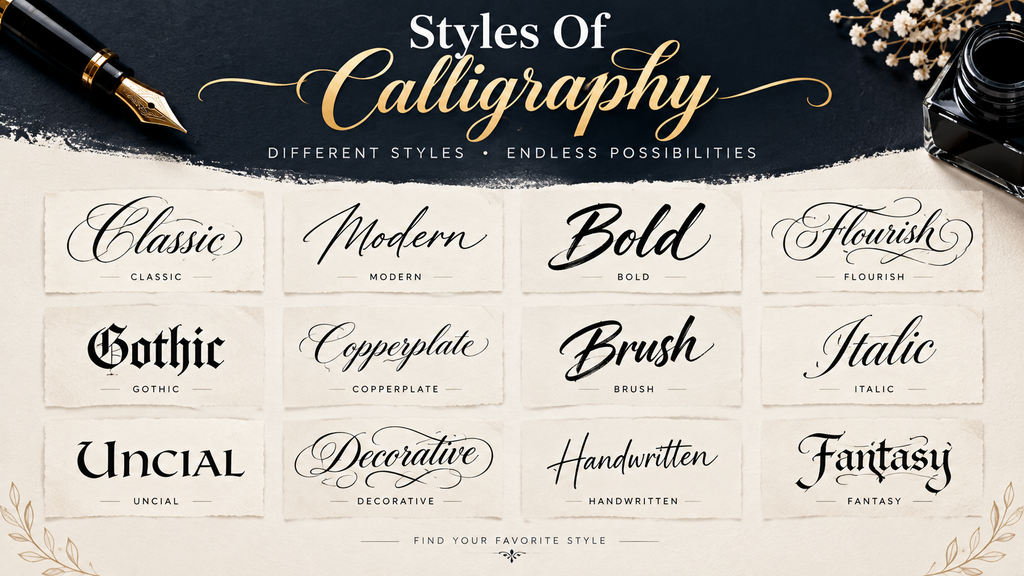
Choices become clearer when grouped by stroke behavior rather than popularity. Great Vibes favors formal script, while Pinyon Script adds romantic high contrast; Alex Brush feels lighter, with short descenders, fitting ceremony headers and layouts.
For everyday use, Dancing Script brings a bouncy rhythm, while Parisienne offers casual character. Lovers Quarrel introduces flourished movement; Allura stays clean and modern, proving choices should follow purpose, breathing room, and readability across channels.
20 Free Calligraphy Fonts
Among options, Great Vibes, Alex Brush, Pinyon Script, Dancing Script, Parisienne, Sacramento, Niconne, Kaushan Script, Yellowtail, and Tangerine span formal, copperplate, high-contrast, and contemporary moods, giving designers choices for headers, cards, identities, and digital accents.
Mr De Haviland, Ruthie, Carattere, Lavishly Yours, Playball, Satisfy, Italianno, Marck Script, Mrs Saint Delafield, and Euphoria Script bring delicate, ornamental, signature, fluid, and whimsical qualities; I use them for short, focused compositions on projects.
Tips For Great Calligraphy Text
Start with clear spacing, then adjust each stroke and curve until letters breathe. In my practice, restrained flourishes often improve readability, while excessive decoration can weaken the overall elegance of calligraphy on a finished design.
Test your lettering at its final size before exporting. Check thin strokes, connected letters, alignment, and contrast. A consistent style with deliberate refinement keeps names, quotes, and invitations polished across designs on different screens today.
Explore Every Calligraphy Style
Explore every calligraphy style by comparing steeply slanted scripts, classic pointed-pen penmanship, and monoline forms. For luxury branding, controlled flourishes can add polish, while weddings benefit from graceful movement and readable letterforms in different layouts.
Bouncier hands can add personality, while even-weight scripts keep layouts clean. Brush lettering introduces brush texture, momentum, and a mood. I match that energy to the project, balancing elegance, clarity, and rendering across modern platforms.
Extensive Collection Of Copy And Paste Calligraphy Fonts
A curated selection makes copy paste calligraphy fonts practical when you need beautiful calligraphy, calligraphy letters, and stunning calligraphy styles. I test free calligraphy fonts; subtle spacing and weight changes transform layouts quickly on screen.
A wedding mark may need elegant styles; branding often favors distinct charm, while experiments benefit from creativity when combinations are copied directly into messages. I review social-media posts and display graphics before export across projects.
Elevate Plain Text Using Our Free Calligraphy Font Generator
Use our instant transformation to reshape plain text within seconds, then select elegant fonts that reinforce your message with no design skills required. I have found this approach useful for branding drafts and event graphics.
Beyond decoration, calligraphy can shape visual perception: a refined script may make ordinary wording feel deliberate, while letter-spacing and supporting details help preserve readability. For me, this balance consistently improves polished digital presentation.
Amplify Your Social Media Presence With Calligraphy Letters
I’ve found that content gains attention when calligraphy is designed to captivate audiences with a crafted tone. A calligraphy text generator adds personality to captions, profile elements, and announcements without forcing every post into design choices.
Across campaigns, I pair business cards with personalized gifts, then adapt the same text-to-calligraphy feature for social posts. These creations strengthen visual recognition, while each word remains purposeful, readable, and suited to the audience consistently.
Create Stunning Designs Using Calligraphy Font Styles
I often test a calligraphy style against the layout before adding detail, because graceful lettering can overpower tight spaces. For wedding stationery, balanced spacing and restrained flourishes usually create more polish than excessive decoration beautifully.
For digital work, I prefer starting with fonts, adjusting color and size, then reviewing the result at display dimensions. This helps text that stands out remain readable while fitting labels, social posts, and invitations smoothly.
Captivate Attention With Stunning Social Media Bios
A polished bio can turn ordinary online profiles into memorable introductions. I have found that combining modern calligraphy font details with classical elegance gives each account a distinctive visual rhythm without sacrificing readability effectively today.
In the digital age, concise words paired with your name can create timeless allure. Thoughtful styling helps readers pause, understand your identity quickly, and remember the personality behind your social presence with greater confidence consistently.
Also read: Invisible Text Generator
Share Calligraphy Fonts Across Multiple Platforms
Good sharing depends less on ornate styling than on compatibility. I usually test ornamental output in modern browsers, then copy the result into social media content before publishing, because some apps today substitute glyphs unexpectedly.
For design work, I keep the source version available and paste it separately into Canva, Photoshop, or Figma. When output matters, exporting instead of relying on glyphs preserves spacing and decorative details during final publication.
Calligraphy Text Generator For Names And Quotes
Names become more distinctive when a calligraphy text generator gives each letter a deliberate rhythm. I often test short names first, then compare elegant lettering and graceful names before shaping longer quotations for balance overall.
For quotes, I prefer calligraphic styling that preserves readability while adding personality. A calligraphy creator can refine phrases into polished designs, especially for invitations, cards, profiles, or projects where expressive lettering needs controlled spacing naturally.
Calligraphy Signature Generator For Personal Marks
Personal marks become more distinctive when calligraphy balances graceful movement with readable calligraphy phrases. In practice, I test several scripts first, then adjust joins and spacing before choosing a style for sharing online or printing.
A signature generator also helps me compare letter width, flourishes, and visual rhythm rather than copying one style blindly. For branding, modern signature cards should remain recognizable across profiles, documents, and small designs consistently today.
Calligraphy Tattoo Font Generator For Lettering Ideas
Before any ink is permanent, I test hand-lettered tattoo mock-ups at the placement, checking scale and curve rhythm. Tattoo script concepts with graceful lettering become easier to compare when spacing, weight, and legibility remain consistent.
From my practice, custom redraw becomes valuable when artwork must suit a tattoo artist’s stencil, especially at small sizes. Simplified contours, consistent spacing, and artist refinement preserve the design better than ornate detail over time.
Conclusion
A calligraphy workflow should finish with clarity: test your chosen calligraphy font, compare lettering, and keep readable forms before exporting. My experience shows thoughtful spacing often improves designs more than excessive decoration or complicated styles.
Use the generator as a starting point for wedding signs, logos online, signatures, and creative projects, then refine each result for its setting. A few edits can preserve elegant handwriting while making the design personal.
Are These Calligraphy Fonts Free For Commercial Use?
Commercial rights depend on the individual font licenses, not on a calligraphy font generator itself. Before publishing stylish branding materials or product packaging, verify whether the selected font permits commercial projects and resale without permission.
Are These Calligraphy Fonts Free To Use?
Many calligraphy fonts are available at no cost, but usage rights vary. A font under the SIL Open Font License can support personal projects and commercial projects, with no attribution required for resulting images too.
Can I Use Calligraphy Fonts For Business Logos And Branding?
In branding work, I’ve found brand logos can use calligraphy for sophistication, especially when distinctive lettering supports brand concepts. Before launch, verify licensing because free availability does not automatically permit business use across branded products.
Can I Sell Products With Generated Calligraphy?
Yes, you can sell products featuring generated calligraphy, provided commercial use rights, font licensing, and personal design work terms permit it. Check permissions before printing labels, packaging, invitations, or marketing materials for direct online resale.
How Do I Make Calligraphy Text Online?
To make calligraphy text online, enter a name, choose a font style, and preview the result. For polished layouts, I test calligraphy-style lettering and visuals separately before copying the finished design to match intended spacing.


[…] Also Read: Calligraphy Font Generator […]