


📢 Ultimate Big Text Generator
Type your text below to instantly generate massive ASCII banner art, bold heading text, and stylish large Unicode fonts for social media, YouTube, and Discord.
A big text generator enlarges normal text, but its real value is creating visual impact through big letters, Unicode characters, and a preview before copy paste into Instagram bios, banners, or titles for creative use.
From my testing, a giant text generator works when a text field converts a phrase into massive text with style; you can see the output, adjust symbols, copy it for game nicks or social media.
Table of Contents
What Is A Big Text Generator?
A big text generator is a practical tool that transforms ordinary copy into large Unicode characters with a bold appearance, making paste-ready text easier to move across platforms without relying on images or manual formatting.
In practice, I treat generated lettering as selectable text rather than artwork: its appearance comes from encoded characters, so results depend on browser, app, operating system, and the specific font coverage available there for users.
Also Read: Wide Text Generator
Where To Use Big Text
Big text works beyond decoration: use banners, announcements, displays, and social media profiles when ordinary type disappears in busy layouts. I often recommend big text for quick scanning, especially where titles need immediate visual presence.
For design work, Canva, Word, posters, and graphic materials can benefit from oversized lettering; digital creators also use Instagram bios and game nicks when scale or personality matters more online in crowded layouts today daily.
Big Font Style Ideas And Uses
From my experience designing social posts, big font styles work best when the visual job is obvious: headings, headlines, catchphrases, or names need stronger attention than surrounding copy, while readability remains controlled. spacing stays balanced.
I also test big text in captions, posters, birthday greeting graphics, and chat messages, because large text can change tone quickly; design aesthetics matter, but practical layout and visual hierarchy should still guide placement cleanly.
How To Use A Big Text Generator
Start by entering your phrase into the big text generator, then test big font styles before choosing a result. Use the copy and paste workflow to move styled text across your preferred platform for audiences.
I usually compare Bold Sans-Serif, Italic Uppercase, and Monospaced Uppercase while checking readability on mobile. Select a clean variant, tap the copy button, and paste it where the surrounding design needs emphasis in practice today.
Why Use Big / Bold Text?
Big or bold text helps readers spot important information quickly, especially when a page contains dense text. I often use visual hierarchy to make key points clearer without making every element visually overwhelming or distracting.
Beyond emphasis, bold fonts can improve legibility and direct attention toward important details in profiles, banners, or posts. Used selectively beside headings, they create stronger design aesthetics and help readers scan content faster without clutter.
When To Use Bold Text, And When Not
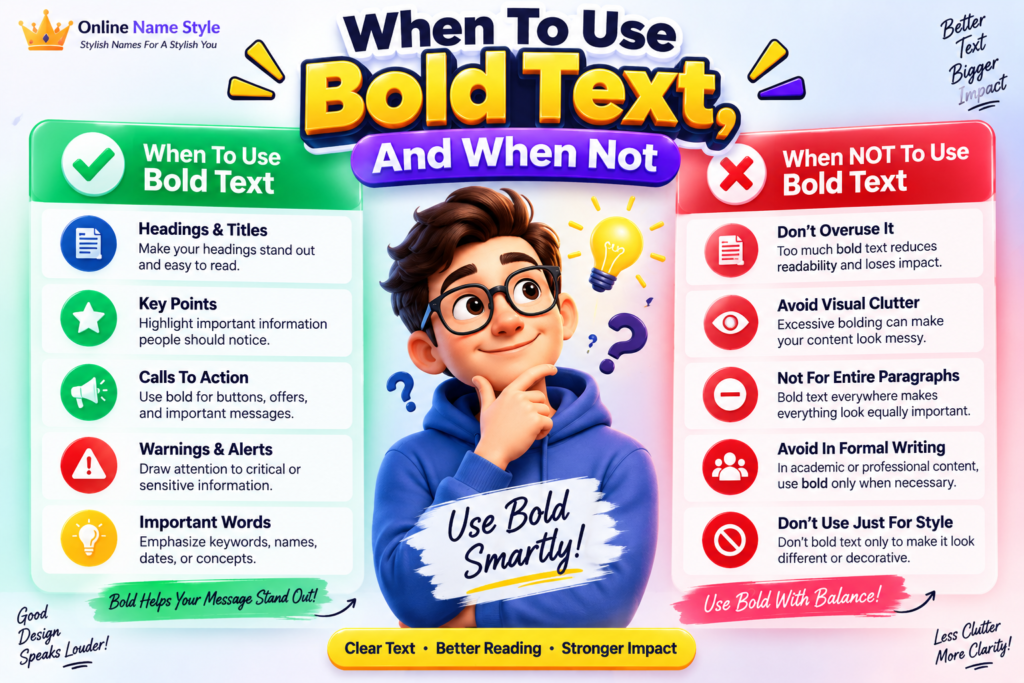
Use bold text when key points need immediate attention, especially during scanning presentations, announcements, or dense explanations. In my experience, selective emphasis improves visual hierarchy without making every sentence compete equally across the page naturally.
Avoid bolding when styling becomes decoration rather than guidance. Excessive use can hinder readability, distract readers, and weaken contrast between ordinary text and emphasis. Use restraint on small screens, where typography becomes harder to interpret.
Also Read: Calligraphy Font GeneratorHow Do I Use Big Letter Copy Paste?
Start by typing your phrase into a big letter generator, then choose a readable font style and review the preview. Select the result, use your clipboard, and paste it wherever text supports Unicode characters.
For quick sharing, big letter copy paste works best when you test the finished characters on each platform. I usually compare spacing, line breaks, and visibility before posting, especially for profiles, messages, or gaming names.
Can I Use Big Letters For Printing?
Yes, big letters can be prepared for printing, but the result depends on the typeface, document software, and output method. I usually test a sample first, especially when decorative Unicode characters are involved during export.
For posters or handouts, Canva and Photoshop can handle oversized layouts, while Word works for simpler documents. A big letter generator helps create visually striking headings before placing them into graphic materials for output cleanly.
What Big Font Styles Are Available?
Big font styles range from Modern Clarity and Urban Square Essence to Gothic Intrigue and Monospace Elegance, giving headings, usernames, banners, and social designs distinct visual weight without changing underlying text readability or message hierarchy.
For softer results, Gentle Calligraphy and Classic Reverie add personality, while Bold Italic Sans, Serif Italic Uppercase, Modern Blockade, and Symbolic Essence suit expressive profiles, dramatic titles, and attention-focused layouts across multiple social platforms today.
Do Big Letters Work In Games?
Yes, big Unicode characters can appear in game names or chat, but results depend on each game’s device support and allowed character set. Some titles display them cleanly; others replace unsupported symbols with boxes entirely.
From my testing, a practical approach is to create oversized text with a font generator, then test it inside your chosen game before publishing. platform limits may affect names, profiles, clan tags, or messages differently.
How Do I Copy Big Letters From The Alphabet?
To copy big letters from the alphabet, enter a letter into the big letter copy paste tool, choose a suitable style, then select the generated text and save it for immediate use online across platforms.
From my testing, alphabet results work best when you compare Bold Sans-Serif, Monospaced Uppercase, and Italic Uppercase options, especially for a nickname, heading, or decorative word that needs clear visual separation on profiles and banners.
Is There A Character Limit For Big Text?
Big text does not have one universal character limit. Most generators transform characters into larger Unicode styles, while the original text length remains based on the alphabet and selected font, in practice for display purposes.
Actual limits come from the platform where styled text appears. Twitter, Instagram, Facebook, and messaging tools may restrict tweets, replies, comments, posts, messages, or bio fields differently depending on their own limits today and formatting.
Why Do Some Big Letters Show As Boxes?
Big letters sometimes appear as boxes when a device lacks the Unicode glyph. I have seen this during testing: the generator works correctly, yet individual platforms cannot render certain characters because their fonts are missing.
Usually, the issue reflects a technical limit, unsupported character set, or unusual space requirement rather than a design error. Switching to normal characters often restores readability, especially across older apps, browsers, and devices reliably again.
Conclusion
Practical work connects stylish fonts, cute fonts, fancy font generator, fancy fonts, Instagram bio, profile, mobile friendly, website, Unicode-based fonts, cute fonts, stylish fonts, fonts, cool stylish fonts, fancy font styles, tone, personality, instant, free.
Practical use spans giant reveal, Harmonic Essence, Gothic Reverie, bio, title, banner, family, friends, English, word, news websites, feed, stories, image, Photoshop, Free Fire, PUBG, Fortnite, online games, less-common Unicode characters, HTML, keyboard shortcuts, CSS.
What Is A Big Text Generator?
A Big Text Generator converts regular words into large, bold, decorative, or Unicode-based text styles that you can copy and paste into social media profiles, posts, messages, games, websites, and other digital platforms.
Is The Big Text Generator Free To Use?
Yes, a Big Text Generator can be used for free to create eye-catching text. You can generate different styles, copy the results instantly, and use them without installing complicated software.
Can I Use Big Text On Social Media?
Yes, generated big and stylish text can be used on many social platforms, including Facebook, Instagram, TikTok, X, and messaging apps. However, some Unicode characters may display differently across devices.
Do Big Letters Work In Games?
Big Unicode letters may work in games such as Free Fire, PUBG, Fortnite, and other online games. Compatibility depends on the game’s username system, supported characters, and device font rendering.
Why Do Some Big Letters Show As Boxes?
Some letters appear as boxes because the device, browser, or application does not support certain Unicode characters. Using more widely supported characters usually improves compatibility across different platforms and devices.


[…] Also Read: Big Text Generator […]