


Transparent PNGs drop straight into Word, Google Docs, PDFs and email. A typed or drawn signature is accepted for many online documents, but check the rules for any legal form you sign.
Even a familiar name can feel distinctive when its lettering reflects the person behind it. A signature font generator reshapes ordinary typefaces through handwritten typography, creating a personal appearance for profiles, signatures, and digital projects.
The useful choice is not always the most elaborate style: test how clearly the name reads at small sizes, whether the letters remain distinct, and whether the finished design fits its intended setting on screen.
Table of Contents
What Is A Signature Font Generator?
A signature font is a digital typeface that imitates handwritten fonts, often through connected script font forms, so typed names resemble a personally written mark without being an actual scanned signature or verified identity record alone.
Its value lies in presentation: creators use it for personal branding, profile graphics, and polished documents, while remembering that decorative lettering improves appearance but does not authenticate a person’s identity on websites and social platforms.
How To Use A Signature Font Generator
Start by entering your name in the name input, then compare multiple styles in the signature previews. Use text editing controls to correct awkward letter connections before settling on a design that suits your purpose.
When the tool supports artwork generation, add a detailed prompt describing the font style, background, and aspect ratio. Inspect the result, then use image export to save the design for your intended application or profile.
Signature Font Styles And Types
Signature fonts are not one uniform category: elegant styles, casual styles, and retro styles communicate different levels of polish. Choose according to audience, placement, and the personality your lettering should convey across varied digital applications.
Brush styles often create expressive strokes, while decorative styles add personality; formal styles suit restrained layouts. A useful library should offer contrast, letting you compare 74 professional styles before choosing lettering for specific projects.
Also Read: Big Text Generator: Make Words POP!
Where To Use Signature Fonts
Place this style where identity needs a touch: memorable emails, professional communication, email signatures, LinkedIn profiles, X profiles, Instagram profiles, and social media bios can feel distinctive without making information harder to scan on phones.
Use signature-style wordmarks for creative branding, logo concepts, and photography watermarks; add handwritten-style text to portfolios, presentations, resumes, and digital documents, keeping decorative typography outside content readers must understand at a glance without losing clarity.
Signature Font Generator Features And Customization Options
Fine-tune a generated signature by adjusting colors, background, font size, and visual appearance. A flexible content editor lets you test custom prompts, refine text customization, and compare options before saving artwork for different projects today.
Beyond lettering, practical controls support resizing, rotation, shadows, borders, cropping, and opacity. You can shape image dimensions, choose an image format, then export a polished result for consistent use across supported platforms today for creators.
Copy And Paste Signature Fonts
After choosing a signature style, complete the name entry and inspect the generated text before selecting the copy option. The clipboard keeps your lettering ready for pasting into compatible profiles, messages, or documents without delay.
Remember that copy and paste transfers copyable text, while a downloadable signature image preserves its visual appearance as a graphic. Test both formats in the destination, because some applications handle decorative characters differently across devices.
How Signature Fonts Work
Signature fonts create signature appearance by converting typed names into handwritten script through a text generator. The output uses Unicode characters and special characters, producing decorative letterforms without traditional font installation on most modern devices.
Unlike conventional typefaces, many generators return copyable text for use across supported applications, although reliable character support determines whether every symbol displays correctly even without downloading a separate font file across different devices and browsers.
Best Practices For Choosing And Using Signature Fonts
Choose a signature style for its actual setting, not novelty alone. Design restraint keeps names recognizable, while limited application gives decorative lettering room to stand out without overwhelming important information on crowded screens and pages.
Check signature scaling at the intended display size; text visibility can change across layouts. Pair scripts with serif typefaces or sans-serif typefaces, preserve text hierarchy, and test color contrast before publishing online on real devices.
Are Signature Fonts Suitable For Professional Use?
Yes, signature fonts can support a professional brand when their legibility suits the setting; use a restrained handwritten appearance for short sign-offs, while keeping names clear across emails, documents, and client-facing materials without distracting decoration.
Choose selective use, appropriate size, and suitable colors; test device compatibility, character support, and application compatibility before publishing. A decorative typeface should complement readable body text, not replace a verified legal signature for high-stakes documents.
Where To Use Your Signature
Choose placements by asking what needs personal identification: letters, business logos, creative identities, marketing materials, promotional content, and advertisements gain distinction; business cards, presentations, headers, labels, product packaging, and photography watermarks can carry it, too.
At milestones, choose wedding invitations, RSVP cards, place cards, event programs, menus, certificates, and diplomas; online, use email signatures, digital communication, social media bios, profile designs, testimonials, personal correspondence, thank-you notes, and freelance portfolios thoughtfully.
Email Signatures
An effective footer rarely needs elaborate lettering; email signature fonts work best when names, roles, and contact details remain clear. Treat personalized text as a finishing detail, not the message’s main attraction on every device.
Before publishing, check that each readable signature supports the purpose of the email: make contact information easy to find, keep links relevant, and avoid decorative elements that compete with the sender’s identity and message content.
Tips For A Professional Signature
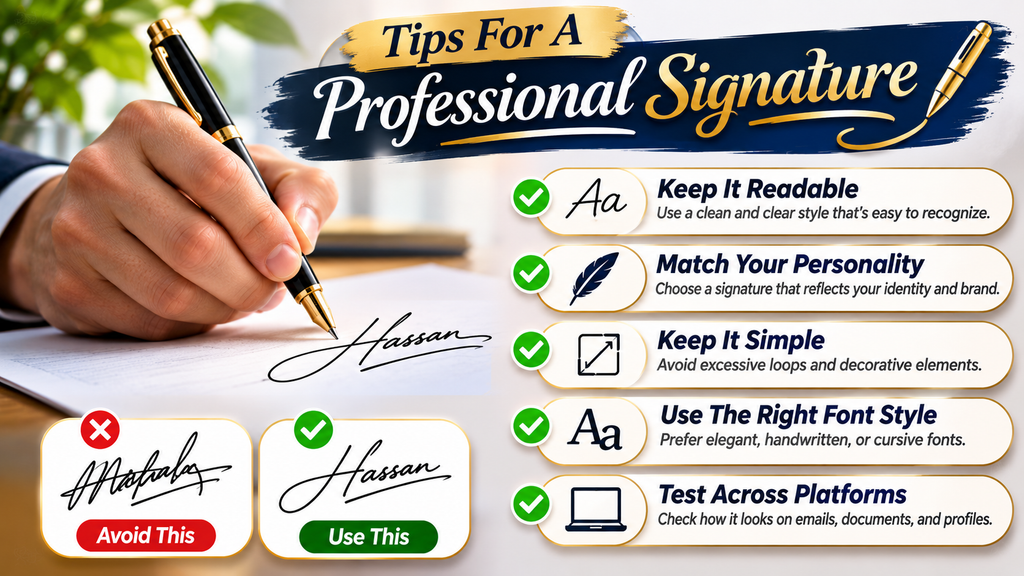
A professional signature should reflect brand personality without sacrificing readability. Choose legible lettering that suits the intended purpose, then check how it appears beside ordinary text across emails, documents, and digital profiles on different screens.
Avoid excessive decoration and distortion; do not stretch letters. Keep visual consistency through careful font pairing, using sans-serif typefaces or serif typefaces for supporting text. Test the design at sizes before adopting it for communication.
Also Read: Gothic Font Generator – Create 1000+ Stylish Blackletter & Old English Texts
Signature Font Disclaimer
Signature fonts provide decorative lettering for visual identity, but they are not proof of identity and cannot replace an authenticated digital signature or meet legal requirements for official documents and financial documents in every jurisdiction.
Check usage rights, license terms, and font licensing before publication; commercial projects and personal projects may have different permissions, so review the provider’s conditions before using generated artwork in client materials before public launch.
Transform Your Words Into Custom Signature Art
Turn a typed name into personalized lettering by choosing a desired signature style, adjusting text color, and adding subtle visual effects. The image generation process creates distinctive signature graphics for profiles, branding, and creative projects.
Fine-tune letter spacing, outlines, or background colors, then compare each generated result before saving. A thoughtful design workflow keeps the artwork recognizable, while custom prompts help shape a signature that reflects your own style.
Customizable Signature Text In Seconds
Enter a name or phrase, then adjust written prompts to guide AI-based generation toward a distinctive signature appearance. The tool turns simple input into text art, giving each personalized design a clear direction and purpose.
For a more specific result, describe lettering preferences before starting image generation; this helps shape creative output into custom signature artwork without treating every generated option as a finished, legally valid signature for real-world use.
Transform Your Words Into Custom Signature Art
Turn a typed name into distinctive signature artwork by adjusting customization choices, testing backgrounds, and comparing visual treatments. I find that small refinements often produce a more convincing result than elaborate effects for everyday use.
For a more personal direction, provide reference images to AI tools when available, then review letter connections, spacing, and readability before saving artwork for profiles, invitations, or brand materials that suit your intended audience well.
Your Signature Fonts, Ready To Use In A Full Content Editor
A full content editor gives creators a practical workspace for content creation: enter your name, adjust font selection, refine text color, and apply design controls while checking each version before sharing it directly with collaborators.
Use browser-based editing to position generated designs, compare image customization choices, and export polished text graphics quickly from the same workspace for profiles, invitations, or branded documents across devices and publishing formats with consistent formatting.
What Makes Signature Fonts Feel Authentic?
A convincing result is not simply a polished script; continuous pen movement and flowing strokes create rhythm, while tiny irregularities help the name resemble something written by an individual hand rather than a preset effect.
Realistic results also depend on pressure variations, modest shifts in letter height, and deliberate entry strokes or exit strokes; these details should feel personal, not exaggerated, so the signature remains readable at ordinary viewing sizes.
Where To Avoid Signature Fonts
Signature fonts are best avoided on legal documents, financial documents, and official documents, where identity must be verified rather than styled. Decorative lettering can create confusion, weaken clarity, or appear misleading to unfamiliar readers.
Also avoid them wherever authentication or digital signature requirements matter; generated lettering may imitate handwriting, but it cannot prove authorship. For contracts, applications, and identity checks, follow the recipient’s approved formal signing procedure every time.
How To Choose The Perfect Signature Font
Start with your brand personality and visual style rather than choosing the most ornate option. Test each signature font against your entered name, checking legibility, visual balance, and readability at the actual display size first.
Before settling, inspect punctuation, numbers, required letters, and glyph coverage to confirm character availability. Consider language context and target audience, compare alternate letterforms and font pairing in a signature preview. Choose natural appearance over decoration.
Conclusion
A signature font should support a recognizable visual identity, not simply decorate a name. Across design applications, logos, and headlines, choose lettering whose personality suits the message and remains readable at its intended size everywhere.
For invitations and personal notes, expressive scripts can add warmth, but consider typography limitations before publishing online. Test spacing, character support, and contrast; then use signature fonts consistently where they strengthen recognition without obscuring meaning.
Is A Signature Font Generator Free To Use?
Yes, many signature font generators are free to use. You can enter your name, explore different handwritten styles, preview results, and copy or download your favorite designs. Some platforms may offer additional premium features.
Can I Use Signature Fonts For Personal And Commercial Projects?
Yes, signature fonts can be used for personal and commercial projects, depending on the tool’s licensing terms. Always review the usage permissions before using generated designs for business logos, products, advertisements, or branding materials.
Do I Need To Install Anything To Use A Signature Font Generator?
No, most online signature font generators work directly in your web browser. Simply enter your text, select a preferred style, and generate your design without downloading traditional font files or installing additional software.
How Do I Copy And Paste My Signature Font?
Enter your name or desired text into the generator and explore the available signature styles. Select your favorite result, click the copy option if available, and paste the copied text into supported applications or websites.
Can I Download My Signature As A Transparent PNG?
Yes, some signature font generators support transparent PNG downloads. This format makes it easier to place your signature over different backgrounds in documents, images, presentations, and graphic designs without displaying a solid background.


[…] Also Read: Signature Font Generator – 100+ Stylish Fonts to Copy & Paste […]