


✨ Italic Text Generator
Type or paste your text below to instantly convert it into stylish italic Unicode fonts for your bio, social media posts, and website.
An italic text generator gives ordinary writing a visual style by creating slanted characters from Unicode characters. This supports quick formatting, adds emphasis, and improves typography without requiring an installed font or complicated design software.
From my testing, styled characters make digital text distinctive while keeping results as copyable text. The generator creates italic text slant for online text, making profile captions and posts clearer without changing the underlying meaning.
Table of Contents
What Is Italic Text?
Italic text is a visual accent created through slanted characters, helping emphasis appear without changing meaning. With Unicode styles, users can copy styled forms into messages, social media profiles, captions, and other plain-text fields directly.
In practice, italic Unicode is not simply a font file; it uses Unicode characters that resemble slanted lettering. This makes copyable text useful when HTML, Markdown, or installed fonts are unavailable across browsers and devices.
Also Read: Alt Code Generator
How Does An Italic Text Generator Work?
An italic text generator turns ordinary text into slanted characters by using text conversion and Unicode output. It analyzes entered letters, maps supported symbols, then returns italic styles that can be copied without changing it.
Behind the interface, the tool follows a style selection, applies an italic style set, and maintains style consistency across results. The selected text is transformed while style ordering determines how each variation appears for comparison.
How To Generate / Use Italic Text
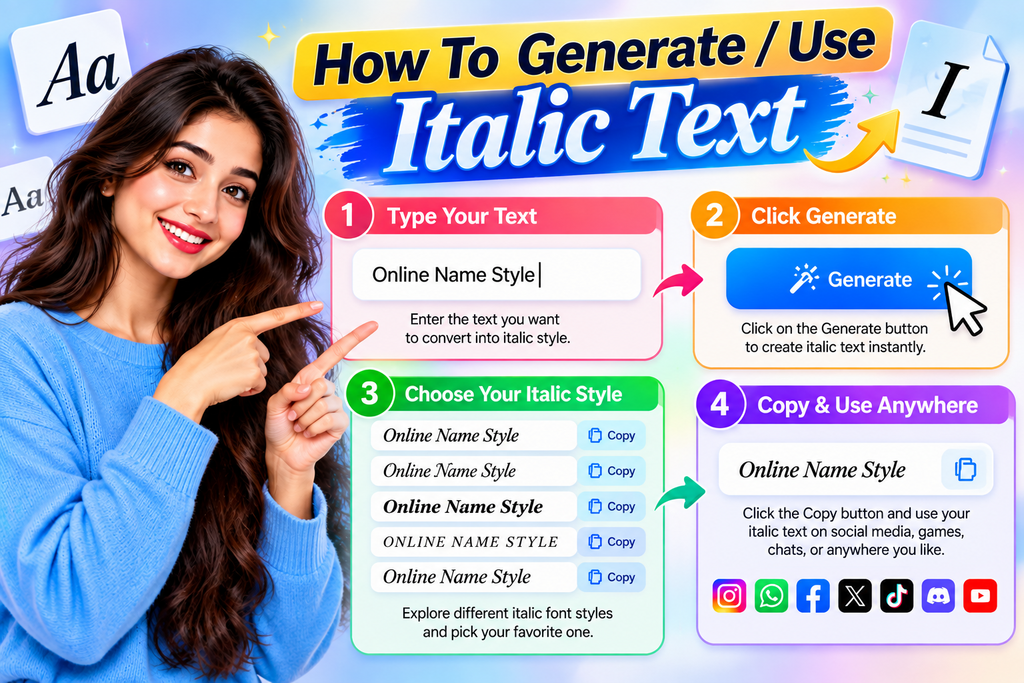
I usually start with a web tool rather than installing software. Enter a phrase, generate italic text, inspect the variations, then copy and paste the version that preserves readability across your target platform with ease.
For practical use, open the online generator in your browser, type clear text, choose a suitable style, copy generated output, and test it inside the intended app before publishing posts, bios, or comments there safely.
Where To Use Italic Text
I use italic most often where emphasis needs to feel subtle: social media, profile bios, captions, display names, and short messages. This treatment can separate key phrases without overwhelming the reader today online across profiles.
For longer material, I prefer restraint. styled text works for headings, creative posts, and usernames, while copyable text keeps practical information usable. Unicode styling adds personality, but readability should remain the first priority online everywhere.
Italic Text Styles
Most generators begin with familiar core alphabets, yet useful italic styles differ in weight, structure, and finish. I usually compare Serif Italic, Sans Serif Italic, and stronger Bold Serif Italic options first for readable contrast.
Decorative variants add personality, but they should support the suggested use rather than overwhelm letters. Bold Sans Serif Italic can suit profiles, while Unicode alphabets, lowercase, uppercase, and italic characters help consistency and reading ease.
Italic Text Compatibility
In practice, italic output is less about appearance than device compatibility. I test font support across phones, browsers, and social apps, because the same characters can render differently when the receiving system lacks glyph mapping.
For dependable results, stable styling matters, but cross-platform display still requires checks. I compare browser previews with the destination app, especially on phones, before trusting italic output for bios, comments, or profiles shared across devices.
Readability / Accessibility / Searchability
Readable italic text should preserve clarity, while accessibility depends on keeping important information understandable. In my experience, pairing styled emphasis with plain text helps screen readers and humans follow meaning without unnecessary friction across contexts.
For discovery, evaluate searchability alongside search systems, search visibility, and searchable wording. Decorative Unicode can remain useful, but readability should guide decisions when profiles, instructions, or essential details need to be understood quickly by everyone.
How To Post Italic Text On Social Media (Facebook, Twitter, Instagram)
Enter your message, generate styles, compare styles, then use the copy button and copy result for a post, status, or caption. On social media, use paste text in the destination field and check the preview first.
For Instagram, use a username or bio with an italic accent; for Facebook, comment and profile fields can hold pasted text; on X or Twitter, test paste in the composer before publishing to confirm readability.
How To Generate / Use Italic Text
Enter your phrase into the italic text generator, test several Unicode styles, then choose the version that remains clear on your device. Copy and paste the result wherever profile text, captions, or bios are supported.
On Facebook, Instagram, or Twitter, generate a fresh line, review its appearance before posting, and keep essential details plain when searchability or accessibility matters. I usually test one style across multiple apps before publishing online.
Where To Use Italic Text
Use italic text for visual accents in profile lines, especially when short names need distinction. In my testing, this works well for bios and captions where clear text remains primary, while styling adds personality without excess decoration.
Use italic styles in a social post when a status update needs distinction, or choose a display name that feels customized. On mobile, test appearance across devices before you publish, especially inside profile text.
What This Italic Page Does
This page focuses on practical text styling by turning ordinary input into a deliberate visual accent. I usually test several italic text styles, checking character styling, readability, and destination app behavior before choosing a result.
For everyday use, the tool produces styled Unicode characters rather than changing an installed font. That distinction matters when I prepare social media captions, profile fields, or headings, because copied results retain appearance across platforms.
How Italic Styles Work
Italic alphabets work by replacing ordinary letters with separate styled Unicode characters, rather than tilting the original typeface. A generator applies character substitution through mappings, turning each selected letter into an italic-style glyph for copying.
In practice, CSS can create visual italics on supported interfaces, but Unicode styles behave differently because the characters themselves change. This distinction explains why generated italic text can travel across apps without requiring font installation.
Best Way To Use Italic Text
The best approach is to keep styled Unicode selective: use short visual accents for emphasis, while preserving plain text for important information, instructions, and contact details. This balances visual styling with readable communication across interfaces.
For profiles, bios, and posts, test the result on social platforms, especially mobile devices and different apps. Use copy and paste, but avoid styling every line; restrained creative styling keeps the message useful and familiar.
Also Read: Simple Font Generator
Popular Directions For Italic
Popular directions for italic vary by purpose: italic alphabets can move from clean Sans Serif Italic toward Bold Serif Italic, while Script, calligraphic, and decorative italic directions create distinct visual moods across practical uses today.
I usually test direction against context first, then compare underlined italic, sparkles, and frames only when decoration remains readable. For social profiles, restrained styled letters often outperform heavily decorated output across many everyday profile settings.
Compare The Italic Styles
When I compare italic and bold directions, I judge the visual goals first: clean styling keeps short copy calm, while decorated styles add personality without overwhelming the message or reducing clarity on mobile screens today.
For practical use, I test clean styles beside italic Unicode and decorated output, then choose whichever matches the design. Bold styles create emphasis, while styling directions help balance names, captions, labels, and notes across layouts.
Italic Alphabet Examples
Examples make italic characters easier to inspect: lowercase a–z can appear in Serif Italic, while Bold Sans Serif Italic gives stronger strokes. Compare the italic characters beside ordinary text before copying it for practice online.
For uppercase letters, test alphabet styles one line at a time. A visual check reveals whether Unicode forms remain recognizable across posts, profiles, and captions, especially when combining Serif Italic with simple symbols during editing.
Keep Important Text Readable
Keep important information in plain text when readability matters for links, instructions, or contact details. From experience, stylish Unicode-styled characters work best as accents, while essential wording stays understandable across mobile screens and screen readers.
Use italic styling for headings or emphasis, but preserve ordinary text for details. This approach supports digital accessibility and search systems, while reducing rendering issues from unsupported characters across devices, platforms, and operating system environments.
Is Italic Unicode A Real Font?
Unicode italic is not a font; it is styled characters created through character substitution. The generator replaces Latin characters with Unicode alternatives, so the slanted appearance comes from mapped glyphs, not from installing another typeface.
Unlike HTML, Markdown, or rich text, Unicode italic travels with the characters. Yet appearance depends on font support and Unicode mappings. In testing, this makes styled text practical, but distinct from a conventional font file.
How Is Unicode Italic Different From HTML, Markdown, Or Rich Text?
Unicode italic changes individual characters, but it is not a real font; HTML, Markdown, and rich text apply formatting instructions interpreted by a rendering system. This affects copy-paste, compatibility, editing, accessibility, and behavior across apps.
By contrast, CSS can style ordinary text without altering its characters, while styled Unicode text embeds alternate typographic characters. Character mapping determines appearance, but unsupported characters may still produce boxes on some systems across platforms today.
Which Italic Alphabets Does The Generator Use?
The generator typically draws from italic alphabets in the Mathematical Alphanumeric Symbols block. Its main options often include Sans Serif Italic and Bold Serif Italic, created through Unicode character substitution for compatible basic letter characters.
For broader output, many tools also expose italic Unicode fonts, core alphabets, and Unicode variants. Common examples cover A-Z, a-z, and styled letters, letting users compare several italic forms within one generator quickly in practice.
Are All Ten Results Different Italic Alphabets?
Not necessarily, because ten results can represent Unicode variants of related italic fonts, style selection choices, or decorative combinations rather than ten alphabets. I compare their letter shapes before treating each generated result as unique.
Some outputs may share the core alphabets while changing weight, spacing, or decoration. A refresh can preserve stable style ordering, yet generated text may differ only through rendering, symbols, or underlined variants on your device.
Why Do Numbers Stay Plain In Italic Text?
In my testing, numbers stay plain because Unicode’s italic mapping primarily styles letters, while unchanged characters may remain plain in tools. In practice, numbers depend on glyphs, character support, and the destination app across platforms.
When the tool relies on basic Latin characters, it may preserve digits rather than force italic formatting, since Mathematical Alphanumeric Symbols contain styled forms but not an italic digit set, supporting predictable operating system rendering.
Is Italic Text The Same As Cursive Text?
Italic text and cursive text can look similar, but they serve different purposes. font styles usually change letter slant, while cursive imitates connected handwriting. Both create visual styling in practice, yet their underlying design differs.
In practice, an italic alphabet may use decorative variants or Unicode fonts for copyable formatting, while cursive emphasizes flowing letterforms. I have found this distinction useful when choosing readable styles for profiles, posts, and headings.
Can I Copy And Paste Italic Text Into Social Media?
Yes, you can copy italic Unicode text from an online tool and paste it into social platforms. Because these are Unicode characters rather than font files, styling can travel with text across most supported interfaces.
For publishing, I check copyable results on each device before posting, because stylized Unicode characters may render differently. I also keep ordinary wording for essential details, while decorative italics handle emphasis rather than critical information.
Why Does Italic Text Show As Boxes?
Italic text may show as boxes when a device, browser, or platform lacks glyphs for particular Unicode characters. I often trace these display problems to unsupported non-Latin scripts, missing accented characters, or incomplete font fallback.
Another cause is Unicode limitation: some characters lack matching italic forms, so generators preserve them differently. Testing across browsers, operating systems, and apps helps identify whether the issue comes from rendering or unsupported glyph coverage.
Is Italic Unicode Accessible And Searchable?
Accessibility depends on how devices interpret Unicode characters, not merely on styling. In practice, I check whether screen readers expose intended meaning correctly and whether essential content remains understandable when styled Unicode replaces ordinary letters.
Searchability depends on the characters behind an appearance. Unicode text can differ from ordinary letters, so indexing varies by platform. For profiles and critical information, I keep readable wording beside decorative styling whenever search matters.
Do I Need To Install An App To Generate Italic Text?
An online tool can generate italic characters directly in your browser, so installation is unnecessary. I typically recommend browser generation because text generation happens instantly without software updates or local storage requirements on your side.
The practical advantage is portability: generator pages work across common browsers, while an installed version may require downloads. For quick names, posts, or profiles, web access keeps the workflow simple and consistent for everyday use.
Is It Safe To Use This Italic Text?
Using a focused generator is safe because it creates Unicode text for visual formatting rather than installing software. I routinely recommend checking the resulting characters before sharing, especially when italic styles display differently across platforms.
Safety mostly concerns compatibility, privacy, and readability, not the italic output itself. Avoid entering passwords or private details, verify copied text after paste, and keep essential information in standard characters when reliability matters online securely.
Conclusion
In practice, I find slanted text effective when it adds emphasis without disturbing reading flow. A concise style comparison helps users recognize differences, while letter examples reveal how Unicode choices behave across interfaces and devices.
My usual recommendation is practical: treat styled output as an enhancement, not replacement for important text. Test copy, search, accessibility, and character rendering before publishing; formatting should support identity and clarity rather than create friction.
What Is An Italic Text Generator?
An Italic Text Generator converts regular text into stylish italic Unicode characters that you can copy and paste into social media profiles, posts, messages, bios, usernames, and other supported platforms.
Is Italic Text The Same As Cursive Text?
No. Italic text generally uses slanted letterforms, while cursive styles often imitate connected handwriting. Some generators may offer both italic and cursive-inspired Unicode styles as separate options.
Can I Copy And Paste Italic Text On Social Media?
Yes. Most Unicode italic text can be copied and pasted into supported social media platforms, messaging apps, usernames, bios, and profile fields without installing additional font software.
Why Does Italic Text Sometimes Appear As Boxes?
Boxes can appear when a device, browser, application, or font system does not support particular Unicode characters. Trying another italic style or updating the platform may resolve the display problem.
Do I Need To Install An App To Generate Italic Text?
No. A web-based Italic Text Generator can create styled text directly in your browser. Simply enter your text, choose an italic style, copy the result, and paste it wherever supported.


[…] Also Read: Italic Text Generator […]