


Invisible Text Generator
Generate clean blank spaces and zero-width characters for WhatsApp, Discord, Instagram, and gaming.
An invisible text generator creates Unicode characters that appear blank while remaining valid to computers and applications. For online work, this approach provides special text for profiles, messages, forms, and content where ordinary spaces fail.
From my experience testing platforms, copyable characters are useful when visible styling is unwanted. The right selection can preserve formatting, support social media, and produce invisible spacing without adding visible marks to otherwise ordinary text.
What Is Invisible Text?
Invisible text uses Unicode characters that remain valid content even when humans see nothing. The browser still processes actual characters, while visual rendering may appear blank or empty because no visible glyph is presented today.
From practical testing, I treat it as real text, not missing data: computers can store, copy, and transmit these digital characters reliably. Their visual absence simply changes how Unicode content appears across modern digital interfaces.
Also Read: Italic Text Generator
What Is An Invisible Character?
An invisible character is a valid Unicode symbol that occupies a position in digital text without producing a visible glyph. It can be stored, copied, processed, and recognized by computers even when users see nothing.
From my testing, these characters can support spacing, formatting, usernames, and controlled blank areas across platforms. Their behavior depends on rendering rules, character handling, and whether an application preserves the underlying data during user input.
How Does The Invisible Text Generator Work?
An invisible text generator typically maps a chosen quantity to Unicode characters, then places the result in an output area. From my testing, the key is selecting compatible characters for a platform without displaying glyphs.
The process can involve generation, character filtering, and copy access through a clipboard; some tools also perform automatic detection or smart selection based on browser support and platform compatibility before producing usable output across devices.
How To Create Invisible Text
Creating invisible text usually starts by choosing a suitable Unicode character, then placing it into a generator. I test the output in a target browser, copy the generated text, and paste it directly where needed.
A practical workflow is to adjust quantity, check compatibility, and verify the result before sharing. For usernames, messages, or documents, I prefer testing several characters because platforms may handle spacing and rendering differently during use.
How Do I Copy Invisible Text?
To copy invisible text, I usually generate a blank-looking result, press the copy button, then paste it directly where needed. This preserves the invisible characters without requiring manual selection or retyping during routine use today.
For stubborn fields, use keyboard shortcuts such as Ctrl+C or Cmd+C after selecting the textarea content. The clipboard keeps those generated characters ready for immediate paste into compatible platforms without extra formatting changes safely afterward.
Why Use An Invisible Text Generator?
An invisible text generator saves time when you need predefined quantities, rather than creating symbols yourself. A quantity selection option makes testing useful, while a copy button and clipboard support reduce mistakes during text preparation.
It is especially useful when manual work becomes tedious. You can generate characters, review them in a test area, use the selection controls, then paste the result wherever the required text needs to appear consistently.
Where Can You Use Invisible Text?
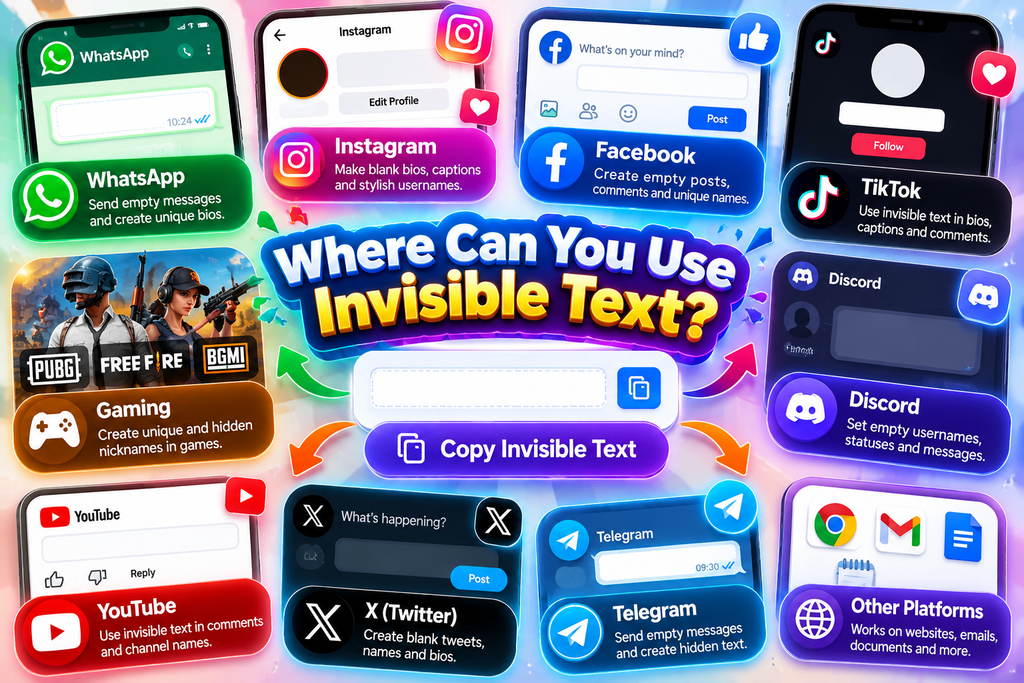
Users can place invisible characters in social media bios, comments, and names when a visual gap or low-profile appearance is useful. I often see them used for gaming, profiles, and custom gamer tags on platforms.
Beyond profiles, the same technique can suit forms, documents, and interfaces when ordinary spaces are rejected. For programming, careful Unicode handling can support spacing or placeholders, while messaging offers playful blank-looking text in projects today.
How To Send A Blank Message?
To send a blank message on WhatsApp, place invisible characters inside the message field, then tap send. The recipient sees no ordinary wording, while the inserted Unicode data remains present and allows the message action.
From my testing, this approach is simplest when a generator supplies reliable Unicode content that appears empty-looking. Different messaging environments can handle spacing differently, so check the result first before repeating the process elsewhere carefully.
How To Add Invisible Line Breaks In Instagram?
For Instagram captions, I create invisible line breaks by placing a blank Unicode space between sections. This preserves visual gaps when standard spacing collapses, giving bios formatting structure without adding marks distract from message.
Before publishing, I check each line and section on a phone, because spacing can render differently. This simple approach keeps Instagram bios organized, prevents crowded captions, and creates deliberate separation without punctuation, graphics, or wording.
What Unicode Characters Does The Invisible Text Generator Use?
Most invisible output relies on Unicode code points whose glyph occupies no visible space. Common choices include Zero Width Space, Zero Width Non-Joiner, Hangul Filler, and Braille Pattern Blank, depending on platform behavior and rendering.
From my testing, the important distinction is not whether a character looks empty, but how applications process it. A generator may select a character that survives copy, messaging, forms, or profile formatting more reliably today.
What Is A Zero-Width Character?
A zero-width character is an invisible character assigned a distinct code point that occupies no visible width. Unlike ordinary spacing, it can influence text behavior while remaining unseen during rendering across digital applications and platforms.
Common examples include U+200B, Zero Width Space, U+200C, and Zero Width Non-Joiner. These special characters help computers preserve hidden structure, joining behavior, or separators without displaying a visible glyph within digital text when necessary.
Which Invisible Character Type Should I Use?
Selection depends less on appearance than on where the copied result travels. Zero Width Space suits gaps, while Braille Pattern Blank is useful when an entry needs an apparently vacant payload across apps and services.
I usually test Hangul Filler when a slot must remain visually blank while preserving state, whereas Zero Width Non-Joiner is better when separation matters. I find this distinction useful during cross-app testing sessions most often.
Which Invisible Character Works Best On Each Platform?
For usernames and display names, I usually start with Hangul Filler (U+3164). It tends to preserve a blank appearance where a visible letter would distract, especially in profiles, naming fields, and simple identity-focused layouts online.
For form fields or controlled spacing, Zero Width Space (U+200B) is often better. It remains visually absent while allowing certain insertion points, although each character type should be tested because platform behavior can vary widely.
Features Of An Invisible Text Generator
An automatic device detection layer can identify the browser and platform, then apply smart selection for a compatible invisible character. This reduces manual testing across mobile and desktop environments without changing user input.
From my testing, strong generators emphasize privacy through local processing, avoid storing or logging data, and provide instant generation with clipboard integration. Good performance and reliability matter because copy actions must remain consistent across sessions..
Invisible Characters In HTML
In HTML, Unicode can represent characters that occupy visual space without a conventional glyph. Developers may use an invisible character for controlled whitespace, alignment, or separation, but browser behavior depends on markup and rendering rules.
From my coding work, hidden spacing is safest when treated as deliberate formatting rather than magic. A zero-width character can affect text flow, while HTML entities and encoded characters preserve intent without relying on symbols.
Also Read: Stylish Text Generator
Invisible Text Detection
Invisible text can be detected when software examines Unicode code points and raw text rather than appearance. Inspection tools reveal characters that moderation systems or spam filters may flag during automated analysis today directly reliably.
In practice, sanitizers can remove or normalize hidden characters, while careful detection checks character sequences and rendering behavior. I treat visual emptiness as evidence worth testing, not proof that text is technically absent from output.
Accessibility And Screen Readers
In accessibility testing, screen readers may treat invisible characters differently: some are ignored, while others can be announced or alter navigation. I test copied text with assistive technology before recommending hidden formatting for public interfaces.
For dependable publishing, accessibility systems should receive meaningful words rather than decorative Unicode. A visually blank character can still affect character order, cursor movement, or pronunciation, so users deserve predictable behavior across browsers, devices, applications.
Language Support
Language support depends largely on Unicode, because Unicode characters represent text across writing systems while applications decide how each character renders, remains copyable, and stays recognized on different platforms and every device reliably during processing.
In practice, I test invisible text with Unicode variants across mobile compatibility, desktop compatibility, and browser support, since device-based selection can change results; language coverage improves when generators use Unicode characters rather than substitutes alone.
Conclusion
A strong invisible text generator benefits from language support, especially when users work across French, Spanish, or Portuguese settings. Testing shows consistent terminology and interface behavior reduce mistakes when generating blank content for different audiences.
A genuinely multilingual experience should keep interfaces clear while localization adapts labels, controls, and instructions naturally. Supporting several languages makes the generator easier to understand when people compare outputs, switch settings, or troubleshoot unexpected behavior.
What Is An Invisible Text Generator?
An invisible text generator creates Unicode characters that appear blank but remain usable as text. These characters can be copied into messages, usernames, bios, captions, gaming profiles, and other supported digital platforms.
How Do I Use An Invisible Text Generator?
Enter or select the desired invisible character, generate the result, then copy it using the provided copy option. Paste the character into a username, message, profile, form, or other supported field.
Can Invisible Text Be Used On Social Media?
Yes, invisible text can work on platforms such as Instagram, TikTok, Telegram, Discord, and other services. However, each platform handles Unicode differently, so some characters may be removed, changed, or rejected.
Can I Use Invisible Text For Gaming Usernames?
Invisible characters are sometimes used for gaming usernames, clan tags, and profile customization. Games such as Free Fire, PUBG, Roblox, and Valorant may apply different validation rules, so compatibility should be tested first.
Is Invisible Text Safe To Use?
Invisible text itself is generally harmless when used for formatting or customization. However, certain websites may restrict unusual characters, and accessibility tools may interpret them differently. Avoid using invisible characters to bypass moderation or platform restrictions.


[…] Also read: Invisible Text Generator […]
[…] Also Read: Invisible Text Generator […]