


✨ Wide Text Generator
Transform your normal text into aesthetic full-width & vaporwave styles instantly!
Wide Text Generator turns ordinary writing into visually expanded text through character conversion using Unicode characters. In practice, I find full-width output especially useful when designers need distinctive headings, names, or compact visual accents online.
The process relies on Latin letters, a Unicode block, and adding Unicode spacing rather than installing a traditional font. This approach creates spaced-out text while keeping results easy to copy, paste, test, and reliably reuse.
Table of Contents
What Is Wide Text?
Wide Text is designed to occupy more horizontal space, often through full-width characters, Unicode spacing, or more character styles. Unlike ordinary lettering, it creates a visibly wider appearance while preserving copy-and-paste functionality across compatible platforms.
In practice, I find it useful for short captions, profile names, headers, and an aesthetic style where emphasis matters. Its roots include CJK typography and vaporwave, while modern generators use automated conversion without installing font files.
How Does A Wide Text Generator Work?
A generator does more than stretch letters visually; it applies wide text functionality through character mapping, selects Unicode-generated styles, and assembles spacing rules before presenting a copy-ready result suited to digital interfaces on compatible platforms.
From my hands-on testing, copy-paste functionality is where the workflow becomes practical: users enter text, the generator transforms individual characters, preserves recognizable wording, and returns widened variants without requiring manual symbol assembly during normal design.
Also Read: Hard Font Generator
How To Use A Wide Text Generator
Enter your phrase and inspect the formatting before choosing a result. I prefer checking individual characters, then reviewing character mapping, because this catches inconsistent transformations while keeping the generated result visually controlled and predictable early.
Then place the result inside a supported application and verify the intended text field. Check the preview before sharing, especially when spacing loss appears; testing one sample first helps preserve consistency across publishing destinations carefully.
Wide Text Vs Full Width Text
Wide text can describe a widened appearance, while full-width Unicode characters occupy standard character cells. In practice, decorative text may imitate expansion visually, whereas true full-width text changes the encoded character choice directly during encoding.
A generator may create spaced styling with U+2009, producing thin-space wide text without replacing every letter. Knowing this distinction helps creators choose copy-paste output based on design, compatibility, and intended behavior across platforms and devices.
Wide Text Vs Named Wide Fonts
Wide text describes an appearance produced through Unicode characters, while named fonts identify specific styles or typefaces. In practice, full-width equivalents change character representation, whereas installed typography changes rendering across different software platforms and devices.
That distinction matters when choosing CJK typography or stretched appearance for social text. A generator may create aesthetic text with Unicode spaces, but traditional installed fonts require files, software, font resources, and rendering support systems.
Wide / Full-Width Text Styles Available
Wide text generators offer expanded bold, oversized, and jumbo serif appearances alongside cursive, glitch, and fancy treatments. Some styles emphasize width, while others combine decorative symbol, cool font forms, or small letters for contrast today.
I often compare Full Width output with text-art and big style before choosing a layout. The right option depends on whether you need readable spacing, visual emphasis, or distinctive typography for profiles, titles, and posts.
Where Can You Use Wide Text?
Wide text fits naturally across social media, especially Facebook, Instagram, TikTok, and X/Twitter, where bios, captions, statuses, and display names need quick visual distinction without requiring elaborate graphic design or unusual typography skills online.
On Discord servers, gaming profiles, channel names, and distinctive username fields, it can frame identity; I also see YouTube titles, portfolio headings, and product tags benefit when wide lettering is reserved for short, prominent labels.
Wide Text For Social Media
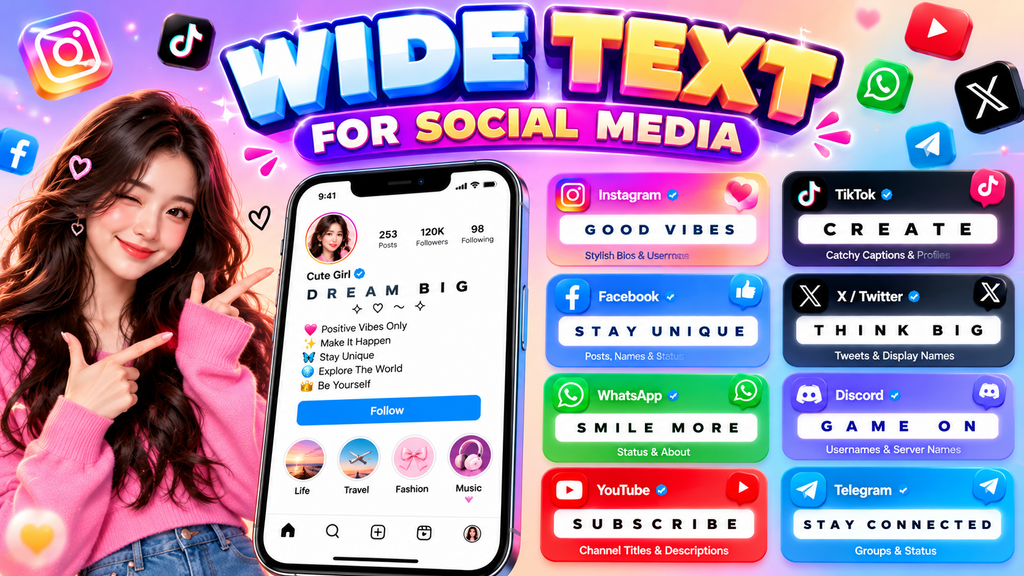
On Instagram, TikTok, and X/Twitter, wide text works best when it supports the message rather than overwhelming it. I use Instagram bios, TikTok captions, and social handles, especially short text where spacing creates rhythm online.
For practical posting, copy and paste the result into WhatsApp, Discord, Facebook, or Telegram. Test destination application because modern browsers and text sanitizers can alter spacing, while LinkedIn, YouTube, and Spotify may present styled text.
Wide Text For Gaming And Discord
In gaming chats, Discord usernames can gain character when full-width letters, spaced-out names, and thin spaces create deliberate separation. I often reserve this treatment for short lines, keeping commands and team callouts conventional.
On supported platforms, wide styling works best as a gaming accent rather than dense gameplay content. Test the copy result before sharing, then place it into a nickname, server role, or channel title and check spacing.
How To Choose The Right Wide Font Style
Choose a look by purpose, not novelty: use wide text with clear letters for headings, while expanded bold suits emphasis. For profiles, test searchability and accessibility before choosing decorative forms that dominate screens too much.
I usually compare the same phrase across oversized options, then check platform search, screen readers, and character limits where needed. A polished choice should preserve readability, support branding, and remain practical after copying between platforms.
Compatibility Across Devices And Platforms
Choosing wide text works best when its aesthetic supports the overall tone, rather than forcing decoration everywhere. Test each decorative style beside normal text, especially where professional typography must preserve clarity across layouts and interfaces.
For branding, compare professional-looking typography with your surrounding fonts before committing. Thoughtful pairing matters in business settings because wide characters can dominate compact designs, alter emphasis, and change how users scan headlines, labels, and calls.
Wide Text Character Limits
Character limits depend on the platform, because wide/full-width text can occupy one or more Unicode characters within limited fields. Check capacity before publishing long wide text, especially on X, where space is tightly controlled today.
In practice, I test styled strings in the editor rather than trusting a counter. text length may change when characters are transformed, copied, sanitized, or wrapped, while reading speed suffers when long paragraphs become dense quickly.
Readability And Accessibility
Wide text can look polished, but readability should lead the design. I check letter spacing, contrast, and character shapes first, because accessibility tools may interpret decorative characters differently from ordinary words on every platform consistently.
For social profiles, I prefer restrained wide styling and test copied text before publishing. Styled accessibility matters alongside search visibility, since unusual Unicode may affect search indexing when important phrases become difficult to process correctly.
Is Wide Text A Real Font?
Wide lettering is usually not an installed font. It is often expanded text created with Unicode characters, including Halfwidth and Fullwidth Forms, so the visual effect travels with the characters instead of requiring a font file.
From my typography testing, the label can mislead because actual typefaces remain files that control rendering. Wide lettering instead modifies character forms, works across Unicode-compatible systems, and behaves as characters, not an application.
Is The Wide Text Generator Free?
Yes, the tool can be used for free generation, making wide text practical for casual experiments, profile styling, headings, and quick formatting without requiring a paid subscription or complicated setup for everyday use by beginners.
In my testing, an unlimited option matters because creators often compare several styles before choosing one. A genuinely free generator lowers friction, letting users generate, review, copy, and paste designs whenever inspiration strikes at once.
Also Read: Heart Font Generator
Do You Need To Download A Font Or App?
You do not need to install an app or font file for wide text. A browser-based font generator can create Unicode output instantly, letting you download nothing, then copy and paste the result without setup.
From my testing, dedicated application software is unnecessary unless you need advanced editing, design editor controls, or export features; ordinary wide characters work through browsers, messaging applications, social profiles, and text fields with no installation.
Creative Ways To Use Wide Text
Wide text can refresh moods, profile statuses, and event announcements by giving short lines more visual presence. I often use retro spacing for themed posts, while greetings and labels stay concise on social channels today.
For creators, visual design becomes more flexible when wide lettering frames music playlists or landing-page titles. Testing fancy and cool variations helps match moods, audience, and platform without sacrificing readability for everyday sharing needs today.
Wide Text Copy-Paste Examples
These wide-text variations are easiest to test as short examples: Wide Text, Create, Username, or Discord. I usually type a phrase, generate it, then paste the result beside normal text before publishing for quick review.
On social profiles, practical examples include WELCOME, MY BIO, PLAY NOW, and GAME ON. For playlists, banners, and aesthetic statements, I keep phrases brief so wide spacing remains readable across iPhone and Windows screens daily.
Wide Text Design Notes
Design notes become clearer when consistent branding guides design tone, while professional typography supports spacing choices; font size, letter spacing, and alignment should work together so wide characters feel intentional rather than merely enlarged on-screen.
For exports, aspect ratio, dimensions, padding, line spacing, and backgrounds should be checked together. I routinely inspect PNG output, image blur, shadows, colors, and image treatment before approving a finished design before publishing across devices.
What Is A Wide Text Generator And How Does It Work?
A wide text generator changes ordinary text into broader-looking characters for bios, titles, and status labels. It maps typed letters to corresponding Unicode forms or spacing patterns, producing stylized output without installing separate software easily.
The process begins inside a text field, where characters are interpreted and replaced with suitable Unicode variants or controlled space insertion. Users can convert short phrases instantly, although display quality depends on platform support consistently.
What Is The Difference Between Wide Text And Full-Width Text?
When I test wide text across social platforms, I treat spacing as the main clue. thin-space wide text creates visual breathing room, while replacing letters is not required and the result remains recognizable on screens.
Full-width text goes further: it swaps ordinary characters for Unicode forms occupying a wider character block. By contrast, a U+2009 separator or spacing technique changes appearance without converting every letter into full-width Unicode in practice.
How Do I Copy And Paste Large Or Wide Text?
Copying wide output is straightforward: select the generated line, use your device’s copy command, then paste it into websites, blogs, or WhatsApp without retyping. Check the preview before publishing to confirm spacing remains visually intact.
For social profiles, gaming spaces, and video descriptions, paste normally, then inspect the result on another device when practical. Mac interfaces, older editors, and platforms with a strict character count can display wide characters unexpectedly.
Where Can I Paste Wide Text?
Wide text can be pasted into a channel description statuses captions and announcements especially when you want a heading to stand apart. I often use it for YouTube descriptions profile lines and short promotional updates.
In communities the same approach works for LinkedIn posts and server-related labels provided the surrounding interface preserves Unicode spacing. Paste the generated text directly then check mobile rendering before publishing important content publicly to readers.
Does Wide Text Work On Instagram, TikTok And Discord?
Wide text usually works on Instagram, TikTok, and Discord when platforms preserve Unicode characters. I have found decorative style choices effective for bios, captions, usernames, and channel names, provided readability remains comfortable across devices today.
On some interfaces, styled characters may be filtered, normalized, or rendered differently by text sanitizers. For reliable posting, test your font style output first, especially in bios or usernames, while keeping key information standard clearly.
What Big Or Wide Font Styles Are Available?
Available styles range from oversized display lettering and jumbo forms to text-art, symbol-framed, and line-based designs. I often test variations against the interface first, because width changes can alter visual hierarchy, spacing, and emphasis noticeably.
Beyond decorative treatments, Impact and Druk illustrate named wide font families, while bold styling changes visual density and expanded proportions can widen characters. Latin letters may feel broad, but platform-level rendering still determines actual spacing.
What Is The Difference Between Big Text And Bold Text?
Scale, not weight, is the key distinction. Big text can consume more screen space, while bold text mainly strengthens visual emphasis. For banners, character capacity matters; for dense copy, readability often matters more than size.
One trap is assuming a wider appearance means heavier lettering. Professional-looking typography can use either approach, but readability changes when characters become oversized. I usually test both before publishing across devices, editors, and social platforms.
Why Does Wide Text Sometimes Look Cramped Or Disappear?
Wide text can vanish when compact text meets narrow fields, aggressive scaling, or unsupported Unicode. In my testing, browsers sometimes compress spacing, while older editors substitute characters, causing unexpected textured results or clipped output visually.
Another issue appears when generated content exceeds platform rules: wrapping changes, line-height tightens, and long wide text feels cramped. Checking device compatibility, reducing decorative labels, and adding pauses around critical instructions usually restores clear rendering.
Should I Use Wide Text In Long Paragraphs?
Long paragraphs are usually better left conventional. In my testing, vaporwave-like lettering works strongest for titles, short notes, and attention-focused uses, while stretched characters across dense lines can reduce scanning speed and visual comfort quickly.
For business contexts, extended paragraphs may also weaken hierarchy because every line competes horizontally. I prefer playlists or other creative uses for decorative width, reserving conventional paragraphs for explanations, instructions, and detailed reading tasks online.
Are Styled Unicode Characters Accessible And Searchable?
From my testing, X handles many Unicode styles, but screen readers may pronounce unusual characters differently. For navigation, plain wording around decorative text keeps meaning clear and usable when profiles rely on text-based discovery tools.
Accessibility depends on the actual characters, not their visual appearance. Full-width or unusual symbols can interrupt speech, copying, indexing, or search matching, so important names and keywords should stay conventional whenever discoverability online systems matters.
Can Wide Text Be Used For Business Or Branding?
For business branding, I use wide text selectively in logos, campaign headers, and visual previews. A large treatment can add personality, while symbol choices and concise phrases keep identity controlled across platforms without weakening consistency.
In practical projects, I use a free tool to generate examples, then edit spacing and readability before approval. Brand chips, moodboards, and album covers can benefit, but corporate body copy usually needs restraint during review.
Conclusion
After years of testing wide text across platforms, I trust restrained choices: small, cursive, or glitch styling can strengthen emphasis, while limited layouts demand careful spacing, clear hierarchy, and consistent visual rhythm throughout each design.
Before sharing branded text, I review text length, numbers, stroke weight, and spacing, then check downloadable font libraries, installation, free generation, and unlimited access; this matters for business workflows and older systems alike effectively today.
What Is A Wide Text Generator?
A Wide Text Generator converts regular text into visually expanded or spaced Unicode styles that can be copied and pasted into social media profiles, usernames, captions, gaming names, messages, and other digital content.
How Do I Create Wide Text?
Enter your desired words into the generator, choose a wide or full-width style, review the generated results, and copy your preferred version. You can then paste the styled text wherever Unicode characters are supported.
Can I Use Wide Text On Instagram And Discord?
Yes, wide Unicode text can often be used on Instagram, Discord, TikTok, Facebook, and other platforms. However, appearance may vary depending on the device, application, font support, and character handling.
Is Wide Text The Same As A Wide Font?
No. Wide text commonly uses Unicode characters that visually appear broader, while a traditional wide font is a typeface installed or loaded by software. Unicode styling can therefore work without installing a separate font.
Why Does Wide Text Sometimes Not Display Correctly?
Wide characters may appear differently when a platform has limited Unicode support, older software, incompatible editors, or restricted character handling. In some cases, characters can look cramped, disappear, or display as unsupported symbols.


[…] Also Read: Wide Text Generator […]