


ASCII & Fancy Font Generator
Type your text below to instantly generate cool ASCII art, fonts, and text decorations.
An ASCII font generator turns words into decorative text through printable ASCII characters, producing banners and letters as ASCII art. I use this generator when projects need standard characters, text, or signatures for consistent display.
I avoid treating style as fancy text; I focus on layout, character arrangement, and width, because spacing determines whether designs stay balanced. Distinguishing pure ASCII from Unicode helps when compatibility, alignment, and platform support matter.
Table of Contents
What Is ASCII Art And An ASCII Font Generator?
ASCII art is computer-generated art built from text, letters, numbers, and symbols, arranged into pictures or banners. An ASCII Font Generator applies FIGlet-style font logic to turn ordinary words into structured text designs quickly online.
In practice, I’ve found that generators change character shapes and spacing while preserving plain-text behavior. Multiline ASCII banners, custom designs, and borders work well for signatures, documentation, terminals, and digital projects where visual identity matters.
History And Origin Of ASCII Art
ASCII art emerged in the 1960s as a way to shape pictures from characters, punctuation, and numbers on computer displays. Early users discovered that careful spacing could turn plain text into recognizable designs without graphics.
As terminals and programming communities expanded, these handcrafted forms appeared in source-code comments, email signatures, and messages. Later, FIGlet organized the concept into reusable fonts and ASCII banners, making text art easier to generate quickly.
Also Read: COD Name Generator
How To Use An ASCII Font Generator
Start by entering a phrase, then test font preview options before adjusting character-width control and flexible layouts. My workflow checks output width, monospace alignment, and whitespace balance carefully before copying the generated design for consistency.
For practical use, choose text mode for terminals or image mode for visual sharing, then use clipboard and copying features. I also verify narrow screens, platforms, and code blocks across devices to prevent rendering surprises.
ASCII Font Styles And Types
Choosing an ASCII style is less about decoration than structure. Large text, decorative letters, symbols, and a custom character set can produce personalities, while small text favors compact readability across narrow layouts with clean output.
In practice, banner examples, box-drawing, emoticons, and visual effects serve different purposes. I often test font style choices against readability, because monospace fonts, horizontal layout, and character width ultimately control whether generated art stays usable.
ASCII Art Layout, Width, Spacing And Borders
Effective ASCII art layouts depend less on decorative complexity than disciplined width. I usually test equal-width characters inside terminals, then adjust whitespace so borders remain stable across a fixed viewport and standard text display systems.
Borders should frame content, not consume its usable area. For wide banners, I prefer measured padding and repeatable spacing; broken alignment often starts when proportional fonts replace monospaced rendering, especially after copy-and-paste between different platforms.
Features Of An ASCII Font Generator
A capable generator balances Block and slant layouts with decorative styles, letting users test standard, Big, or small letters quickly. Practical controls should preserve spacing while keeping the generated output readable across terminals and browsers.
I look for custom character sets, shadow, 3D, and squared letters when comparing tools, but dependable features matter most: ASCII fonts, flexible font styles, preview controls, and consistent output across supported platforms and paste workflows.
Where Can You Use ASCII Art?
For communities, forums and social media can host compact signatures, announcement art, and visual decoration; bios and posts are especially useful when ASCII remains legible across narrow spaces, screens, and feeds, for quick sharing today.
For technical work, websites, code comments, and retro projects give ASCII practical roles in documentation, interface testing, terminal culture, classroom exercises, portfolio pages, and collaborative projects, especially where lightweight text stays preferable to image-heavy assets.
ASCII Art For Social Media
On social media, ASCII art works best when its shape survives quick scrolling. I often use small text art for profile bios, captions, replies, and comments because compact output remains recognizable across busy feeds today.
For X/Twitter, Instagram, Facebook, Reddit, Tumblr, and forums, ASCII pieces can add personality. I also reuse them in blogs, websites, YouTube descriptions, and Discord, keeping copy-paste layouts easy to scan on mobile screens for readers.
ASCII Art For Coding, GitHub And Terminals
In a terminal, compact CLI headers can make logs easier to scan. I prefer README examples that preserve spacing, especially in plain-text environments, where ASCII remains readable without rendering, plugins, or special fonts during reviews.
On GitHub, place wider designs inside fenced code blocks to prevent Markdown reshaping. For programming strings, test backslash escaping and whitespace carefully, because copied banners can break when delimiters or line endings change before commits.
ASCII Art Compatibility Across Devices And Platforms
ASCII art can survive across terminals, GitHub, and chat applications, but alignment changes with a narrow viewport and limited horizontal space. I test formatting first because monospace rendering often determines whether multiline art remains readable.
On social platforms, Unicode text art and decorative characters may behave differently, while fenced code blocks preserve spacing better. For dependable sharing, use Markdown, README files, or CLI banners, then carefully verify the generated output.
ASCII Art Vs Unicode Text Art
ASCII art relies on familiar characters and plain-text environments, while Unicode text art expands the character set with decorative symbols and Unicode symbols for richer visual styling across modern platforms without requiring special fonts today.
In practice, ASCII text favors predictable rendering for coding and terminals; Unicode fancy text offers broader expressive choices, yet platform compatibility can vary, so I test styled output before publishing, especially in mixed-device online conversations carefully.
How Does Image-To-ASCII Conversion Work?
Image-to-ASCII conversion starts with sampling an image, measuring brightness and contrast, then assigning each region a character according to character density. This preserves recognizable shapes while keeping tonal relationships readable without requiring the resolution.
A converter then maps grayscale values across the image, where darker areas receive denser characters and lighter regions use sparse marks; sampling controls resolution, while visual rendering determines how convincingly the structure survives display intact.
How Does Image-To-ASCII Conversion Work?
Image-to-ASCII conversion begins by sampling images into small regions, then measuring brightness and contrast. Each area receives a character through character mapping, creating an image-to-ASCII pattern whose visual density follows underlying details with remarkable visual accuracy.
A practical converter first converts pixels to grayscale, then adjusts sampling according to image quality and display size. During image conversion, darker areas gain denser symbols, while lighter zones preserve spacing, producing readable results consistently.
ASCII Art Examples
Strong ASCII examples often become clearer when arranged as animals, stars, or hearts, because simple character patterns reveal spacing, rhythm, and alignment. I routinely test these forms before building larger decorative pieces for different screens.
For quick experiments, arrows and a shrug make useful reference pieces, while a table-flip adds personality. Combining examples with measured widths helps verify how an ASCII design behaves across terminals, editors, and posts consistently everywhere.
Common ASCII Art Mistakes
Many broken designs begin with careless copy and paste choices: whitespace breaks, uneven borders, excessive horizontal padding, or ignored viewport width can distort ASCII text before anyone notices the underlying character set is fine today.
Another common mistake is trusting every generated art preview without checking resolution, wrapping, or transparent background. I test multiline output in chat, README files, and terminals because platform spacing can change the final appearance unexpectedly.
How To Copy And Paste ASCII Art
Start with the finished design, then select the entire block rather than dragging individual characters. I usually copy-paste pieces directly, preserving line breaks, spaces, and alignment before moving artwork elsewhere, into a new document safely.
For Discord code blocks or raw strings, paste the artwork without automatic formatting, because programming languages and markup formats may alter spacing. Watch backslashes carefully, then reuse the clean version in terminals or projects consistently.
How To Download Or Export ASCII Art
When I prepare ASCII art for a project, I usually check the layout before choosing a file format. A clean file export workflow should preserve spacing, borders, and readable TXT content without unexpected changes during transfer.
For image-based work, I prefer image export when a fixed appearance matters, then save the result as PNG or JPG. Some workflows also support GIF, especially for compact visual sharing across platforms and devices reliably.
Is The ASCII Font Generator Free?
Yes, an ASCII text generator can be free online, and basic tools are free. I use these for personal projects, prototypes, and quick banners, while premium fonts may carry different licensing terms for some projects.
From my experience, checking licensing matters before publishing. No-cost access can cover personal use, artwork collections, and experimentation, while commercial use may still require permissions, attribution, or usage rights for commercial projects and client work.
Commercial Use And Licensing
Commercial use of ASCII art depends on the source, license, and permissions attached to the generator or font. Before publishing generated ASCII art, I check whether commercial use requires no attribution or specific credit requirements.
For personal use, the rules may be simpler, but commercial publishing still deserves verification. I review open-source notices, contributors, and font artists credits before logos, products, advertisements, or client work go live online today.
How To Choose The Right ASCII Text
Choose text by destination before choosing style. For layouts, narrow designs and small text usually preserve readability, while terminal work may need sturdy characters. I test the same phrase at different widths before committing first.
For social posts, smaller text art can be safer than a tall banner, while coding contexts may favor readable script banners. Compare retro and modern styles, check platform limits, and keep choices intentional before publishing.
ASCII Art Quick Reference
An ASCII Art Quick Reference is most useful when it helps creators choose formats quickly. I regularly check text-art pictures, arrows, stars, and hearts before adjusting width, spacing, borders, or font choices for publishing online.
For practical projects, I compare large text, small text, and multiline art, then test Twitter or Instagram placement. This approach catches whitespace collapse early and keeps each design readable across screens and devices during sharing.
Popular ASCII Art Examples And Copy-Paste Pieces
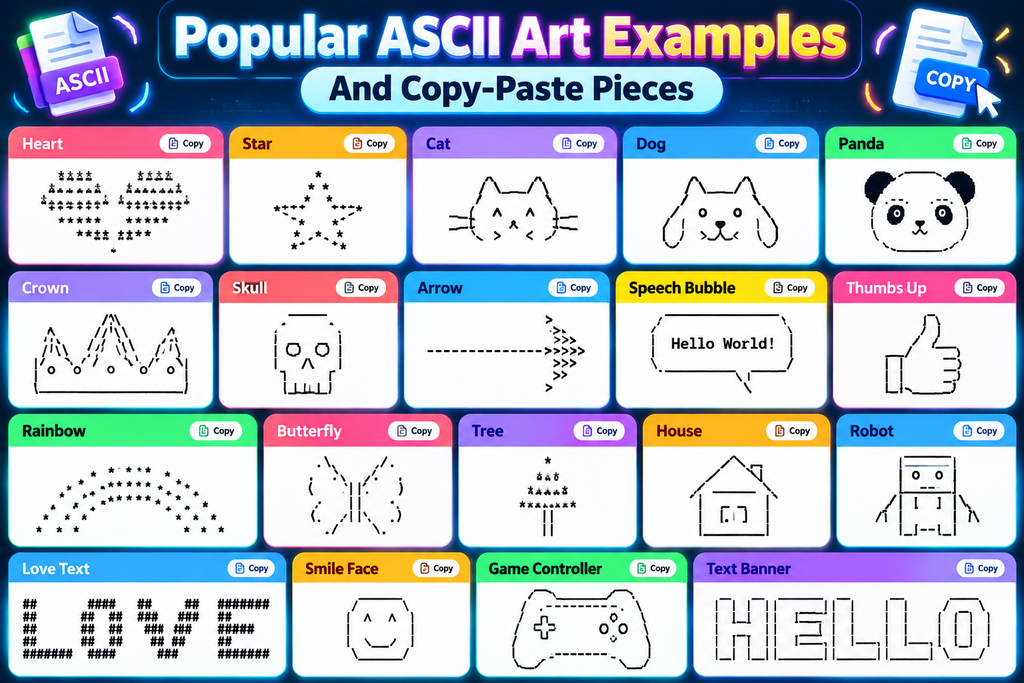
Popular custom examples work best when each design has a clear purpose: an animal, greeting, banner, or username can become an instant visual signature through spacing, alignment, and deliberate character choices that remain readable everywhere.
I often keep copy-paste pieces short enough for chats, then reserve wider compositions for profiles or project pages. animals are especially useful because recognizable outlines stay readable even with limited characters and uneven font support.
Also Read:Calligraphy Font Generator
Related / Other ASCII Tools
Related ASCII tools become useful when projects need lettering. I often carefully pair an ASCII generator with FIGlet, then test border styles, whitespace tools, and TXT export before placing computer-style art inside documentation, terminals, or profiles.
For visual work, an image-to-ASCII resolution check matters; for coding, programming strings and backslash escaping prevent broken output. I also compare image exports, PNG, JPG, and GIF options when an ASCII design travels beyond plain-text.
What Is An ASCII Text Generator
An text-to-ASCII-art generator converts ordinary wording into structured character artwork, using a font collection and layout options to shape readable patterns. Unlike ordinary graphics, it produces designs directly from keyboard characters for fast online sharing.
At its core, the generator follows the American Standard Code of Information Interchange, arranging letters into patterns that can become an ASCII art maker output. This approach suits retro interfaces, documentation, banners, and playful messages without special software.
Conclusion
An ASCII font generator is most useful when it turns ordinary text into a deliberate visual form. My practical testing favors custom designs, select font, and multiple borders when building readable, reusable layouts for projects.
Keep spacing controlled, especially for vertical padding, empty spaces, and trimming whitespace, because different screens can shift alignment. For GitHub, terminals, and social networks, a compact design usually survives copying better across common platforms today.
What Is An ASCII Font Generator?
An ASCII font generator converts regular text into decorative character-based designs using standard ASCII symbols. It helps create banners, headings, signatures, terminal text, and other visual formats that are easy to copy and share.
Can I Use ASCII Art On Social Media?
Yes, ASCII art can be used on platforms such as Facebook, X/Twitter, Tumblr, Discord, and other social networks. However, complex designs may lose alignment when displayed with proportional fonts or different formatting settings.
Can I Use ASCII Art In GitHub And Terminals?
Yes. ASCII art works especially well in GitHub README files, source-code comments, terminals, logs, command-line interfaces, and developer projects. Monospaced fonts generally provide the most reliable alignment for larger ASCII designs.
Why Does My ASCII Art Look Broken After Pasting?
ASCII art can appear distorted because of different fonts, spacing rules, line wrapping, or removed whitespace. Using a monospaced text area, preserving line breaks, and avoiding unnecessary resizing usually keeps the original structure intact.
Is ASCII Art Free To Use Commercially?
Many ASCII designs created with generators can be used freely, but licensing depends on the source and any third-party artwork involved. Always check the specific tool’s terms before using generated artwork for commercial branding or products.


