


✨ Star Font & Text Generator
Type your text below to instantly decorate it with unique star symbols and typography styles.
A star font generator turns ordinary text into cute star text for captions, bios, and gaming names, adding sparkle symbols or decorative designs in seconds without requiring a separate font installation or advanced design skills.
Use it to build stylized words and usernames with decorative Unicode characters, then compare star-themed text and copy-and-paste star styles before sharing your chosen look across profiles, posts, or chats on different platforms with ease.
Table of Contents
What Is a Star Font Generator?
A star font generator is a browser-based generator that transforms ordinary typing with Unicode symbols into a distinctive effect. It decorates labels or brief notes without installing a font or changing the underlying text itself.
Rather than changing an app’s typeface, it adds star-inspired styling around glyphs, offering visual appearance choices and text personalization for accounts, descriptions, and player handles; results can be copied wherever symbols are supported on platforms.
How To Use A Star Font Generator
Begin with your starting text in the generator input, then explore text variations until one suits your username or message. Add a star-themed design sparingly, since a clean result often stays easier to read well.
Review the selected result before using one-click copying or the clipboard option. Paste it into a gaming username field, destination text field, or one of your supported applications, then confirm the symbols render correctly there.
Types Of Star Font Styles
Classic stars keep usernames recognizable, while hollow stars, solid stars, and text borders provide simple framing. Choose restrained decoration when the name itself should remain easy to scan across busy profiles on smaller screens too.
Four-point stars and glimmering symbols brighten captions, while shooting-star imagery suggests movement. Minimalist design keeps delicate layouts restrained; cosmic style suits galaxy themes when a bolder mood feels appropriate for bios and profile headers alike.
Also Read: HTML Text Generator: Create, Customize & Copy HTML Text Online for Free
Classic Star Fonts
Classic Star Fonts often rely on familiar five-point shapes and balanced spacing, giving names a clear, timeless finish. Choose solid stars for stronger emphasis, or hollow stars when lighter decoration suits the design best overall.
From profile names to short captions, minimalist designs usually stay readable at small sizes. Add four-point stars sparingly, or borrow subtle celestial imagery and galaxy imagery when a classic style needs extra character without clutter.
Cute Star Fonts
Cute star fonts give names a cute appearance through star symbols and simple decoration. For profile titles, I prefer soft lettering with tiny sparkles, creating a gentle look without crowding each character or reducing readability.
Try traditional star symbols around nicknames, then preview them beside cute profiles or short bios. A few small sparkles can express personality more clearly than elaborate ornaments, especially when readable text remains the priority overall.
Fancy Star Fonts
Fancy star fonts work best when the stars support the message rather than overpower it. Choose restrained decorative lettering and creative patterns for a polished, personal result across short online names on public social profiles.
Before copying, compare each option at its actual destination: tiny symbols may crowd a username, while balanced spacing keeps the lettering readable. Prefer a clean design and test the final appearance first on your device.
Shooting Star Fonts
Shooting Star Fonts create a sense of movement, pairing a bright trail with your chosen name or words. Use this style for gaming profiles, fan pages, and social media bios that need visual impact instantly.
Unlike static star symbols, a Shooting Star Font suggests direction through stylized lettering and decorative patterns. Review generated variations, then copy text and test character support before adding it to your preferred social media platform today.
Aesthetic Star Fonts
In practice, star fonts work best when decoration supports a name instead of overpowering it. Pair simple stars with readable lettering to create distinctive appearance across profiles, captions, and creative pages without cluttering the design.
For a softer look, combine celestial themes with subtle spacing, then compare several layouts before posting. The intended mood may feel dreamy, polished, or playful while keeping each word easy to recognize at a glance.
Cosmic Star Fonts
Cosmic Star Fonts combine galaxy symbols and sparkle symbols with Unicode characters to give names a futuristic appearance. Use this style for gaming identities, creative bios, or short titles when ordinary lettering feels too plain.
A good star font generator lets you place celestial symbols around text without installing a conventional typeface. Preview each result, then use copy-and-paste text wherever the destination supports those characters across compatible social media platforms.
Decorative Star Fonts
Elaborate designs can place star accents beside letters, around nicknames, or between words. For most profiles, sparkle fonts look polished when their symbols remain balanced and the lettering stays easy to recognize at a glance.
A test is to preview aesthetic star fonts inside the username field; some platforms simplify uncommon characters or crowd them beside emojis, so check the result on your phone before posting it to your profile.
Why Use Star Fonts?
Star fonts help ordinary text communicate personality, not merely sparkle. Profile personalization works best when decorative meaning fits the message, while visual elements give names or short quotes a recognizable focal point for visitors online.
For creators, competitive appearance can separate a gaming identity from generic labels, and character arrangement adds structure without changing the words themselves. The best choice stays legible, fits the platform, and feels intentional to readers.
Where Can You Use Star Fonts?
Use aesthetic posts, themed pages, and creative text to establish a mood; star accents also fit short quotes, chat messages, and greetings, provided the decoration stays clear and suits the audience across social platforms.
Players can test gaming nicknames and clan tags before placing them in player profiles; for everyday use, preview copy-and-paste designs on modern phones and computers, since text rendering may vary before sharing a finished design.
Star Fonts For Social Media
On Instagram, Facebook, and short-form platforms, star accents can give profile descriptions a recognizable signature without overwhelming the message. Place decorative text beside a name or highlight one concise phrase for scanning during quick visits.
For posts and stories, test star characters inside status updates before publishing; some apps handle unusual symbols differently. Keep readability central, check device differences, and save a simpler version when a platform alters spacing unexpectedly.
Best Practices For Using Star Fonts
Keep star styling purposeful: test decorative symbols beside readable text, compare multiple variations, and check how your usernames appear in bios before publishing. A restrained accent often makes a profile clearer than crowded decoration alone.
For gaming pages, preview star-decorated text on mobile phones and desktop computers, then confirm platform support and legibility in comments. Keep labels plain whenever quick reading matters, and retain an unstyled copy for later edits.
Star Symbols Copy And Paste
Try ★, ☆, ✦, or ✧, then choose Unicode star characters matching your message. Follow the copy-and-paste process to decorate Instagram bios and gaming usernames; preview the final result carefully across devices before publishing online.
Use decorative Unicode characters sparingly around words, or place them before text and after text for balanced framing. Test the copy result in your desired application because spacing may differ on older devices or apps.
Star Symbols For Different Occasions
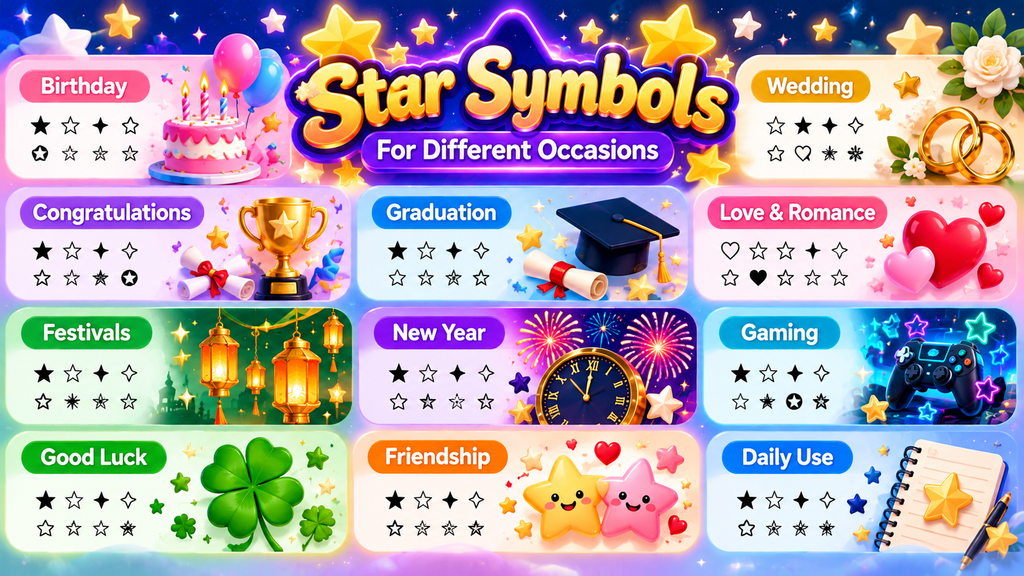
Choose classic star symbols for congratulations, star emojis for birthdays, and delicate sparkle symbols for wedding notes; matching each occasion’s mood keeps greetings personal without overcrowding greeting cards, invitations, or celebratory updates on any occasion.
For graduations, try decorative borders around short quotes; for game-night posts, use repeated star patterns sparingly. Test the design on each platform, since symbol support and spacing can vary between devices and apps in practice.
Also Read: Underline Text Generator
Star Fonts For Gaming And Profiles
For gaming, combine username styling with a strong design rather than filling every space. A clean gaming profile creates a competitive appearance while staying recognizable in lobbies, leaderboards, and team chats on mobile during matches.
I recommend testing Brawl Stars Font and gaming-oriented styles on profiles before choosing. Futuristic lettering or a decorative username adds personality, while standout profile details must never obscure the name teammates need during fast matches.
Star Kaomoji And Japanese Emoticons
Kaomoji bring Japanese emoticons into messages through expressive combinations of brackets, punctuation, and characters. Unlike star-only decoration, these compact faces suggest moods—happiness, awkwardness, excitement, or affection—without needing colorful graphics or images in casual chats.
For creative profiles, try a face such as (^▽^) for joy or (¬‿¬) for playful confidence. Keep each kaomoji legible, match its mood to context, and treat it as personal expression, not a universal language.
Star Text Art And ASCII Designs
ASCII designs are useful when a profile needs stars without relying on colorful emoji. Arrange asterisks, five-point stars, or starburst symbols into compact patterns, keeping spacing balanced so the artwork remains clear across text fields.
For stronger layouts, combine text art with star dividers, borders, and straight lines; test the result after copying. Simple spacing often works better than crowded symbols, especially in usernames and short decorative messages on profiles.
Named Star Font Styles
Named star styles work best when their visual mood matches the name: cute star fonts suit friendly profiles, while fancy lettering and decorative lettering create a more polished identity without requiring downloaded typefaces or software.
For a bolder profile, combine bold lettering with star borders; a softer theme can use a dreamy aesthetic or delicate decoration. Preview the result on your target app because symbol support can vary between platforms.
Decorated Text Beyond Star Symbols
A layout doesn’t need stars; decorated text can use text decoration, ornaments, and elaborate designs to introduce personality, while multiple symbols add texture. Keep results purposeful so names stay readable across devices and profile layouts.
Designers can switch formats rather than simply add icons: framed text, multiline arrangements, and large text layouts suit banners, whereas single-line decorations fit bios. Preview spacing before sharing to prevent clutter on many profile pages.
Conclusion
A useful star font generator turns ordinary text into memorable text designs without requiring font installation. From aesthetic profiles to gaming names, restrained star placement improves recognition while keeping names practical across compatible online platforms.
Although elaborate symbols attract attention, readable names and appropriate decoration work better than crowded layouts. Test the final design in messaging, gaming, and social media before sharing, because supported text fields may display symbols differently.
What Is A Star Font Generator?
A star font generator transforms ordinary text into decorative text designs using star symbols and Unicode characters. You can copy the result and use it in compatible usernames, bios, captions, messages, or gaming profiles online.
Are Star Fonts Free To Use?
Most free generators let you create text without downloads. Check each platform’s usage rules, character restrictions, and support for special symbols, because results can vary across destination platforms and devices before sharing them publicly online.
How Do I Get Stars Around My Name?
Enter your name in the generator, choose a design, and add star symbols before or after the text. Preview the result, copy it, then paste it into a supported profile field on your chosen platform.
Can I Use Star Fonts On Instagram?
Yes, many star styles work in Instagram bios, captions, and comments because they use Unicode characters. Still, some selected characters may look different across devices, and certain symbols might not display correctly for every viewer.
Do Star Fonts Affect Readability?
Decorative Unicode text can make a username noticeable, but it may be less readable to some people or screen readers. Keep important names and keywords in standard text when discoverability matters on social media platforms.


