


🌊 Wavy Text Generator
Create animated visual wave effects and copy-paste unique Unicode wavy styles instantly!
A wavy text generator turns ordinary text into a decorative text style, creating a wave-like appearance through flowing letters, Unicode characters, or graphic tools. The result adds personality without requiring design experience or specialist software.
For short bios, captions, and usernames, test each output before publishing: character decoration and font rendering can vary between apps. Choose readable styling, copy the characters, and check the final display on your device first.
Table of Contents
What Is A Wavy Font?
A wavy font gives ordinary lettering a rippling, wave-like text appearance, adding visual flair without changing the message. It suits social media, gaming, and creative projects, especially when standard lettering feels stiff beside playful layouts.
Behind the style, a wavy text generator applies decorative typography through Unicode text or graphic treatments; results may differ by device. Choose selectable styles, preview the dreamy aesthetic, then test instant copying before posting anywhere.
What Is A Wavy Text Generator?
An online tool can turn wording into a wavy style, producing a flowing style that feels lively without changing meaning. Its generated output may be copyable Unicode text or graphic text, depending on the design.
For decorative names and short captions, the interactive generator can shape flowing characters into a fresh appearance with wavy typography. Gentle movement and ocean-inspired style often stand out better than lengthy, crowded text on profiles.
Also Read: Repeat Font Generator – Repeat Text Online Free in Seconds
How To Use The Wavy Text Generator?
Start with a short phrase in the text input box, then review the style selection for your message. Preview the wavy output styles before choosing a version that stays clear on phones and desktops alike.
Use the copy controls to copy-and-paste characters into a compatible text field, such as a bio or caption. For lettering, use a graphic design tool to create curve effects and export result as an image.
Where Can You Use Wavy Fonts?
Wavy fonts can personalize social media bios, captions, and WhatsApp statuses, adding movement to short updates without replacing their message. Preview each style before posting because apps may render decorative Unicode differently on various devices.
Use them in gaming profiles, Discord usernames, blog headings, website designs, image overlays, videos, presentations, and creative projects when a playful accent suits the audience; keep important information plain for comfortable reading and easy recognition.
Wavy Text Generator Features
The generator should offer wavy text styles, quick presets, and an output preview, letting users compare decorative text options. A text shape control can support rotation, character spacing, and color adjustments without overwhelming first-time creators.
For polished results, font selection and style customization should sit alongside text color, background color, and visual contrast. Export options such as PNG and JPG help creators place graphics into stories, videos, presentations, or banners.
Is The Wavy Text Generator Free?
Yes, this free generator can handle everyday styling, and the free tool lets visitors create wavy text without paying upfront, with no signup required, before trying basic designs for bios, captions, and playful social messages.
Check the pricing, premium features, and usage terms before exporting finished graphics; some services may reserve advanced effects or downloads for paid plans, while an attribution requirement can apply to free designs on certain platforms.
Does Wavy Text Work On All Devices And Platforms?
Wavy designs travel well, but Unicode combining characters can produce rendering differences across fonts, operating systems, and applications; check cross-device compatibility before publishing, especially when precise visual consistency matters for a brand or profile page.
Although Unicode-based wavy text appears on Instagram, Discord, and modern platforms, combining marks can create a different display on older systems; preview text rendering in each app, since platform compatibility never guarantees matching results everywhere.
Flowing Ocean Vibes With The Wavy Text Generator
Give ordinary captions a coastal rhythm with ocean themes and a relaxed mood. A wavy text generator adds gentle motion to usernames, playlist titles, and beach-inspired posts, helping each design feel calm, readable, and distinctive.
Instead of decorating every line, apply the wave effect to a short phrase, then keep text simple. This contrast suits lo-fi music playlists, summer posts, and meditation content, where atmosphere matters as much as legibility.
Relaxed Uses For Dreamy Wavy Text
Use wavy text sparingly in social media stories, journal covers, playlists, or a bio when a profile aesthetic matters more than decoration. A few curved words can suggest a dreamy mood without overwhelming your message.
For everyday design, pair flowing typography with muted colors, generous spacing, and one decorative effect; reserve busier marks for short titles. Preview the result on your phone before sharing to check readability and visual consistency.
Flowing Wavy Text Phrases Ready To Copy
Keep short expressions ready for copy-and-paste text when refreshing social media bios, playful captions, or profile introductions. Try a softer wave for beach photos, cheerful announcements, and brief messages that deserve personality without sacrificing readability.
On Instagram, TikTok, Discord usernames, and gaming profiles, test the Unicode output before posting; some screens reshape combining marks. Save a plain alternative for accessibility, then reuse the chosen line in music captions where permitted.
Wavy Accent Styling Tips And Technical Notes
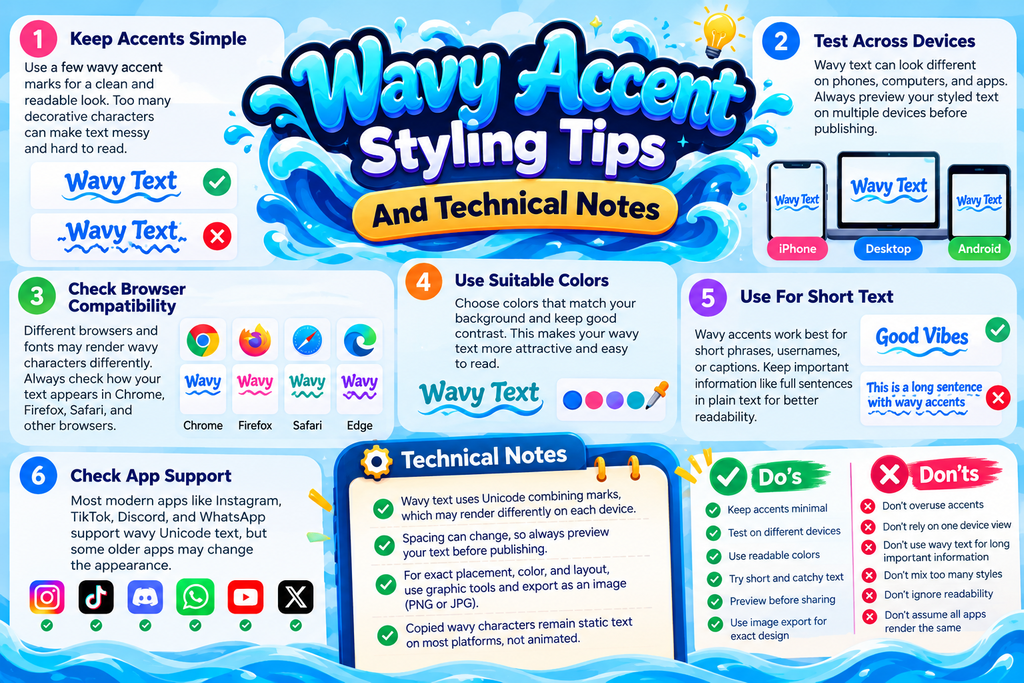
For a clean wavy text effect, keep accent marks sparse and test display variation across browsers; decorative characters may shift spacing, reduce legibility, or appear uneven when pasted into different apps and devices you use.
When precision matters, compare Unicode combining marks with graphic-oriented tools: copied characters stay editable while exported artwork preserves placement, color, and curved positioning more reliably across presentation software and social platforms in final reviews too.
Also Read: Cursed Text Generator
Wavy Text Effect
A playful look can come from wiggly lettering shaped by a moving pattern of combining double tilde marks. Despite the apparent motion, copied characters usually remain static text on most social platforms and messaging apps.
Designers often combine graphic text with wave-inspired typography for bios, banners, or thumbnails; the visual effect feels expressive without requiring an animated file, while Unicode combining marks can render differently across devices and installed fonts.
Wavy Text Generator — Wiggly & Wave Fonts
A wavy text generator creates playful lettering by combining a wave font look with a wiggly font rhythm, giving usernames, bios, and short captions movement without requiring advanced design skills or specialist software at all.
Choose a style collection that suits your message, compare the visual appearance of each selected effect, then copy styles from reliable text generators and test them in your intended app before publishing to avoid surprises.
Wavy Text Generator Styles
An interactive generator can offer wiggly fonts and wave fonts for different moods, from a subtle relaxed aesthetic to a more distinctive appearance. Choose a wavy style that suits the message rather than overpowering it.
For profile names, banners, or artwork, combine wave-inspired typography with balanced text arrangement and restrained background effects. Test copyable characters across apps; use image export when precise spacing, colors, or layout matters most in publication.
Conclusion
A strong wavy text generator is less about adding curves everywhere and more about choosing a flowing effect that suits the message, stays readable, and supports the personality of each post across different social platforms.
In practice, test the final design at its intended size before sharing; decorative marks can change appearance between screens, so choose a gentle curve when clarity matters more than visual complexity for everyday online reading.
What Is A Wavy Text Generator?
A wavy text generator is a free online tool that transforms ordinary text into decorative, wave-inspired lettering. You can use wavy text to make social media posts, usernames, bios, captions, and creative designs more attractive.
How Do I Create Wavy Text Online?
Enter or paste your text into the generator, select your preferred wavy style, and preview the result. Once you find a design you like, copy the generated text and paste it into your favorite platform.
Is The Wavy Text Generator Free To Use?
Many wavy text generators are available for free and do not require registration. However, certain tools may charge for advanced design features, image downloads, premium fonts, or other customization options.
Can I Use Wavy Text On Instagram, TikTok, And Discord?
Yes, you can use compatible wavy Unicode text in Instagram bios, TikTok profiles, Discord usernames, captions, and messages. However, the appearance may vary depending on the platform, device, and font support.
Does Wavy Text Work On All Devices?
Wavy text can work on most modern smartphones, tablets, and computers. Unicode-based styles may display differently across operating systems, while image-based wavy text generally preserves its designed appearance when shared as an image.


