


Cursed & Glitch Font Generator
Transform normal text into terrifying, chaotic Zalgo text for social media and gaming bios.
A cursed font generator turns ordinary lettering into a deliberately unsettling visual language, using distorted characters, Unicode, and layered marks to create mysterious text that feels haunted without requiring specialized typography software or image editing.
In practice, I treat cursed text as a controlled visual effect rather than random corruption: adjust intensity, test readability, then copy the generated result wherever the target platforms render Unicode consistently across major services online.
Table of Contents
What Is Cursed Text?
Cursed text is ordinary writing transformed into a deliberately unsettling visual form, often through Unicode symbols, altered characters, and combining marks. The result may look distorted, mysterious, unstable, or unexpectedly creepy across digital communication online.
In practice, I see Zalgo treated as the extreme end, while readable cursed styles rely on controlled visual distortion. Different platforms and applications can render these effects differently, so intensity matters when sharing publicly online.
How To Use A Cursed Text Generator
Enter your desired phrase in the input field, then transform normal writing into a darker result. Start with a short message, because subtle settings often preserve clarity better than dense distortion across platforms and devices.
Then explore style selection and adjust intensity before choosing a stronger appearance. Check the generated result, copy it, and paste the version into your profile, post, or message, verifying placement before publishing carefully each time.
Step 1 — Enter Text In The Field
Start by placing your normal message into the input field before touching controls. A browser-based tool usually accepts ordinary letters, then prepares them for a creepy transformation while keeping the wording intact, ready for preview.
Use a short phrase first; this makes the workflow easier to inspect. Experienced users often enter one line, verify spacing, then choose a mysterious style. Keeping the initial text simple improves editing accuracy before generating.
Step 2 — Choose A Font Style / Adjust Intensity
Choosing font styles is not simply about maximizing distortion; I compare style variants first, then use the intensity slider gradually. That approach preserves subtle typography, while controlled embellishment keeps the final design readable across devices.
For profile work, I prefer social media bios with moderate distortion; horror and spooky designs can handle heavier treatment. Generate altered text quickly, inspect each appearance, and test it before using it in public posts.
Step 3 — Copy And Paste Font
After checking the output, I usually treat the copy and paste stage as a quality test: select the generated cursed text, copy it cleanly, then paste it into the intended field without retyping manually again.
For social use, I prefer a quick preview before posting because platform support, rendering differences, and older devices can change appearances. Keep the final string handy, especially when sharing cursed styles between apps or browsers.
Also Read: COD Name Generator
Extensive Collection Of Cursed Font Styles
A curated collection gives cursed typography useful variety without making every result chaotic. I test mysterious presets, multiple styles, and ready-to-use outputs, then compare consistent results against the intended mood before publishing with care daily.
Strong libraries also pair extreme distortion with intense examples, while reduced-intensity versions keep text practical. In my testing, creative work benefits from visual design choices that avoid identical rendering across varied screen sizes and devices.
Use Cursed Text Across Platforms
Cursed text can become beyond gaming when platforms reward distinctive identities. I usually test visual styling inside bios, posts, and social profiles separately, because each renderer may interpret combining marks differently across devices and browsers.
For Discord, copy and paste can expose character limits, rendering limitations, or platform restrictions. My practical rule is simple: keep the message readable, then use intensity slider for social messages, comments, captions, and profile elements.
Amplify Your Social Media Presence With Cursed Text
Cursed text can strengthen a profile when used selectively, especially in posts, Facebook bios, Instagram captions, or Reddit communities where unusual styling helps a reader notice personality before scrolling onward through crowded social feeds today.
In my own testing, the strongest results come from pairing messages, comments, and profiles with readable wording, then checking Discord compatibility and Twitter and X rendering before choosing to publish confidently across feeds without visual surprises.
Create Stunning Designs Using Cursed Fonts
Designs can reshape a first impression when unusual aesthetics introduce mystery and horror without sacrificing clarity. In my experience, cursed lettering works best when branding stays recognizable while selective distortion creates tension around important details.
Use attention-grabbing cursed text sparingly across a social media presence; excessive distortion can hide the message. I prefer testing hierarchy first, then placing stronger effects around titles, profile elements, or campaign accents where viewers naturally pause.
Elevate Plain Text Using Our Free Cursed Text Generator
Plain text becomes expressive when a free toolkit turns ordinary wording into a spooky version with controlled distortion. I use the generator as an online tool, adjusting spacing, emojis, and variants until outputs stay readable.
For bios, game posts, or Halloween campaigns, I pair creative wording with a dark aesthetic, especially creepy messages that need a first impression without sacrificing usability. This approach makes copy distinctive while keeping edits easy.
The Free Toolkit For Cursed Text Maker
The Free Toolkit for Cursed Text Maker brings practical controls together: a free generator can turn ordinary writing into special styles, helping creators test design choices, adjust intensity, and prepare creepy social content quickly online.
In my experience, strong results come from balancing plain input with controlled drama; characters, rendering, compatibility warning, and operating systems still matter, especially when you share text across digital platforms or supported destinations without surprises.
Captivate Attention With Stunning Social Media Bio
A strong bio does not need clutter; a subtle creepy atmosphere paired with stylized wording can stop scrolling. I often recommend testing the aesthetic first, because personality reads better when distortion supports the message clearly.
For social media, check rendering limitations before publishing. A memorable visual effect should remain readable across devices, while character length and accessibility deserve attention. The best results feel unusual, intentional, and easy to copy anywhere.
Common Cursed Text Mistakes
Most cursed text mistakes begin when extreme distortion is mistaken for decoration. Excessive stacked marks and poor readability can turn a useful visual effect into noise, especially across platforms and devices with inconsistent support today.
I usually check character length before publishing because a string that looks fine on one website or app may behave differently elsewhere. Test Unicode output and rendering limits, then avoid heavily distorted text when limitations are obvious.
Cursed Text Examples
Cursed text examples become more useful when tested as Unicode combinations rather than judged visually alone. I often compare a cryptic phrase with shadowed letters, wavy forms, and stroked characters to assess readability before sharing.
A practical test is placing a short message beside an extreme glitch version, checking overlapping marks on Discord, Instagram, and websites. This reveals rendering differences, character length issues, and whether normal Unicode characters remain recognizable.
What To Know About Cursed Text
Cursed text is less about a specific typeface and more about an unstable effect created when letters gain unusual marks. The result can look glitch-like, ornamental, or barely readable, depending on intensity and platform rendering.
From my testing, the most useful approach is controlled distortion: combining marks and diacritical marks can create stacked characters without relying on images. Difficult-to-read output works best for playful profiles, themed game designs, and content.
Creep Everyone Out With The Cursed Text Generator
To creep everyone out, I usually choose a cursed effect that adds controlled distortion rather than maximum chaos. This keeps the font readable while creating a deliberately unsettling visual effect for profiles, captions, and gaming.
Experienced users know styles work best when the string stays short. A mysterious phrase with stacked marks, ancient accents, or double-stroke details can feel disturbing without overwhelming the character representation or causing rendering limits subtly.
How To Choose The Right Cursed Text Font From The Cursed Font Generator?
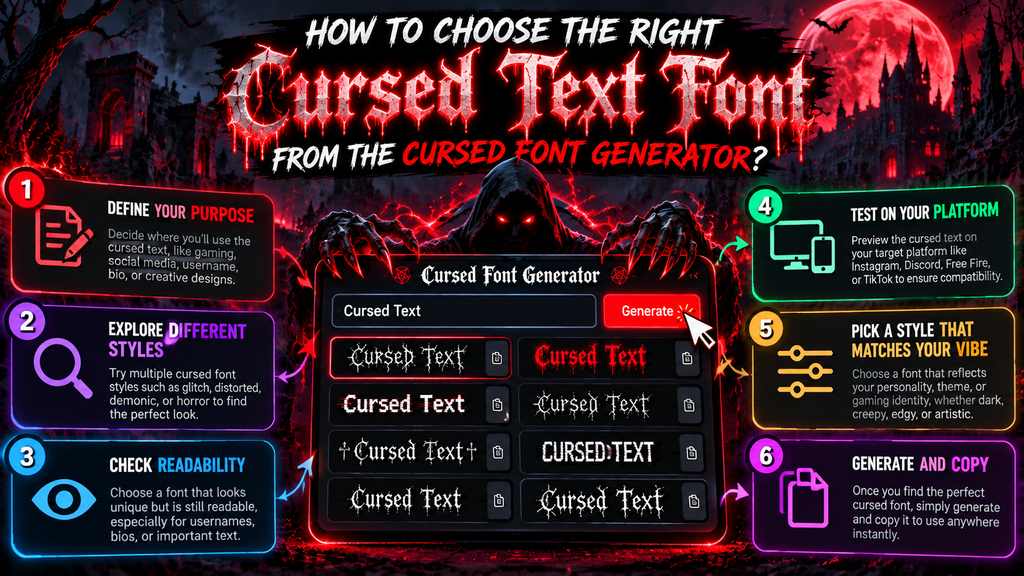
Start by judging the mood you need, then test several styles instead of trusting the first result. A reliable font style should remain readable, visually coherent, and suitable for your intended platform and audience comfortably.
In my experience, subtle distortion often works better than maximum intensity. Use randomization sparingly, compare the visual effect on real posts, and consider platform behavior before choosing a cursed design you plan to reuse consistently.
Also Read: Kawaii Fonts That Will Steal Your Heart
Cursed Font Generator Online
Cursed Font Generator Online turns plain writing into visually distinctive effects without manual formatting, letting users experiment with fonts, branding, and digital narratives in seconds. I prefer testing several variants before choosing a final creation.
A workflow is to treat each output as a design element, then check ordinary typography balance before sharing. The free tool should preserve readable form, especially when a profile bio needs attention without becoming distracting.
Extensive Collection Of Copy And Paste Cursed Text
I often start with font generator online results, then compare a mixed collection of crossed forms and unusual style variants. Seeing several versions together makes choosing copy-ready cursed text faster and more deliberate in practice.
For practical projects, I keep stunning designs readable while reserving heavier effects for social media, hidden messages, or prank-style content. This approach keeps each result memorable, flexible, and useful for entertainment; I paste what fits.
Share Cursed Text Across Multiple Platforms
Cursed text becomes more useful when shared selectively across platforms, because each service handles Unicode styles differently. I usually test the same phrase on Discord, social profiles, and messaging apps before publishing it widely first.
For reliable sharing, copy the generated font directly, review display behavior, and keep a plain-text alternative nearby. This approach prevents broken characters, inconsistent rendering limits, or platform behavior from weakening otherwise striking posts and designs.
What Is The Difference Between Cursed Text And Zalgo?
At first glance, cursed text and Zalgo seem interchangeable, but scope matters: a cursed effect describes distortion, while Zalgo specifically stacks marks through the universal character encoding standard and encoding system, creating extreme display changes. Unicode
I tested a writing generator producing a string for website or app; platform behavior and limitations affect compatible output, while maker settings keep it less intense; online generator settings adjust Top, Middle, Bottom, and height. CodeKitHub
Is The Cursed Writing Generator Safe?
A writing generator is safe and compatible when it performs Unicode-based transformation locally and accepts input without collecting personal data. Do not enter real passwords or confidential material; test harmless word samples instead during testing.
Safety matters across entire posts and multiple platforms: avoid common mistakes, overuse, sensitive form fields. Extreme distortion in output can reduce readability, cause identical rendering, and exceed platform limitations when copied carelessly, especially when reposting.
How To Use A Cursed Text Maker?
Begin by opening the maker and typing your phrase into its input area. I usually test a short sentence first, because intensity controls become easier to judge before creating elaborate cursed text before posting anywhere.
Then experiment with variations rather than choosing the strongest effect immediately. Check how characters render on your target platform, adjust typography when needed, and copy the final result only after confirming readability remains acceptable there.
How To Copy And Paste Cursed Fonts On Social Media Platforms?
When I test social posts, I use a writing generator first, then compare how shorter Unicode sequences render through each platform’s display zone. If symbols look excessive, disable heavy effects before sharing, keeping readability practical.
A maker can keep safe habits by testing a second writing generator, checking privacy, and limiting user data before you store drafts in data storage. Never retain unnecessary details; follow responsible use when sharing online.
Is Cursed Text Compatible With Different Devices And Platforms?
Compatibility depends less on the generator and more on how each platform handles Unicode. In practice, cursed text usually survives across phones, browsers, Discord, Instagram, and gaming apps, but rendering can vary by operating system.
On iPhone, Android, Windows, and macOS, unusual characters may appear differently because fonts, apps, and fallback systems are not identical. I always test copied text in the target app first, especially when distortion is heavy.
Why Does Cursed Text Get Shorter When I Paste It Into Discord?
Discord can make cursed text look shorter because many styles rely on Unicode combining marks that sit above or below base letters without taking additional horizontal space. Rendering merges them into compact, distinct visual clusters. Unicode
The pasted message may still contain many code points even when it appears brief. Discord enforces message limits by characters, while users visually perceive grapheme clusters, so stacked marks can seem dramatically much shorter.
Can Cursed Text Break A Website Or An App?
Cursed text rarely breaks a website or app by itself. More often, unusual Unicode characters expose weak rendering, validation, storage, or parsing systems, causing display errors, truncated strings, layout shifts, or unexpected behavior during testing.
In my testing, modern platforms usually survive ordinary styled characters, while malformed sequences, excessive combining marks, or unsupported code points create trouble. Developers should sanitize input, enforce sensible limits, and test cross-platform rendering before deployment.
How Do I Make Cursed Text Less Intense?
To make cursed text less intense, start with simpler Unicode choices, reduce combining marks, and avoid stacking multiple distortions. In my testing, subtle effects remain readable while still giving ordinary messages an unusual character online.
A practical approach is to test one effect at a time, shorten heavily distorted letters, and keep spacing normal. This usually preserves the eerie style without overwhelming readers, especially on mobile screens and chat apps.
What Is The Best Cursed Text Maker?
From my testing, the best cursed text maker is not simply the one with the most effects. It should offer controlled distortion, readable previews, quick copying, and consistent results across common platforms today and browsers.
A strong generator also lets users compare intensity levels before posting. I prefer tools that keep customization simple, because unsettling lettering works better when distortion remains intentional, recognizable, and easy to copy for everyday sharing.
Is The Cursed Writing Generator Compatible With Different Devices And Platforms?
Compatibility depends less on the generator itself and more on how each device renders Unicode characters. In my testing, cursed text usually transfers between phones, desktops, browsers, and apps without special software. Most modern systems.
Platform differences appear when fonts rely on combining marks, unusual symbols, or unsupported characters. Social networks may normalize, shorten, or replace them, while messaging apps can display spacing differently. Always preview before publishing to confirm.
Conclusion
Cursed text works best when distortion supports the message rather than hiding it. A reliable generator lets users control intensity, copy Unicode results, test readability, and adapt styles across modern platforms safely consistently before publication.
From social bios to gaming profiles, cursed typography adds personality without requiring image editing. In practice, I recommend previewing unusual characters, checking device rendering, and choosing a recognizable style before sharing for consistent visual output.
What Is A Cursed Font Generator?
A Cursed Font Generator is an online tool that transforms ordinary text into distorted, creepy, glitchy, or unusual Unicode styles. You can copy the generated text and use it in social media bios, messages, gaming profiles, and creative designs.
Is A Cursed Font Generator Free To Use?
Yes, most online Cursed Font Generators are completely free. You can enter your text, experiment with different cursed styles, adjust the visual intensity when available, and copy the result without installing special software.
Can I Use Cursed Text On Social Media?
Yes, cursed text can work on many social media platforms, including profiles, bios, comments, captions, and messages. However, compatibility depends on the platform, Unicode characters supported, and the device displaying the text.
Why Does Cursed Text Sometimes Look Different?
Cursed text may appear differently because phones, browsers, operating systems, and applications use different Unicode fonts and rendering systems. Some characters can become boxes, disappear, or display differently when a platform does not support them.
How Can I Make Cursed Text Easier To Read?
Choose a moderate distortion level and avoid combining too many unusual characters. Preview your text before posting, especially on mobile devices. A balanced cursed style can look creepy and creative while remaining recognizable to readers.


