


⚡ Pro Gaming Font Generator ⚡
Generate aesthetic & stylish gamer tags for Free Fire, BGMI, COD, Discord & Socials
A gaming font generator gives players a way to turn ordinary text into Unicode styles. Enter a nickname, browse categories, select a preferred style, generate the result, then copy it for chats, profiles, or games.
From Discord usernames to Free Fire names, these tools make customization fast without installing software. In my testing, compatibility matters as much as appearance, because different devices and platforms handle Unicode rendering across systems differently.
Table of Contents
How To Use The Gaming Font Generator
Start by type text into the generator, then select style that matches your identity. The generated result appears immediately, so you can inspect it before using instant copy to move the nickname into your profile.
Use the preview to compare options, try custom sample text, and adjust adjustable font size when available. For cleaner results, use input editing, font selection, and filtering before relying on copying controls for final placement.
How Does A Gaming Font Generator Work?
A gaming font generator converts normal text into stylized text through Unicode-based gaming text, producing a generated Unicode result without installing files. The tool selects characters, assembles styles, and prepares readable output for easy copying.
Behind the scenes, the tool matches input with a Unicode character presentation, then checks practical rendering behavior across operating systems. In my testing, platform differences matter more than appearance, because unsupported characters can display inconsistently.
Also Read: Kawaii Font Generator
Where Can You Use Gaming Fonts?
Gaming fonts can shape gaming usernames, Discord usernames, clan tags, server roles, and gaming profiles, especially when players want recognizable identity across teams, communities, and competitive spaces online today and community interaction across gaming spaces.
From Instagram to YouTube content, social media identities, and creative digital communications, I also find symbols, emojis, Unicode symbols, and decorative gaming names useful for framed usernames, quick sharing, and PixelLab projects during normal gameplay.
Gaming Font Categories & Styles
Gaming font categories are easiest to compare through visual identity: pixel, digital, and arcade styles suit retro-minded players, while gaming-related styles give usernames a recognizable character for competitive profiles and communities without relying on artwork.
In practice, 3D styles work well when depth matters, whereas glitch, cursed text, and darker styles create a disruptive look. Mixing categories carefully can produce memorable gaming names without sacrificing readability or platform compatibility today.
Popular & Trending Gaming Fonts
Trending gaming fonts rarely succeed because they look complex; they succeed when a player’s identity feels distinctive. Pixel, Retro, Digital, and Arcade styles remain popular because usernames stay readable while gaining character in actual profiles.
From my testing, Futuristic, Techno, Horror, and Glitch treatments attract players seeking stronger personalities. Meanwhile, 3D, Sci-Fi, Bold, and Medieval designs work well when visual impact matters more than simplicity across competitive game profiles today.
Free Gaming Font Generator
A free gaming font generator keeps the workflow simple: choose gaming font styles, test Unicode output, and copy results directly into a browser-based generator without account creation, payment, or installation for quick profile customization anywhere.
In practice, 100% free access matters when testing popular gaming fonts across modern devices; I compare visual weight, copy behavior, and Unicode compatibility before settling on names for profiles, clans, or social platforms with confidence.
Gaming Font Compatibility Across Devices And Platforms
In practice, Unicode compatibility matters more than a flashy typeface. I test rendering across major operating systems, because platform differences and device differences can alter spacing, glyph shapes, or even replace characters unexpectedly in gameplay.
A useful check is: copy the styled result into the game, Discord profile, or social account. generated characters may display correctly while visual differences appear across different platforms, especially when unusual Unicode shapes are involved.
Gaming Fonts For Free Fire
Free Fire names benefit from fancy nicknames when players want a sharper identity without changing gameplay. I usually test Unicode support, then previewing variations before instantly copying the preferred name into the game during play.
Not every decorative style survives platform differences, so Unicode characters and compatible games matter. For Free Fire, choose readable outputs, paste them carefully, and verify the generated name appears correctly before entering battle during play.
Gaming Fonts For Discord
On Discord, a nickname rarely needs an installed typeface. I prefer styled Unicode text for quick testing, because Discord clan server identity depends more on readable server names, roles, and nicknames than heavy visual effects.
For competitive communities, I test decorative names and symbols beside ordinary lettering before choosing a profile style. This keeps combinations clear across channels while preserving a recognizable clan and consistent server identity for Discord members.
Gaming Fonts With Symbols And Emojis
Symbol-heavy styles can make a player alias instantly recognizable, especially when balanced with readable letters. I often test stars, arrows, crowns, brackets, and fire emojis around names before choosing the cleanest combination during handle customization.
Decorative names become more effective when styled Unicode text is paired with a few relevant emojis rather than crowded symbols. This approach keeps profiles distinctive while preserving quick recognition across games and social platforms today.
Gaming Fonts For Instagram
Instagram gaming pages benefit from distinctive Instagram usernames and readable Instagram bios, especially when a creator wants a recognizable gaming identity without sacrificing clarity across profile layouts, captions, comments, highlights, and reels for consistent branding.
I’ve found that Instagram gaming page branding works best when gaming pages use styled text selectively: names can stand out in crowded feeds, while bios remain easy to scan, copy, and recognize on mobile screens.
Gaming Fonts With Glitch Or Cursed Text
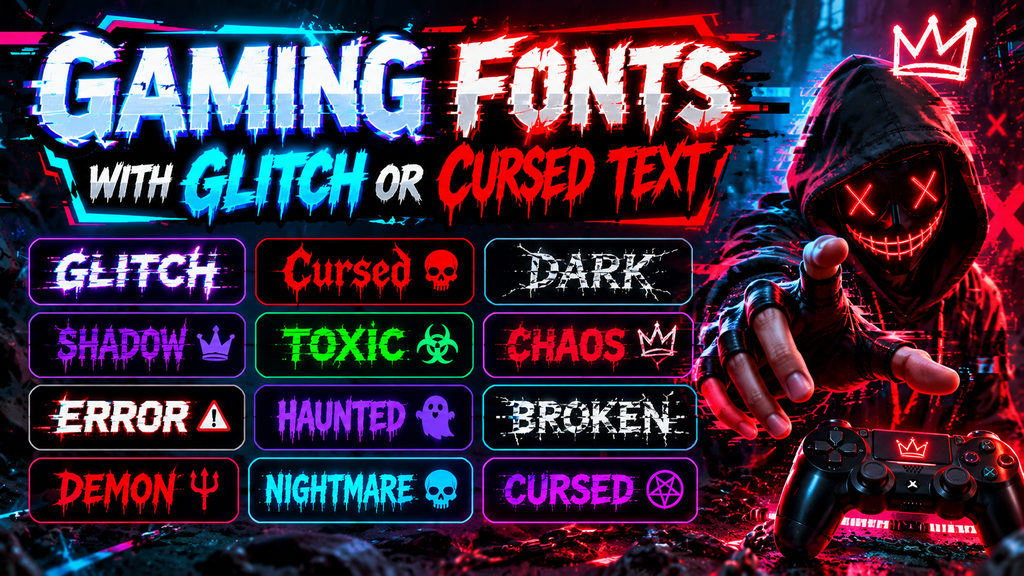
For competitive profiles, glitch text can add visual disruption, while cursed text pushes the nickname toward unsettling territory. I often reserve these darker effects for usernames, overlays, or clan branding where readability remains controlled enough.
Chaotic effects become more convincing when horror styles are balanced rather than stacked everywhere. The best combinations usually keep one dominant distortion, one readable base treatment, and enough spacing for players to recognize the username.
Also Read: Twitter Font Generator
Gaming Fonts In PixelLab
In PixelLab, gaming font design starts with imported font files rather than Unicode alone. Add your selected typeface, adjust spacing and size, then build gaming names directly inside layered graphics for thumbnails and posts today.
For quick use, open PixelLab’s text controls, choose the imported style, and apply effects such as shadows, outlines, or depth. A clean font import workflow keeps logos, banners, and gaming artwork visually consistent across projects.
3D Gaming Fonts
A strong 3D gaming fonts setup gives usernames depth without requiring bulky graphics, especially when players want readable profiles. A gaming font collection can include dimensional lettering that remains recognizable beside avatars, badges, and banners.
From my design testing, 3D styles work best when spacing stays controlled and letterforms remain clear. Subtle shadows, depth layers, and bold edges create useful visual styles for gaming identities without sacrificing recognition during gameplay.
Gaming Fonts On DaFont
DaFont is useful when you want downloadable font files rather than instant Unicode output. I browse categories, compare font downloads, and test letters before choosing a typeface for logos, thumbnails, overlays, or offline design work.
A common mistake is expecting DaFont to behave like copy-and-paste Unicode generators. A browser-based generator is better for quick usernames, while DaFont suits installed fonts, image editing, and custom gaming artwork for simple profile experiments.
Downloadable Gaming Fonts
DaFont offers downloadable font files for designers who want installed typefaces rather than only generated characters. For gaming projects, this approach suits logos, overlays, thumbnails, and custom interfaces where consistent typography matters across visual assets.
A browser-based Unicode generation tool serves a different purpose: copy-and-paste styling works instantly without installation. I separate these workflows because Unicode text is convenient for profiles, while font files and downloads provide control in software.
What Is A Gaming Font Generator?
A Gaming Font Generator converts a normal nickname into fancy Unicode text and styled outputs, helping players create distinctive usernames. Its browser-based system works with no software required, enabling experimentation across many gaming-oriented styles online.
I find the value is choice: a large selection of gaming styles, input, and preferred result previews help shape a digital identity. Because results depend on system rendering, Unicode compatibility remains important across devices.
Conclusion
After testing different styles, I find a gaming font generator most valuable when visual personality never replaces clarity. fancy text can strengthen gaming profiles, while social media presentation benefits from controlled styling and readable characters.
From practical use, I prefer matching the generator to the project rather than chasing elaborate effects. downloadable gaming fonts, a browser-based workflow, and a free gaming font generator each offer useful flexibility for different players.
Can I Use A Gaming Font Generator For Game Usernames?
Yes, a gaming font generator can create stylish text for usernames, profiles, bios, chats, and gaming communities. Most tools use Unicode characters, allowing you to copy and paste designs without installing traditional font files online.
Is A Gaming Font Generator Free To Use?
Most gaming font generators are free and work directly in your browser. You can enter text, preview multiple styles, copy the preferred result, and use it immediately across supported games, social platforms, and messaging apps.
Will Gaming Fonts Work In Every Game?
Compatibility depends on the platform and Unicode support. Some games accept decorated characters perfectly, while others may replace unsupported symbols with boxes. Testing your generated name in-game is a practical approach before using it.
What Gaming Font Styles Can I Generate?
Yes, many generators provide styles inspired by gaming aesthetics, including 8-bit, Monospace, blocky, glitch, gothic, and decorative designs. The best choice depends on your username length, platform restrictions, desired identity, and audience expectations online too.
Are Downloadable Gaming Fonts Different From Unicode Fonts?
Traditional downloadable gaming fonts and Unicode generators serve different purposes. Downloadable fonts are mainly useful for graphic design, while Unicode text is better for usernames, bios, messages, and other places where installing fonts is impossible.


[…] Also Read: Gaming Font Generator […]