


✨ Ultimate Tiny Text Generator
Type your normal text below to instantly convert it into Small Caps, Superscript, Subscript, and Circled text formats for social media, bios, and captions.
With a tiny text tool, I turn regular writing into small-looking characters without installing a downloadable font. The process uses Unicode characters for compact visual styling, making copy-and-paste results practical across everyday digital online spaces.
In my testing, a small text generator is less about shrinking font size and more about character conversion. Specialized Unicode characters preserve the intended appearance when profiles, messages, or captions need a distinctive compact style.
Table of Contents
What Is Tiny Text Generator?
A Tiny text generator is an online tool that reshapes normal text into small text by using small letters represented through Unicode characters, rather than reducing the physical font size inside your document or elsewhere.
From my testing, an online converter changes ordinary input into copy-ready characters, giving the appearance of smaller writing while preserving standard character data; this approach is useful for pages, captions, notes, and compact text placements tiny text generator.
Also Read: Big Text Generator
How To Use The Tiny Text Generator
Start with the easy to use interface, enter text, choose small caps or superscript, then press the generation button. Review the output carefully before applying your tiny styling, with no download or no sign-up needed.
Afterward, click Copy, then paste the result into apps, bios, or social posts. Check compatibility across each device and application support, especially when sharing styled text publicly online for consistent display everywhere before posting now.
Types Of Small Text
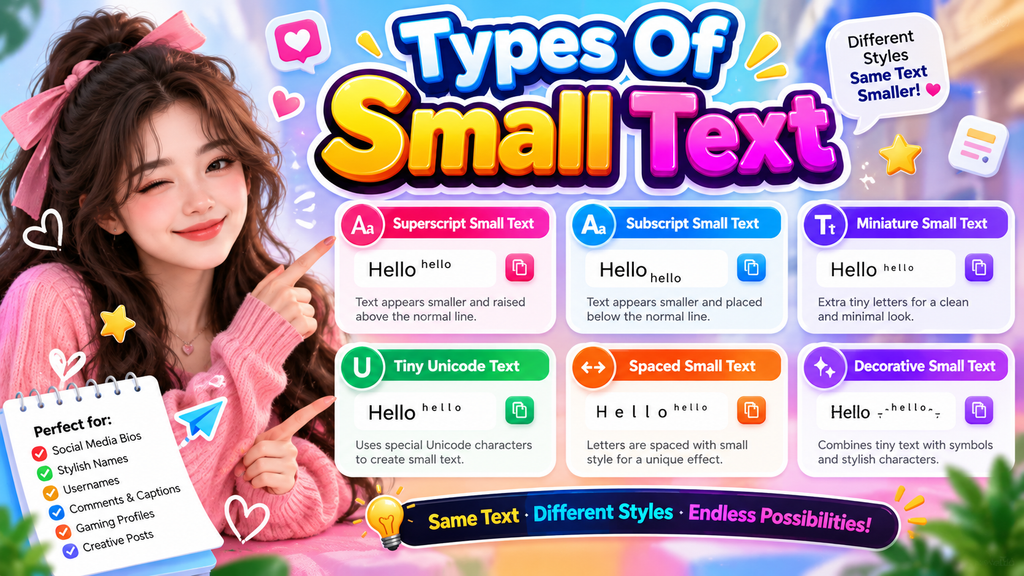
Small text is not one format. In practice, I separate it into superscript, subscript, tiny styles, and stylized names, depending on whether the goal is emphasis, notation, identification, or decoration across digital layouts on screens.
Another useful distinction covers small numbers, numerical text, footnote references, chemical formulas, and mathematical notation. For design work, professional use, and readability, selecting the type first usually prevents compatibility problems later across everyday digital projects.
Features & Benefits
Features become more useful when small text adds contrast without overwhelming a page. I use a tiny text generator for social media, profile names, and creative design, especially when standard typography feels visually heavy today.
Benefits extend beyond appearance: copy-and-paste results work across captions, emails, and direct messages, while font choice, layout, and readability help keep styled characters practical. My testing favors simple text fit over decoration alone for projects.
Where To Use Small Text
Small text is practical across social spaces when visual hierarchy matters. I often use it for compact bios, captions, status lines, and profile labels on Instagram, WhatsApp, Discord, or TikTok, especially when spacing feels crowded.
For creative identity, small text also suits usernames, gaming names, and profile names, while tiny numbers can support mathematical notation or footnote references. Before publishing, test character rendering across devices because compatibility can vary.
Small Text By Platform
Across platforms, behavior matters because small-looking Unicode characters can render differently. In my testing, Facebook, Instagram, Twitter, Tumblr, and Pinterest usually preserve supported characters, while websites and blogs depend on rendering systems across devices reliably.
On YouTube, Telegram, Roblox, and Snapchat, results can vary with Android, iOS, Windows, Mac, or Linux. Unicode font support and application support remain important, especially when missing font support creates display issues during everyday use.
Also Read: Twitter Font Generator
Small Text For Names & Usernames
For names and usernames, tiny styling works best when user names need a compact identity across profiles. I often combine small text fonts with aesthetic spacing, keeping the appearance readable, distinctive, and easy to recognize.
For gaming handles, bios, or creative profiles, test design choices beside the original name before publishing. Selective use can emphasize initials, while right small text style adds personality without overwhelming any text style or reducing clarity.
Small Text For Numbers
For compact digits, tiny text typically uses numerical characters through text conversion, creating smaller-looking numbers without reducing the underlying character scale. Specialized characters can make numbered labels, dates, scores, and counts appear neatly styled clearly.
Before publishing, test device support because an application may handle Unicode font support differently. I usually inspect character display and rendering first, especially when tiny digits appear in names, bios, counters, or decorative layouts carefully.
Unicode And How Small Text Works
Unicode turns tiny typography into text that is encoded as individual characters, so a text generator can create small, tiny forms without changing the message. Each styled symbol depends on supported character sets and rendering rules.
In practice, I see failures when characters are missing from a device or platform. cross-platform compatibility matters because unsupported Unicode characters may render as boxes or squares, even though the encoded text remains valid elsewhere.
Compatibility & Display Issues
Display problems usually begin when a device cannot interpret Unicode characters correctly. In practice, I check unsupported characters first, then test the browser and platform, because compatibility can depend on character support rather than scaling.
Another overlooked issue appears when users expect font-size changes from Unicode styling. A missing font can leave symbols blank, while character-based text may alter alignment, line wrapping, or screen-reader behavior, despite appearing visually smaller everywhere.
How To Choose The Right Small Text Style
I usually choose small text by best use case first, then judge readability, spacing, and tone. A gaming profile may suit monospace text, while bios often benefit from subtle whisper styling when compact appearance matters.
During my testing, I make a comparison between fancy cursive, Math Sans, and subscript harmony against the platform before settling. Right style should remain legible after copying, posting, and viewing across different screens and apps.
Style Comparison Table
A useful style comparison table becomes clearer when it separates fonts, character-based text, and text styling by appearance, spacing, and platform behavior. I compare generated text visually before choosing a compact style for profiles online.
For use, boxes, squares, and downloadable fonts should be judged differently: one may display reliably while another fails. I also check character limits, word limits, readability, and whether copy and paste preserve the intended design.
Conclusion
In practice, a tiny text generator works best when visually smaller characters remain readable across profiles, messages, and designs. I prefer testing mini letters beside regular writing, then checking free online converter output before publishing.
For everyday use, focus on convenience, multiple outputs, and accessible copying rather than decoration alone. This keeps personal copy creation practical, while professional copy and academic copy benefit when chosen Unicode characters display consistently properly.
What Is A Small Text Generator?
A small text generator converts writing into visually smaller Unicode characters, creating mini letters that can fit profiles, messages, bios, or social posts without changing the text. It works through character substitution rather than fonts.
How Do You Make Words Smaller?
To make words smaller, type your text, choose a small text font, then generate and convert it. The result is ready to copy and paste for a profile, message, or design without changing your wording.
How Do I Copy And Paste Small Text?
To copy small text, use the website to generate your style, then select the result and copy it. Paste it into a profile, message, or social post wherever Unicode characters are accepted without extra software.
Where Can I Post Small Text?
Small text works best where compact styling is accepted: chats, personal blogs, presentations, slides, DIY designs, and everyday messages. I also use it for short-form video content when decorative emphasis matters without hiding the message.
Is The Small Text Generator Available Offline?
Offline use depends on the tool’s design. A browser-based generator usually needs an internet connection, while a downloaded app can sometimes create tiny text without access, then save results inside a document locally for convenience.


[…] Also Read: Tiny Text Generator […]