


🌸 Cute Font Generator 🍡
Generate adorable, aesthetic, and kawaii text styles instantly for your bios & posts!
A cute font generator turns ordinary letters into decorative text styles through Unicode characters, helping you copy and paste distinctive text into profile descriptions, captions, and compatible text fields with minimal effort across common platforms.
Choose soft lettering or bubble lettering for a playful mood, then check readability and device compatibility before sharing. Good styling supports personal expression without making names or messages difficult to recognize on smaller screens too.
Table of Contents
What Are Cute Fonts, Pretty Fonts, And Cute Text?
A free online text-styling tool can apply letter transformations to plain typing, helping each chosen phrase feel warmer without changing its meaning or making the original wording difficult to recognize at a glance on screen.
Those treatments are best judged in context: aesthetic lettering may suit a public handle, while Unicode-based text and ornaments can add personality; preview each result before sharing it across different apps and devices almost anywhere.
Unicode: How Cute Fonts Work
Cute fonts often rely on Unicode text symbols, not installed typefaces. A generator replaces ordinary text with alternative supported letters, combining shapes, hearts, or sparkles, so decorative text can travel between compatible apps and devices.
In practice, it depends on the receiving app and device: some characters may show as boxes or shift. Preview cute Unicode text, check character count, and favor simpler styles for text compatibility before you paste.
Cute Font Styles And Pretty Font Examples
Pretty lettering is not one fixed look: cute font examples may pair cursive text with heart frames, while symbol combinations give short names a softer signature. Compare selected styles before choosing the best fit online.
Pretty fonts can feel delicate, playful, or polished depending on font appearance and font descriptions. For a username, test styled names; for a caption, explore style collections and typography examples that remain clear after copying.
Also Read: Repeat Font Generator – Repeat Text Online Free in Seconds
How To Use A Cute Font Generator
Start with a short name or message in the cute font generator, then enter text exactly as you want it displayed. Keep style selection simple, choosing a light design before adding decoration around it later.
Use text preview to compare styles, then copy result and paste result into the intended profile or caption. Check character compatibility on the receiving app, since some symbols may display differently before you post online.
Where To Use Cute Fonts
Use cute fonts in social media bios, Instagram bios, and display names when a little personality matters; choose decorative lettering for short captions, but keep names recognizable and easy to scan on small screens today.
For WhatsApp messages, Discord conversations, and quick greetings, try pretty text or aesthetic phrases; use bubble numbers sparingly for dates or emphasis, and check character support before sharing across devices and applications each time.
Choosing Readable Cute Fonts
Readable cute fonts balance charm with clarity; choose pretty font styles that preserve comfortable reading, recognizable letters, and enough spacing. A design may look delightful on screen yet become confusing after copying to mobile applications.
Before using a style, check the natural appearance of complete words, compare visual balance, and perform style testing in the destination app. Prefer conventional characters whenever ornate lettering weakens recognition or accessibility for everyday readers.
Cute Font Compatibility And Character Limitations
Unicode character support varies by app, so unsupported characters may become boxes despite a perfect preview. Check application compatibility, device support, and font support by pasting complete text into the intended supported text field first.
Keep decorative symbols and extra characters sparse: they increase message length, reduce available space, and can exceed character limits in bio text or profile fields. Test the style before posting, especially on Instagram or TikTok.
Common Cute-Font-Mistakes
Excessive Frames can make a nickname difficult to scan, especially in crowded bios. From my testing, overdecorated text often hides the actual name, so choose one small accent and keep letters clear on every device.
Cute-Font-Mistakes include ignoring handle restrictions and assuming every decorative character will display consistently. Preview your result on the target app, test readability at small sizes, and keep a plain version ready for copying.
What To Know About Cute Unicode Text
Cute Unicode text usually relies on alternative-looking letters and symbols, not a separate typeface saved on your device. Unicode support helps these characters travel between apps, although appearance may vary across platforms and operating systems.
Before sharing styled text, test its character rendering in the destination app; a decorative result may become plain, empty squares, or unexpected symbols. Keep short labels understandable, especially when readers use older devices or browsers.
Cute Font Examples
Good cute font examples often balance familiar lettering with small details. Try decorated cursive, circled letters, or small caps for names; add flowers sparingly when the message needs warmth without sacrificing readability across everyday profiles.
For playful posts, compare glitch text, wide text, and ready-made styles before choosing; the best example fits the platform, keeps wording recognizable, and makes personality feel intentional rather than crowded or overly ornate for viewers.
Common Cute-Font-Mistakes
Cute lettering can lose its charm when excessive frames compete with the name itself. I usually test one decorative edge first; too many ornaments distract from meaning and make a simple profile feel crowded online.
Before sharing, check text decoration on a phone and desktop. If readable text turns into difficult readability because symbols overlap, remove extras; visual clutter and a cluttered design rarely make cute styles more memorable overall.
Cute Fonts For Usernames And Display Names
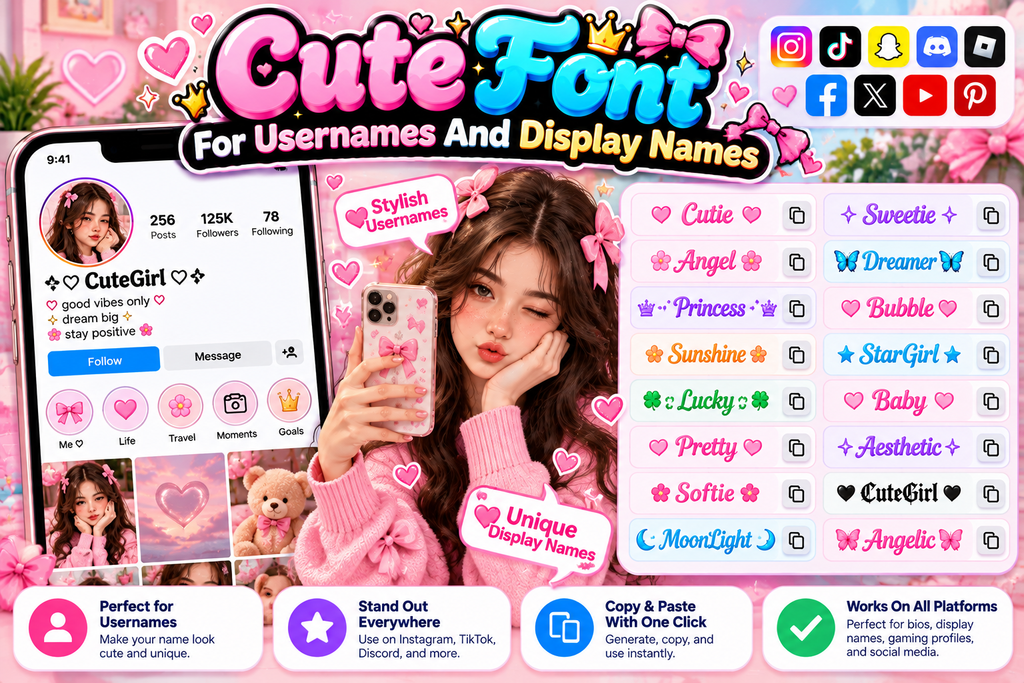
Usernames work best when a cute style adds personality without hiding the name itself. Try readable cute fonts and check the preview before placing decorative text on a social media account or gaming profile page.
For display names, choose compatible characters and modest decorative styles that survive different apps. Test the generated text on the receiving device, because symbols may shift, disappear, or look crowded across platforms and screen sizes.
Also Read: Cursed Text Generator
Boxed Cute Fonts
Boxed cute fonts make a name feel organized without losing its playful character. Choose square frames, thick boxes, or soft frames around short text, keeping each symbol easy to recognize at small screen sizes today.
For profiles and captions, outlined text and symbol decorations can add structure, but test the result before sharing. Use copy-and-paste text in the intended app to check spacing, readability, and character support on each device.
Conclusion
A cute font generator is useful when personality matters more than decoration alone; the best results balance charm, clear reading, and reliable character rendering across profiles, captions, and everyday digital conversations on different devices today.
Before sharing, test a few cute styles in the intended placement, keep a single name or short phrase uncluttered, and check whether decorative symbols remain legible when copied into each receiving application on mobile screens.
What Is A Cute Font Generator?
A cute font generator converts ordinary text into decorative Unicode styles, including bubbly, cursive, hearts, and playful symbols. You can copy the result into supported social profiles, captions, chats, and usernames without installing extra software.
How Do I Use A Cute Font Generator?
Enter or paste text into the generator, browse available designs, choose your favorite style, and select copy. Then paste it into a compatible app and check how the characters display before publishing on your device.
Are Cute Font Generators Free To Use?
Many online cute font generators are free to use and work directly in your browser. Some sites may display advertisements or offer additional features, so review the website before using optional services or sharing information.
Do Cute Fonts Work On Instagram, WhatsApp, And Games?
Cute fonts usually work where an app accepts Unicode text, but support varies by platform, device, and field. A style may appear correctly in a bio yet display differently in messages or games across devices.
Are Cute Unicode Fonts Accessible And Readable?
Some decorative characters can be difficult for screen readers or hard to recognize at small sizes. Choose simple styles for important information, keep names understandable, and use plain text when clarity matters most for readers.


[…] Also Read: Cute Font Generator: Create Adorable Fonts to Copy & Paste for Free […]