


Tattoo Font Generator
Generate custom Old English, Gothic, Script & Tribal tattoo lettering instantly.
A tattoo font generator lets you test tattoo lettering before committing ink, turning names, quotes, or dates into usable concepts. I find this especially valuable for comparing font styles against placement and readability.
Good tattoo previews also expose details that look different on screen, including spacing, lettering size, and overall tattoo design balance. This practical step helps transform an idea into a clearer tattoo concept for an artist.
Table of Contents
Why Choose A Tattoo Font Generator?
A tattoo font generator helps test font choice before ink meets skin, letting you explore tattoo lettering, custom text, and style selection while judging readability without committing to a permanent design or costly revision today.
In practice, I use tattoo visualization to compare lettering styles, body placement, scale, and spacing early. This saves revisions and makes tattoo preparation more deliberate, especially when unusual typography must remain clear across different areas.
How To Use A Tattoo Font Generator?
Start by entering your words, dates, or meaningful phrases, then browse tattoo fonts and choose among font styles that fit your concept. I usually compare cursive, script, Gothic, or minimalist options before judging the lettering.
Next, use tattoo previews for visualizing tattoos across different tattoo placement ideas, adjust the text, and compare styles. Save the strongest design previews, then export high-quality output or high-definition stencil output for artist review later.
Tattoo Font Styles?
Script, brush script, Old English, and blackletter create distinct moods, yet style should follow the tattoo text rather than fashion alone. In practice, I compare readability, visual character, and body placement before recommending ornate lettering.
For compact names or phrases, minimalist, Roman, stencil, and typewriter options can stay controlled. I also test Chicano, handwritten, calligraphy, and traditional styles against size, spacing, and long-term readability before choosing the final tattoo design.
Also Read: Gaming Fonts Generator
Choosing A Font For Different Tattoo Text?
For names and initials, I favor handwriting, script, or cursive because personality matters more than ornament. For dates and coordinates, Roman or typewriter styles preserve structure, while minimalist lettering suits small text on real skin.
Longer long quotes need restraint: clear text, lettering style, and font choice should survive body contours and tattoo aging. For dramatic statements, Gothic or Chicano can add character, while block and stencil styles suit practical text.
Choosing A Font For Different Tattoo Text?
Choosing tattoo text starts with its purpose, not its trend. For names and initials, I favor cursive or handwritten styles; for dates, Roman lettering gives structure, while coordinates often benefit from clean, minimalist forms visually.
For a meaningful phrase, script, calligraphy, or Gothic can shift the mood, yet readability should decide. I test bold lettering against delicate lettering at the body placement, because font choice changes with scale and skin.
Preview Tattoo Lettering On Skin?
A convincing tattoo preview depends on more than centered text. I test skin preview across the forearm, chest, and calf, checking scale, position, curvature, and body contours before treating the result as serious lettering reference.
On-screen placement can expose problems that look minor in isolation. Compare skin tones, adjust lettering preview, and inspect natural contours at realistic tattoo size; this makes tattoo visualization much more practical before committing ink decisions.
Tattoo Lettering, Size, Spacing, And Readability?
Good tattoo lettering depends on controlled lettering size, spacing, and readability rather than decoration alone. In practice, I test line weight alongside body contours, because crowded forms can lose clarity as skin moves, settles, and ages.
Before finalizing tattoo text, compare font choice with tattoo placement and tattoo longevity. A compact phrase may suit smaller areas, while broader layouts need clearer lettering style, sufficient spacing, and a workable stencil for clean application.
Bringing The Design To A Tattoo Artist?
A generated result should begin a conversation, not end it. Bring the generated result as a tattoo reference, while your tattoo artist checks size, spacing, line weight, and placement against real skin, directly with confidence.
In my workflow, a professional review catches issues a screen cannot: readability, stencil behavior, and tattoo-specific requirements. Treat the tattoo design as a working draft, allowing final adjustments before tattoo preparation begins properly today smoothly.
Who Is A Tattoo Font Generator For?
Tattoo fonts suit anyone testing lettering before committing, especially people comparing font styles, tattoo text, and lettering for names or dates. They help users inspect tattoo previews while exploring personal choices with less hesitation.
From my experience reviewing tattoo concepts, beginners gain confidence through instant previews, while experienced clients can compare font variety and placement ideas. The tool is useful for artists discussing design previews before final adjustments together.
Tattoo Fonts And Licensing?
Before approving commercial use, check the licensing attached to individual tattoo fonts. Personal use may be allowed, while commercial applications often require separate permission, especially when artwork becomes merchandise, branding, or paid client work directly.
I always review licensing terms in the font catalog before sending a design onward. Confirm usage rights and any individual font license, because a preview can look finished while legal permission for production remains unresolved.
Tattoo Text In Any Language And Symbol System?
A strong tattoo layout can include non-English lettering when the intended language support is clear, especially across writing systems such as Chinese, Japanese, Arabic, and Cyrillic. I test spacing early so each character stays balanced.
The same approach works for multilingual lettering: Sanskrit may require careful joins, while runes and other symbols demand attention to authentic forms. I verify characters visually before finalizing multilingual tattoos for ink and placement decisions.
From Screen To Skin — Turn Your Text Into A Tattoo Stencil?
Once the lettering looks right on screen, I check the final file at its intended scale, then compare the raster image against a vector format. This design review catches spacing, distortion, and details before printing.
For stencil preparation, I print artwork, test the tattoo stencil, and keep the generated lettering easy to trace. A screenshot documents the approved version, while the tattoo artist can make artist adjustments for professional tattooing.
One Word, Three Tattoo Fonts?
One word can change character dramatically when tested across tattoo font styles. I often compare the same name in cursive, blackletter, and Roman capitals, because spacing and weight reveal which treatment actually fits the skin.
Three options expose differences a single preview can hide. Font selection becomes easier when the word stays identical, letting you judge connected strokes, bold structure, and clear forms before refining the final tattoo for placement.
What Each Lettering Style Actually Suits?
The strongest match depends on purpose, not fashion. Initials tend to suit block or traditional treatment, while dates and coordinates reward restrained script. For short statements, I often compare handwritten, Chicano, and Gothic treatments before.
For expressive wording, calligraphy can add movement without overwhelming meaning. Typewriter works well when clarity feels intentional, while Roman choices give factual content firmer structure; these contrasts become especially useful when judging proportion and rhythm.
Choose Text That Stays Readable As A Tattoo?
Readability starts before font selection: keep tattoo lettering brief, preserve clear text, and leave room between characters. Small lettering, thin strokes, and densely packed lettering can weaken legibility as ink settling changes under actual conditions.
For names or quotes, check the final size and tattoo placement before approving ornate type. Curved body areas can introduce distortion, while long text may compromise tattoo longevity when letterforms are too dense over time consistently.
Find The Right Style For Your Tattoo Text?
Finding the right tattoo style starts with the message, not the trend. Test short phrases, names, and meaningful phrases in several font styles, then compare how lettering size changes their visual character for balance.
I usually judge Old English, minimalist, brush script, and Roman capitals at the intended body area. A strong tattoo preview reveals whether spacing, stroke weight, and natural contours support clear reading before commitment for longevity.
Tattoo Fonts Collection?
A useful font collection should make discovery feel deliberate, not endless. I usually start with style categories, compare font styles, then test tattoo lettering styles against the actual word, checking visual character, font selection, and style switching before deciding.
Good discovery also depends on context: Old English, blackletter, minimalist, graffiti, brush, fine-line, serif, vintage, and handwriting can each change how a phrase feels. Explore lettering styles, compare visual variations, and keep the tattoo concept practical.
Can I Use Tattoo Fonts For Real Tattoos?
Yes, generated lettering can guide a real tattoo, but treat it as a concept rather than finished tattooing artwork. Check tattoo placement, final size, spacing, and readability with your artist before committing to make informed decisions.
From my experience, the safest workflow uses a tattoo reference for discussion, then adapts the design to skin movement, curved placements, and tattoo-specific requirements. The artist should prepare the final stencil after reviewing proportions, alignment, and practical skin behavior.
Is The Tattoo Font Generator Free?
Yes, a browser-based tattoo font generator can offer free access without requiring payment, especially for basic previews. In my experience, no-sign-up access makes testing tattoo fonts faster, letting users explore lettering before committing money upfront.
Free tools may still limit features, but instant previews, rapid variations, and high-quality output can provide enough value for choosing a tattoo style. Check licensing and privacy details before downloading or using generated text commercially.
How Do I Use A Tattoo Font Generator?
Start by entering text using names or quotes, then browse styles and select a lettering style. Preview the result, refine proportions, adjust the curve, outline, and compare lettering variations before saving the draft for your tattoo artist to review carefully.
For practical testing, change the color, background, or experiment with lettering controls, then download or copy the design. I usually check spacing, readability, and tattoo placement before showing the final reference to an artist for feedback.
Can I Customize Tattoo Fonts?
I usually begin by changing font styles, then test the same phrase in unexpected directions. A tattoo font generator lets me compare lettering styles while keeping custom text readable and visually balanced for each placement.
My preferred workflow checks font choice, style variations, and visual variations before considering body contours or tattoo placement. I also involve tattoo artists, because practical judgment improves customized design more than endless tweaking alone.
Which Tattoo Font Lasts The Longest?
In my experience, no single tattoo font guarantees longevity; stronger strokes, adequate spacing, and sensible size generally age better because ink spreading can soften intricate details over time, especially on moving skin during everyday wear.
For lasting lettering, I favor blackletter, Roman capitals, or sturdy serif designs over ultra-thin scripts. Their stronger forms remain clearer as skin movement and natural fading gradually affect tattoo readability through years of ordinary wear.
How Small Can Tattoo Lettering Be?
Small text can remain readable, but tattoo lettering size depends on thin lettering, spacing, and tattoo placement. In practice, I avoid shrinking delicate characters too far because ink and tattoo aging gradually soften fine details.
A lower limit depends on the body area, movement, and design complexity. Short phrases with clear spacing usually survive better than densely packed lettering, especially when choosing for a fine-line tattoo style for long-term readability.
Can I Preview The Tattoo On My Body?
A tattoo preview lets me test lettering before committing, placing the design across a chosen body area to judge scale, position, and natural contours. This practical check often exposes awkward spacing early before ink application.
I also compare skin tone and placement because a realistic tattoo visualization can reveal whether contrast survives actual skin. A flexible design preview helps refine proportions before showing the final concept clearly to an artist.
Does A Tattoo Font Generator Support Different Tattoo Styles?
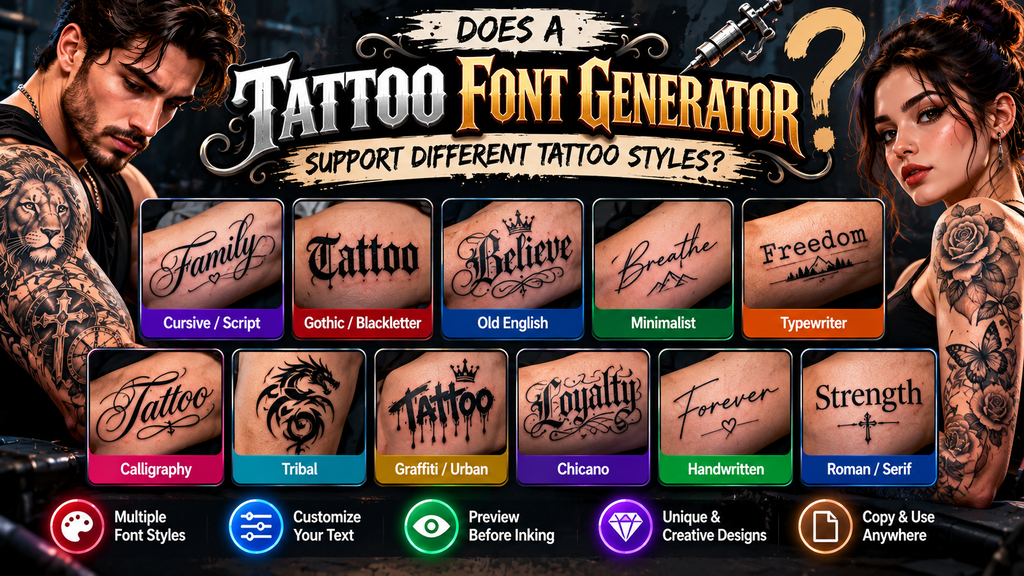
A generator can accommodate tattoo lettering styles beyond one visual mood, letting you test Old English, minimalist, graffiti, brush, and fine-line treatments. In practice, I compare these options against placement, scale, and the personality conveyed.
More advanced tools may include vintage, medieval, decorative, and ornate choices, plus handwriting or brush script. I find this useful because style changes can alter readability, emotional character, and how convincingly lettering follows body contours.
Also Read: Underline Font Generator – Copy & Paste Stylish Underlined Text
Can I Use The Fonts For Commercial Purposes?
Before selling a design, check font licensing rather than assuming generated lettering is unrestricted. commercial use may require permission, especially when using proprietary typefaces or downloadable font files for paid tattoo artwork and merchandise carefully.
For client work, distinguish rendered text from the underlying font. usage rights can permit tattoos while restricting distributing font files. I always review the individual licensing terms and commercial applications before accepting paid projects first.
Can I Use Old English, Gothic, Cursive, Or Script Tattoo Fonts?
Old English and Gothic fonts remain strong choices when a tattoo needs visual weight, history, or shadow. Cursive and script fonts bring movement, especially for names, short phrases, and designs where a personality matters most.
In actual practice, I compare lettering styles by checking stroke density, body placement, and font choice before making choices. A generator makes switching between Old English, dark, ornate, or flowing options easier during design review.
What Does A Tattoo Try-On Feature Do?
A tattoo try-on feature lets you test tattoo lettering before committing, placing a tattoo preview across body placements. A 3D view can show natural contours, helping you judge position and lettering size realistically before deciding.
Using body tones and the upper arm, the tool can preserve proportions while a skin preview reveals placement effects. I find this useful when refining a tattoo concept, especially before an artist reviews the design.
Can AI Generate Custom Tattoo Lettering?
AI can generate custom lettering by combining style variations with controlled font flexibility, then adapting characters to body contours and tattoo placement. In practice, I use these drafts for inspiration, not final stencil decisions carefully.
The advantage is testing personal use ideas through tattoo previews, visualizing tattoos, and comparing styles before choosing lettering style. AI can suggest forms, but readability, line quality, and artist judgment still determine what works on skin.
Conclusion
After testing tools, I find tattoo fonts work best when style selection follows the character of text. Readable text, short phrases, and classic choices preserve clarity, while decorative fonts need design review before becoming permanent.
An AI tattoo font generator can compare visual variations, refine tattoo typography, and create a tattoo preview before an artist works on skin. This workflow balances readability, personal expression, and design decisions without overcomplicating choice.
Can I Use Tattoo Fonts For Real Tattoos?
Yes, generated lettering can guide real tattoos as a concept, but your artist should review placement, size, spacing, readability, and stencil behavior. I recommend treating every preview as a reference before permanent ink is applied.
Is The Tattoo Font Generator Free?
Many browser-based tattoo font generators offer free previews, allowing users to test lettering styles without payment. Features vary, so check access limits, export options, licensing terms, privacy details, and whether commercial use requires additional permissions.
How Do I Use A Tattoo Font Generator?
Enter your tattoo text, browse font styles, preview lettering, and compare variations. Adjust size, spacing, curve, or placement, then save the strongest concept. I always inspect readability and body contours before artist review carefully properly.
Can I Customize Tattoo Fonts?
Yes, customization can include font choice, lettering size, spacing, curves, and visual variations. I prefer testing custom text across styles, then selecting a version that remains balanced, readable, and suitable for tattoo placement confidently alone.
What Is The Difference Between PNG And SVG?
PNG stores tattoo lettering as a raster image, while SVG preserves vector paths for cleaner scaling. PNG works for sharing previews; SVG is better for resizing, editing, and preparing stencil references without losing sharp edges.


