


Underline Font Generator
Transform your normal text into cool underline, strikethrough, and decorative Unicode font styles.
An underline font generator transforms ordinary text into underlined-looking text through text formatting using Unicode text, allowing you to copy results into captions, bios, usernames, and messages without installing actual font files or changing settings.
In practice, results depend on character support, font rendering, and the destination app; test generated output on different screens before publishing, because certain combining marks may alter spacing or reduce readability for some online audiences.
Table of Contents
What Is An Underline Font Generator?
An underline font generator transforms ordinary typing into Unicode-styled text, adding an underline effect without requiring a separate downloadable font. You enter words, preview the result, then copy and paste it into compatible platforms easily.
Unlike a downloadable font, it usually styles the characters you copy rather than changing the typeface installed on your device; results depend on Unicode characters, app support, and screen rendering in practice across different platforms.
How Does Underline Text Generation Work?
An underline generator usually preserves the base text and attaches Unicode combining marks to relevant characters, creating underline effects without replacing the original letters or requiring a separate font file for everyday online copy-and-paste use.
Different marks can simulate single underline, double underline, wavy underline, or dotted underline; results depend on Unicode support and character rendering, so inspect the preview before sharing text across apps or devices when published publicly.
How To Use An Underline Font Generator
Start by entering your wording into the generator, then review the generated preview before choosing an underline style. Check whether the line suits your username, caption, or other intended text field before sharing it publicly.
When the result looks clear, use the copy button and paste it into the destination application. Check spacing and character appearance on your device, because some platforms display Unicode underline effects differently before sharing online.
Types Of Underline Text Styles
Choosing an underline style depends on the message, not merely appearance. A single line suits clear emphasis, while double line styling can make short labels more noticeable without changing the underlying words or meaning itself.
For playful profiles, a wavy line or dotted line adds personality, but test each decorative underline on the target platform first. Keep letter clarity and visual contrast strong, especially in compact layouts with limited space.
Also Read: Barbie Font Generator: Create Cute Pink Text Styles Free
Benefits And Main Features
An effective underline font generator adds visual emphasis without requiring image editing. Choose underline styles for short phrases, profile text, or captions, then compare the result before copying it into your final app for sharing.
Convenient free access and a browser-based tool help people create styled text on desktop or mobile. A quick preview supports style selection, while simple copying keeps the workflow practical for everyday digital communication across platforms.
Where Can You Use Underlined Text?
In practice, underlined text suits social media profiles, bios, and usernames when a subtle visual cue helps names stand out. It can also highlight key details in online posts without changing the message’s overall meaning.
Use messages and comments to draw attention to a phrase, or style gaming identities and status updates for recognition. Video descriptions, text fields, and promotional content benefit when formatting displays correctly across platforms and devices.
Unicode Underline Vs. HTML Underline
Unicode underlining embeds line effects into characters, so plain text may preserve its appearance in social media fields. By contrast, HTML formatting uses HTML tags to apply a native underline within supported webpages when rendered.
Formatted text depends on supported environments and character rendering, whereas text portability differs across apps. For reliable results, test each output: web pages handle HTML easily, but copied Unicode may vary between interfaces and devices.
Popular Underline Style Recommendations
For everyday profiles, start with standard underline when clarity matters, then try wavy underline or dotted underline for a lighter accent. Preview each option before copying it into your intended platform on phones and computers.
Use double underline for short labels, while cross-stitch underline and other decorative line effects suit playful usernames. For longer captions, prioritize readable text, test underline variations, and avoid styles that obscure letters or spaces on-screen.
Examples Of Underlined Text
Examples of underlined text work best when the text purpose is clear: carefully highlight promotional phrases, distinguish usernames, or draw attention to wording that matters in social media bios, captions, online messages, and public comments.
Try specialized underline styles sparingly in profile fields or status updates; excessive decoration can reduce text clarity. Check platform compatibility, then copy the result and compare its text appearance across devices before posting anywhere online.
What Is An Underline Text Generator?
An underline text generator is a browser utility for text transformation: enter user input, and the styling tool rearranges character sequences into decorative text using the Unicode standard, creating results you can copy anywhere easily.
Installable fonts are unnecessary: a generator uses copy-and-paste text and font styling to distinguish social media captions, while cross-platform use depends on text compatibility because apps can render characters differently across devices and operating systems.
How Does An Underline Text Generator Work?
An underline text generator starts with text input, then applies text processing to each character. Depending on its method, it may use Unicode code points or underline combining characters to create a visible line effect.
The result can vary because glyph rendering, character encoding, and device compatibility affect how base characters appear. Check word spacing and single underline continuity before copying the styled text to another destination platform or app.
How Do You Generate Underlined Text?
Start by typing a phrase into the generator, then choose a suitable method for adding an underline. Character encoding determines how characters are represented, so inspect the result before copying it elsewhere on another platform.
A reliable workflow is to preview several styles, copy the finished text, and test it where you plan to post. Combining characters may render differently across apps, so verify spacing and readability on each device.
Where Can You Use Underlined Text?
Underlined text can distinguish profile names and short messages on Instagram, TikTok, Facebook, LinkedIn, or X, especially when formatting controls are unavailable; check each platform’s rendering before publishing so emphasis remains clear in online content.
Creators also add underlines to YouTube video descriptions, Reddit posts, Telegram chats, WhatsApp updates, and Discord communities; gaming identities benefit too, although text fields may handle decorative characters differently, so preview your copied text first.
Can You Use Underlined Text On Instagram And TikTok?
Yes, you can paste underlined Unicode into Instagram and TikTok bios or captions, but social media bios may display differently across devices because character compatibility varies, and some viewers may see unexpected marks or spacing.
Treat underlining as copyable text, not a built-in font setting; generate the style, paste it into a bio or caption, then preview it on mobile; keep usernames plain and prioritize text styling that remains readable.
Does Underlined Text Work On Discord?
Discord supports native underlining in messages: place two underscores before and after the words. This Markdown option is usually clearer than relying on special output copied from a generator for important channel announcements and updates.
Generated Unicode underlines can still work as decorative styling, but character rendering varies by app and device. Check platform compatibility in a test message first, especially before using styled names for moderation or urgent instructions.
Can You Use Underlined Text On WhatsApp?
WhatsApp does not offer a universal native underline button, but you can create underlined text with Unicode characters and paste it into chats. Check device compatibility because text characters may render differently on different phones.
For important messages, keep wording readable and test the result before sending; some digital platforms display decorative marks inconsistently. If a line looks broken, use standard text instead of relying on styling alone for clarity.
Is The Underline Generator Free?
Yes, many underline generators offer free access through a browser-based tool, letting you create styled text without paying or installing software. Check the website’s terms for any restrictions, premium features, or registration requirements before starting.
In practice, a trustworthy free online tool should provide immediate results and clear copy-and-paste functionality without hidden charges. Review advertisements and privacy considerations, and confirm whether every underline style remains free for ordinary use first.
Is Underlined Text A Real Downloadable Font?
An underline effect is usually not a real downloadable font; many generators transform letters using Unicode styles or combining symbols, so the result travels as text formatting rather than an installed typeface on your device.
Because no font file is necessarily downloaded, the styled result can appear wherever character support exists, although cross-device rendering may vary; save the text itself, not assume a typeface was installed through a desktop app.
Will Underlined Text Look Identical On Every Device?
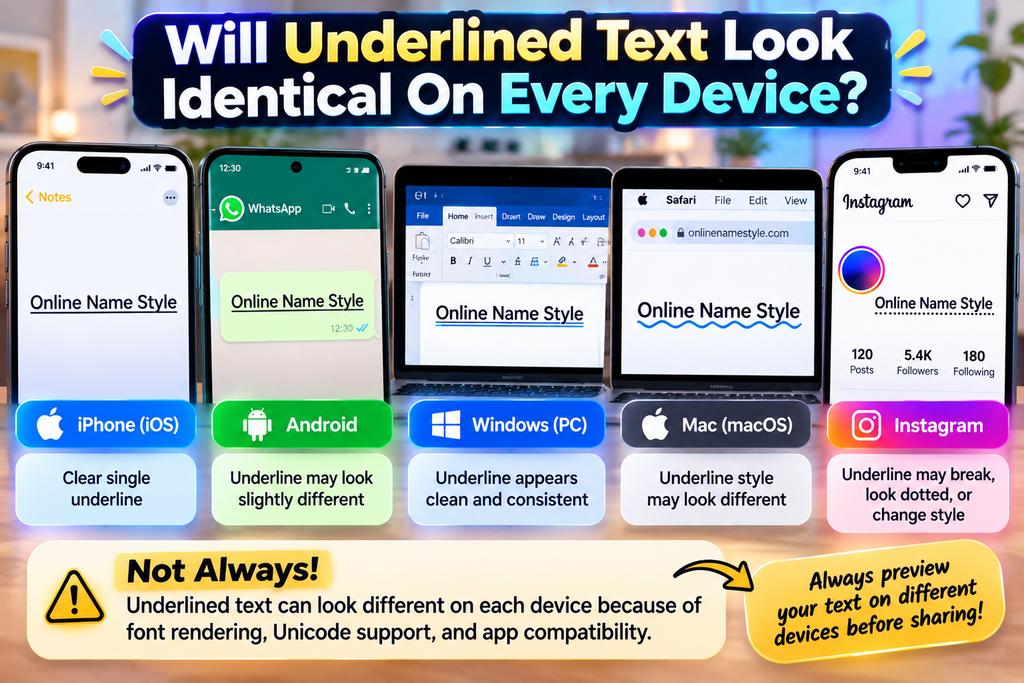
Not always: cross-platform compatibility depends on how each app handles Unicode, fonts, and text rendering. An underline created with decorative characters may shift, break, or appear differently across browsers, messaging apps, and modern operating systems.
For reliable results, compare the underline appearance in the destination platform before publishing. Social media text fields may interpret decorative formatting differently; test phrases on each device, especially when display differences affect legibility or accessibility.
Also Read: Sports Font Generator & Text Effects
Why Does An Underline Stop Between Words?
An underline may stop at spaces between words because many generators attach marks to letters, while blank spaces receive none. The result reflects Unicode behavior rather than one continuous line drawn beneath the entire phrase.
Check the preview before copying: some tools apply line effects character by character, so punctuation or blank spaces may interrupt the result. For an unbroken rule, use HTML underline formatting where the destination supports it.
Which Unicode Characters Create Different Underline Styles?
Unicode underlines often use combining marks, not a separate typeface. A generator may combine letters with decorative symbols or character combinations to produce single, double, or low-line effects in compatible apps and browsers across platforms.
The choices depend on the generator; Unicode support may include combining low line, double low line, or macron-below characters. Test copied output because font and app rendering can shift around punctuation and spaces between words.
Do Underlined Characters Count Toward Text Limits Differently?
Underlined Unicode usually counts according to pasted characters, not the visible line beneath them. In plain text fields, character-level styling may increase the count within social media text, so check platform counters before publishing content.
Because cross-platform rendering varies, compare the underlying text with text output before sharing. Services may count combining marks toward usage limits, so test text portability across target apps before posting publicly to avoid truncation.
Conclusion
An underline font generator is most useful when text appearance needs emphasis without changing the message. Test multiple underline styles in real profiles first, because social media apps may render decorative characters differently across devices.
For dependable results, consider text portability, readable spacing, and how formatted text behaves when copied. Check the final output in its destination before publishing; a simple preview helps avoid confusing decoration with actual formatting rules.
What Is An Underline Font Generator?
An underline font generator is a free online tool that transforms ordinary text into underlined text styles. You can copy the generated result and use it in social media bios, captions, usernames, and messages.
Is The Underline Font Generator Free To Use?
Yes, an underline font generator can be used for free without installing software. Simply enter your text, select an available underline style, and copy the result for use on your preferred platform.
Can I Use Underlined Text On Instagram And WhatsApp?
Yes, you can copy and paste underlined text into supported Instagram bios, captions, and WhatsApp messages or profile fields. However, the appearance and compatibility may vary depending on the application and device.
Is Underlined Text A Real Downloadable Font?
No, most underline text generators do not create downloadable font files. They typically use Unicode characters or combining marks to produce an underlined appearance that can be copied and pasted into compatible applications.
Will Underlined Text Look The Same On Every Device?
Not always. Underlined text may appear differently on Android, iOS, desktop browsers, and different applications. Always preview your generated text on the destination platform to check its readability, spacing, and overall appearance.


[…] Also Read: Underline Font Generator – Copy & Paste Stylish Underlined Text […]