


Twitter Font & Bio Generator
Create eye-catching tweets, thread headers, and display names with custom unicode fonts.
Twitter/X font generator changes ordinary text into styled Unicode without installing software. I use it when a profile needs stronger visual identity: enter text, preview variants, then copy the selected result directly into your post.
The useful distinction is that these are Unicode characters, not downloadable fonts. That matters for searchability, accessibility, and device compatibility. In practice, restrained styling works best, especially for bios, display names, headlines, and short posts.
Table of Contents
How To Use The Twitter Font Generator ?
Start by entering your text into the Twitter font generator, then review the style options before choosing a suitable font. I recommend checking the preview, especially when preparing tweets, bios, or display names.
After selecting a style, copy the generated text and paste it into the relevant X field. Because these designs rely on Unicode, test the final appearance across devices before publishing styled text or decorative formatting publicly.
How Do You Get Different Fonts On Twitter (X)?
Different fonts on X come from Unicode rather than fonts: enter text into a Twitter font generator, generate several font styles, then select style and copy the result into a tweet, bio, or display-name field.
My usual approach is to test styles before posting: preview the output, compare readability, use spacing controls when needed, and keep decorative choices selective so important text remains clear across devices on X in practice.
Where Can You Use Twitter/X Fonts?
Twitter/X fonts use Unicode styling rather than actual fonts or installed fonts. For profile, tweet, or bio, bold, italic, small caps, and script create visually different through converted letters, while platform retains interface font.
I use these copy-and-paste styles across bios, tweets, and display names, then test the pasted result on platform. They are Unicode equivalents, not font files or downloadable fonts, so effect travels with characters.
Also Read: Manga Font Generator – 1000+ Anime, Japanese & Comic Text Styles to Copy and Paste
Twitter/X Character Limits And Styled Text ?
Styled text does not create extra room inside an X post. The 280-character ceiling still applies, while Unicode styling can change how individual symbols are represented and counted, making character limits less intuitive in practice.
In my testing, decorative choices usually affect presentation rather than capacity. Weighted character counting means visually compact styled-Unicode text may still consume the same character capacity, so check text length before posting online in advance.
Can You Use Fancy Fonts In Your Twitter/X Username Or Display Name?
A fancy font can add personality to an X/Twitter username, but the @handle remains the account’s identifier. In practice, character restrictions mean decorative Unicode is better suited to the display name instead for naming purposes.
A Twitter display name supports styled text, so Unicode generated through a font tool can be pasted there. I usually suggest checking the display-name field after pasting, because some characters may render differently across devices.
Twitter Font Styles / Examples ?
A practical set of Twitter font examples can turn a simple headline into a recognizable tweet, display name, or profile element. I regularly compare bold, italic, monospace, and script treatments before choosing an appropriate style.
For example, decorative text works well when the goal is visual distinction, while concise styling can clarify specific use cases. Testing several variants helps determine which examples preserve readability while giving the message a distinct appearance.
Best Practices For Using Twitter Fonts ?
Good best practices make styling tweets intentional: use emphasis lightly, protect readability, and avoid excessive decoration. For personal accounts, suitable font choices should support tone without distracting from the message or reducing clarity across posts.
For business accounts, favor brand consistency and plain text for important keywords and hashtags. Check screen-reader accessibility, avoid problematic styles like Zalgo, and use limited styles when adding visual personality where possible in feeds.
Twitter Font Searchability / SEO ?
Twitter fonts can influence search behavior because Unicode-styled letters may not match plain letters consistently. For discoverability, I keep critical keywords readable, especially in hashtags, where searchable text matters more than decorative styling and formatting.
In practice, search results can vary with unusual characters, so I reserve Unicode styling for visual identity rather than core terminology. Keeping plain text available supports predictable search behavior and stronger discoverability across X profiles.
Twitter Fonts And Accessibility ?
Accessibility starts with whether meaning survives styling. screen-reader accessibility can weaken when uncommon characters replace familiar letters, because some software may render glyphs incorrectly, making names, messages, and links harder to interpret consistently for everyone.
I test plain text against styled text, then check display on devices. Keeping hashtags readable and avoiding problematic characters preserves context when Unicode output behaves differently across major platforms or assistive tools reliably in practice.
Is The Twitter Font Generator Safe?
From experience, a Twitter font generator should explain security, privacy, and how submitted text is handled. A browser tool using client-side processing can reduce exposure because data stays local during text processing without tracking or storage.
Safety depends on the site itself: avoid generators requesting account credentials, downloads, or unrelated permissions. For local processing, inspect the page, use reputable tools, and never enter sensitive information merely to create styled text.
Get Likes And Retweets With The Twitter (X) Font Generator ?
A strong visual hook can help a post earn attention, but a font generator alone cannot create engagement. On X, readability, relevance, timing, and authentic interaction still shape whether people like or retweet content naturally.
I’ve found that using generated styles selectively can make a tweet stand out without turning the message into decoration. Pair visual identity with clear ideas, then invite responses through specific questions or timely updates.
How To Choose The Right Twitter (X) Font From The Twitter (X) Text Generator ?
Choosing a font is less about novelty than context. I usually start by checking the X preview, then compare style cards, generated text, and style selection until the lettering supports the intended post mood carefully.
For profile work, test the display-name field alongside bio placement, while posts deserve a quick character count check. Prefer text-size preview adjustments when readability changes across devices, especially before committing to ornate formatting choices online.
Why Twitter Fonts Exist?
Twitter fonts exist because visual identity matters in fast feeds. styling gives ordinary text more personality, while Unicode-styled letters can distinguish profiles, posts, and names without installing font files or changing Twitter’s native typeface today.
From my experience, users adopt fancy text to create emphasis, recognition, or mood. These generated styles expand expression through decorative Unicode, letting creators vary appearance while keeping content portable across supported text fields easily.
The Real Cost Of Styled Text: Character Limits Explained ?
Styled text does not necessarily consume more character slots, but X applies weighted character counting in ways users often overlook. A tweet limit still matters, while decorative Unicode may behave differently depending on character structure, links, or formatting.
In practice, I check character count before publishing, especially with small caps, fullwidth characters, and complex symbols. Some character costs feel invisible during drafting, yet they can reduce usable space and make a carefully edited post exceed capacity unexpectedly.
Twitter Font Examples ?
Twitter font styles become more useful when examples show purpose, not novelty. Feed Stopper, Bio Caps, Quote Tweet Serif, and Hot Take Bold can separate announcements, profiles, quotations, and emphatic posts.
In practice, I test bold italic, monospace, fullwidth, script, and small caps against the message first. Thread Marker suits structured updates, while Retweet Highlight or Reply Guy Mono can sharpen context.
Common Twitter Font Mistakes ?
Common Twitter font mistakes often begin when creators treat fancy fonts as ordinary text, overlooking readability. Excessive decoration, elaborate Unicode styling, or problematic Zalgo may weaken discoverability, confuse readers, and make important keywords harder to scan.
In practice, I see users prioritize visual personality over brand consistency, combining styles across a personal account or business account. A better approach uses complementary styles sparingly, preserves tone, and keeps the entire tweet clear.
Preview Twitter Fonts ?
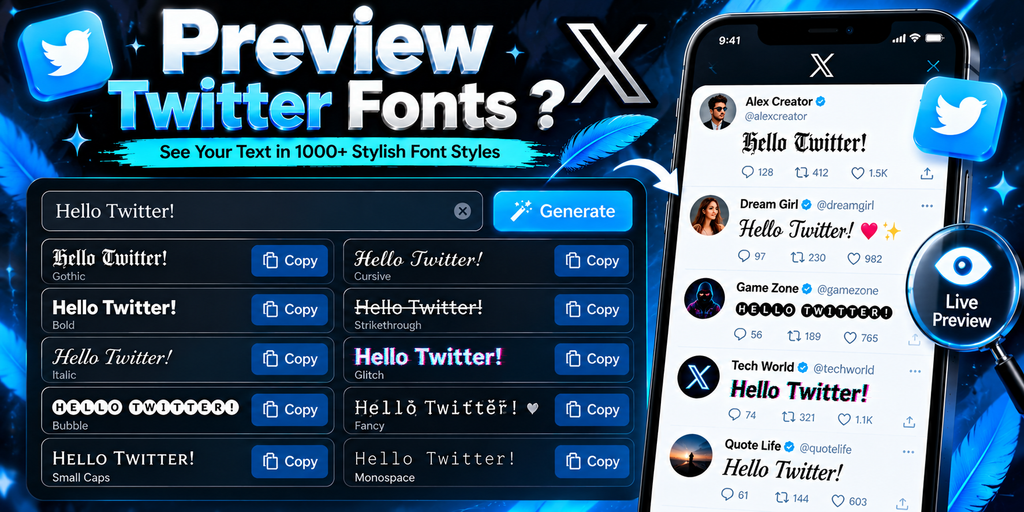
Previewing generated result before posting is more useful than choosing a style by instinct. I check each selected style in the preview functionality area, especially when symbols, emoji, spacing, and emphasis change the visual balance.
On X, I also test tweet text with bold characters or italic characters because rendering can vary across a device. A clean preview exposes awkward breaks, unsupported glyphs, and distracting density before publication for readers.
Also Read: Big text generator
How Does The Twitter Font Generator Work?
A generator takes your text, maps letters into Unicode-styled letters, and previews each result instantly. From my testing, the browser performs these transformations locally, so the generated text can be copied without installing a font.
The trick is understanding these are not real fonts. The text generator substitutes supported characters, while formatting tools help pick a style, inspect visual preview, then paste results into a tweet, bio, or profile field.
How Do I Make Text Bold Or Italic On X/Twitter ?
On X/Twitter, you usually create bold or italic text by converting ordinary letters into Unicode styles, then copying the result into a post, bio, or display-name field. The platform does not provide traditional font controls.
A practical approach is to enter text, select a bold italic or bold sans style, generate it, and paste transformed characters where supported. I test variants first because unusual decorative Unicode can affect readability or display.
Is This Twitter Font Generator Free To Use ?
Yes, Twitter fonts are available through free generators that let you enter text, pick a style, and paste generated text into X without installing downloadable fonts or paying a subscription for basic formatting needs online.
From my testing, free tools usually handle decorative text and unusual characters smoothly, but quality varies. Check privacy, character count, and compatibility before using generated text across profiles, social media, websites, or blogs carefully today.
Can I Put These Fonts In My Twitter Display Name ?
Yes, you can usually add Unicode-styled text to the display name field, provided X accepts those characters. In practice, I find restrained styling works better than heavily decorative combinations, especially for recognition and clarity today.
Your username remains a separate identifier, while the display-name field can present generated text with greater flexibility. Before saving, check the supported result on your device, because some Unicode styles may render inconsistently across screens.
Are These Twitter Fonts Searchable ?
Twitter fonts can be searchable, but their decorated forms may weaken search matching when readers type standard text. In practice, I recommend ordinary letters for key terms, while using Unicode styles selectively in profiles there.
From an SEO perspective, decorative Unicode can reduce search visibility because systems may treat stylized characters differently. Indexing varies by platform, so keep important names readable and let styling support, rather than replace, searchable wording.
Will These Twitter Fonts Work On All Devices ?
In practice, Unicode support matters more than the generator itself. Generated styles use encoded characters, so a phone, browser, or older operating system may display each glyph differently, especially when its character set is incomplete.
I have found unsupported character handling is the real test: some devices render fancy letters cleanly, while others replace them with boxes or question marks. Testing finished text across phones and desktop browsers catches surprises.
Can I Use These Fonts Outside Twitter/X ?
Yes, you can use many generated styles beyond X, especially across chats, captions, comments, and digital designs. Because the output uses Unicode characters, you can copy styled text into numerous apps without installing anything extra.
In practice, I test a style in a bio, status updates, or TikTok caption before publishing. Compatibility still varies: modern devices usually render Unicode well, while older devices may display unfamiliar Unicode characters differently sometimes.
Is Using A Twitter Font Generator Safe ?
A trustworthy generator should prioritize client-side security and local processing, because your submitted text should not need unnecessary transfer. In practice, I avoid tools that request accounts, permissions, or unrelated personal details, prioritizing safety.
I also check storage, data handling, and privacy protection before recommending any tool or generator. Privacy matters most when text contains sensitive material; safe practice means minimizing collection, clearly explaining retention, and avoiding permanent records.
What Font Does Twitter/X Use ?
Twitter originally introduced Chirp as its native typeface, giving the interface a distinct voice. However, current X brand guidelines specify Helvetica Neue for official typography, so product history and brand guidance can still differ today.
That distinction matters when using a generator: Twitter fonts are usually Unicode characters, not the platform’s actual typeface. In practice, I treat generated styling as copyable text layered over X’s regular interface and underlying font.
How Do I Add Extra Blank Lines To An X Post ?
In my testing, extra blank lines work best when you use spacing controls inside the post input, then paste the result carefully. The interactive preview helps verify breaks before publishing without disrupting your message layout.
I also check the character count because blank lines consume capacity within the tweet limit. Using simple formatting tools and the generator interface keeps styled posts readable and controlled, preventing accidental spacing before publishing online.
Are Twitter Fonts Real Downloadable Fonts ?
Twitter fonts are not typically downloadable font files. Most generators create Unicode-based characters that resemble font styles, letting you copy generated text into a supported field on X with no local installation or software package.
In practice, I treat these designs as text transformations, not fonts stored on your device. A Unicode styling result can travel through digital platforms, but compatibility varies, and copy-and-paste behavior depends on each service consistently.
Conclusion
A reliable generator makes font choices practical: test styles, protect readability, and keep your message recognizable across X. In my experience, restraint works better than decorative overload, especially when brand identity and audience attention matter most.
Think of styled text as a formatting layer, not a replacement for clear writing. Check privacy, safety, and device compatibility before you paste generated characters, then use visual personality selectively where it genuinely supports communication.
Can I Use A Twitter Font Generator For My X Bio?
Yes. You can copy and paste Unicode-styled text into many X profile areas, including your bio. However, some characters may display differently depending on the device, browser, or operating system.
Are Twitter Font Generator Styles Real Fonts?
No. Most Twitter font generators create Unicode characters rather than downloadable font files. These characters are pasted as text, allowing certain stylistic effects to appear without installing a new typeface on your device.
Will Fancy Fonts Work On Every Device?
Not always. Unicode characters depend on device and software support. Most common styles display correctly, but unusual symbols can appear as boxes, question marks, or other unexpected characters on unsupported systems.
Do Fancy Fonts Affect X Character Limits?
Styled Unicode characters can affect character counting because some visual symbols may be represented by multiple code points. It is best to check X’s character counter after pasting your finished text.
Can I Use Twitter Font Generator Text Outside X?
Yes. Generated Unicode text can usually be copied into Instagram, Facebook, Discord, messaging apps, comments, and other platforms. Display quality can vary because each platform handles Unicode characters and unsupported symbols differently.


