
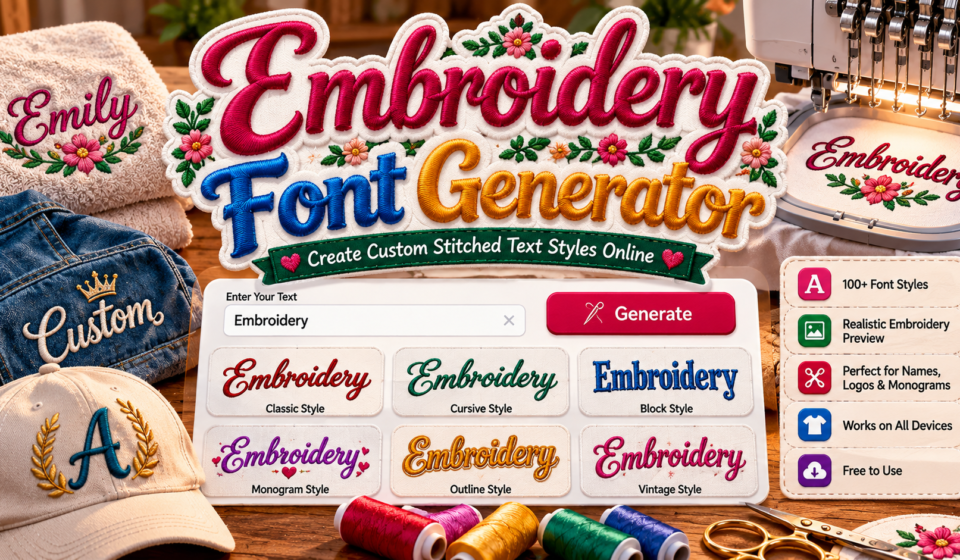

Embroidery Font Generator
Transform plain text into stitched, monogram, cross-stitch, and needlework font styles!
A stitched lettering preview can look polished on screen, yet embroidered appearance alone does not guarantee sewability. Treat stitch-inspired typography as a concept preview before choosing a production method for your fabric and equipment setup.
With machine embroidery lettering, start by testing short names, initials, or labels; use copyable Unicode text for digital mockups and downloadable images when a visual sample matters more than editable stitch data before digitizing begins.
Table of Contents
What Is An Embroidery Font Generator?
An embroidery font generator creates text previews that suggest a stitched appearance for names, initials, or short messages. It helps compare lettering styles before committing time to embroidery preparation or production on fabric or garments.
Unlike a machine-ready design, this tool may provide decorative text, copyable text, or a downloadable graphic; actual stitching generally requires separate digitization, a compatible stitch file, and planning for machine embroidery on the intended fabric.
How To Use An Embroidery Font Generator
Begin by enter desired text—a name, phrase, or initials—then browse embroidery-inspired styles before you choose font. Check each preview result carefully, because decorative appearance on screen may differ from stitched lettering on fabric.
Next, adjust settings such as font size and letter spacing, then review design at its intended scale. For physical stitching, confirm machine compatibility, verify file, and follow stitch instructions; an image preview alone is not stitch-ready.
Features Of An Embroidery Font Generator
Useful generators prioritize font selection, digital preview, and readability, letting makers compare decorative lettering before committing to thread. These previews clarify stitch appearance, though a screen mockup cannot guarantee results on fabric during actual production.
Look for customizable text, design previews, and copyable text, plus image output for sharing concepts with clients. Before stitching, test letter shapes and stitch quality against the chosen fabric and thread with a sample run.
Also Read: Manga Font Generator – 1000+ Anime, Japanese & Comic Text Styles to Copy and Paste
Embroidery Font Styles And Design Options
Design choice is not merely decorative: Patchwork Stitchlings can suggest a textured, playful finish, while Starry Stitch gives lettering a more celebratory feel for names, patches, keepsakes, and themed handmade projects to suit individual tastes.
Review font samples at the final lettering size, then use a lettering preview for spacing and balance; visual comparison helps reveal which design remains clear on the chosen fabric before stitches begin during sample testing.
Benefits Of Using An Embroidery Font Generator
Compare font previews early to judge font readability and letter separation before stitching; this check reveals weak letter details on screen, reducing avoidable thread, fabric, and time waste during real sewing for client projects overall.
Test letter shapes, review fabric-specific font selection, and check spacing control against the material; these small decisions help names stay clear on caps, gifts, uniforms, and compact logos without unnecessary redesign after the first stitch.
Where To Use Embroidery Fonts
Embroidery fonts suit custom gifts such as towels, keepsake bags, and baby blankets, where names make ordinary items personal. Use initials on robes, handkerchiefs, or cushion covers for a thoughtful, polished finish that feels personal.
On clothing, denim jackets and cotton shirts can carry names, club marks or motifs; reserve ornate fonts for stable fabric, and run test stitches before stitching to protect the garment from puckering or unwanted distortion.
Free Embroidery Fonts And Font Resources
In practice, free font resources help makers compare options before committing to a design; decorative lettering alone rarely guarantees stitch quality. Review font preparation, file purpose, and intended formats before selecting artwork for production today.
A useful shortlist records downloadable resources, typography discovery, and font selection alongside each file’s license; machine embroidery suitability matters more than a decorative preview when the final result must stitch cleanly on fabric without surprises.
Embroidery Font Compatibility And Output Formats
Reliable cross-format compatibility means checking whether a generator creates visual previews or usable stitch data. Machine embroidery files carry machine-readable instructions; PNG and JPG images show appearance, not needle movement in a machine’s stitch path.
For graphics, match canvas dimensions and resolution to the intended display, then inspect an embroidery-inspired graphic at actual size. Image previews help assess style, but digitizing checks confirm practical machine results at scale before production.
Embroidery Font Quality And Readability
Readability depends on more than attractive lettering: font quality must suit the fabric type, thread size, and stitch scale. Preview small text carefully, because narrow gaps may close when stitched on real material during testing.
At preview stage, prioritize clean lettering over ornament; bold block styles often remain distinct on textured garments, while delicate scripts need wider spacing, simplified curves, and a sample sew-out before production for dependable results overall.
Is An Embroidery Font Generator Free?
Browser-based access may cost nothing for previews, but free access does not guarantee commercial use. Check font licensing carefully: paid font collections or tools may charge for advanced controls, exports, or production rights before purchase.
Some free tools provide online typography features and a real-time preview, yet font-file generation is a separate capability. Check whether TTF files or OTF files are included; decorative output alone cannot automatically create stitch instructions.
Top AI Tools For Custom Embroidery Font Creation
Free AI tools such as EmbroidAI digitize artwork, while SewFlow creates prompt-based concepts through AI image generation. Use prompt engineering and style selection to explore embroidery lettering and evaluate custom font resources before stitching samples.
Inspect the font preview, compare output quality and visual consistency, then refine custom text. A downloadable image is only artwork; use embroidery digitization software to generate stitch paths and test sew before production on fabric.
Installing Fonts In Embrilliance Software
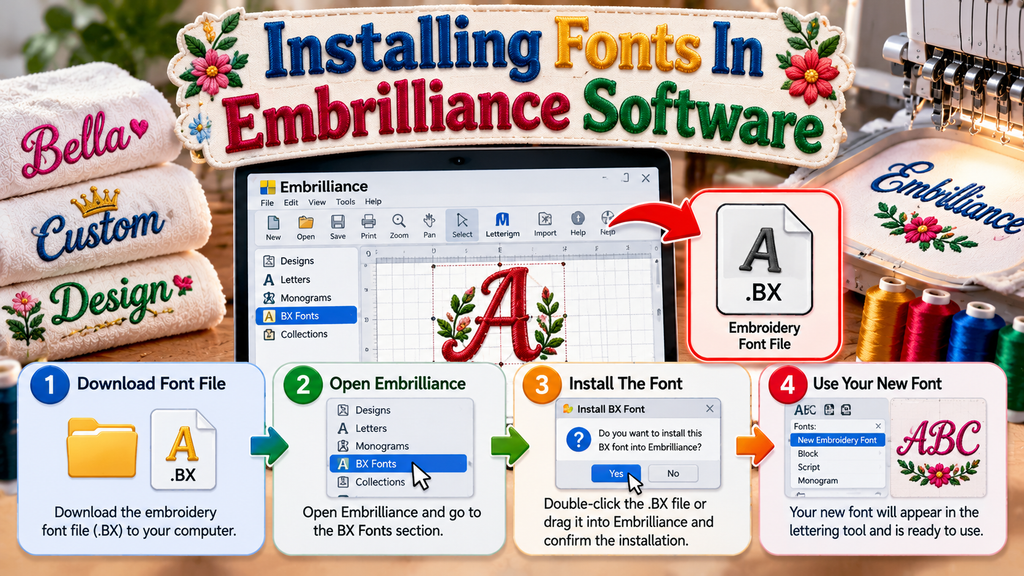
Embrilliance accepts embroidery lettering in BX format; double-click the font installation file or drag the .BX file onto the open design page, then approve the confirmation prompt to add the alphabet to the lettering tool.
A typeface is not automatically stitch-ready: look for a .BX alphabet, not simply TTF or OTF files. Use production testing on scrap fabric to check spacing, size, and stitch quality before sewing your final project.
Also Read:Cursed Text Generator
Embroidery Font Previews
Useful visual previews show how an embroidery design may appear before stitching, but screen images cannot guarantee results. Carefully check lettering size, design dimensions, and spacing before choosing a style for the intended fabric type.
Treat previews as planning aids: thread selection, stitch density, and fabric characteristics affect the result. Zoom in to spot crowded lettering or distorted characters, then test a small sample beforehand to confirm clean lettering.
Exporting Customized Embroidery Graphics
Before exporting, inspect the canvas controls and text customization at actual display size; balanced font sizes, clear spacing, and a transparent background help customized lettering remain flexible across layouts and embroidery presentations and print previews.
Choose PNG export for crisp overlays or JPG export for compact previews, then verify background colors, text colors, and visual effects on the intended surface before sharing the final download graphic with collaborators or clients.
Browsing And Downloading Embroidery Fonts
When browsing, compare machine embroidery fonts against project requirements before downloading. Check font suitability for lettering size, fabric, and machine workflow; a screen preview does not guarantee clean stitching, so inspect licensing and file details.
Explore free font collections alongside paid catalogs, but check permitted usage before adopting designs for client work. Download only from trusted sources, save license information, and verify the file type works directly with your machine.
Unicode Text, Copying, And Platform Limitations
Unicode characters may imitate embroidered lettering, yet text copying creates no stitch instructions; decorative text should be checked in design applications for symbol support across devices and apps before sharing a finished name with others.
Some text characters render differently across browsers, editors, and profiles; PNG export and JPG export preserve appearance, while font files and machine embroidery formats need testing across platforms for consistent output formats in production workflows.
Conclusion
An embroidery font generator is most useful when it helps translate custom stitched text from an early idea into a practical design workflow. Previewing lettering can clarify style, spacing, and intended use before production begins.
Still, previews cannot guarantee actual stitching will remain clear on every fabric; thread, scale, and machine settings matter. Check font licensing, test sample, and confirm the machine-ready file suits your equipment before final production begins.
What Is An Embroidery Font Generator?
An embroidery font generator is an online tool that previews lettering styles for craft projects. It helps you explore text appearance before digitizing designs, but may not create machine-ready stitch files automatically for your equipment.
How Do You Use An Embroidery Font Generator?
Enter your name, initials, or phrase, then choose a lettering style and adjust size, spacing, and colors. Preview the result, then export an image or continue in compatible embroidery software for further digitizing and stitching.
Is An Embroidery Font Generator Free To Use?
Many online generators offer free previews and basic styling, while advanced exports, premium fonts, or digitizing services may cost extra. Review licensing and feature limits before using designs commercially or for customer orders and gifts.
Does An Embroidery Font Generator Create Machine-Ready Files?
A decorative preview is often an image or Unicode text, not an embroidery stitch file. Machine stitching usually requires digitization software and an appropriate format supported by the intended machine model for successful production runs.
Can I Use Embroidery Font Designs In Canva Or Photoshop?
You can use exported preview images in design platforms such as Canva or Photoshop for mockups, labels, and promotional graphics. However, image placement does not convert artwork into machine-readable embroidery instructions for your stitching machine.


