


Facebook Font Generator
Type your normal text below to instantly convert it into stylish, cool Unicode fonts for Facebook posts, comments, bios, and Messenger.
A Facebook Font Generator is an online tool that transforms ordinary text into decorative text with alternative Unicode characters, creating visual styles for profile names, captions, posts, and bios that simplify copy-paste through a browser.
In my experience, a Facebook font changer feels practical when fonts need variety without installing software; the Facebook text generator helps test styles quickly, then copy, paste, and refine names or captions for posting needs.
Table of Contents
What Is A FB Font Generator?
A Facebook font generator is an online tool that converts ordinary typing into Unicode-styled text for Facebook posts, comments, bios, and profile names, creating stylized text that looks different without installing a new font family.
From my experience testing these tools, the useful part is selective styling: users can compare font styles, preview generated text, then use copy-paste readable styles for page headlines, captions, group posts, or intros across social media.
How Does A Facebook Font Generator Work?
A Facebook font generator begins with an input field where users type text, then generate alternatives through several style options. Behind the interface, character mapping creates visual variations suitable quickly for different Facebook writing needs.
In practical testing, the live preview makes comparison immediate: users inspect each result, select a preferred version, and move it toward the clipboard. The process changes characters, not the device’s installed font, for posting anywhere.
Also Read: PLS Donate Text Generator
How To Use The Facebook Font Generator
Start with Step 1 by entering your desired text in the text field. I usually keep wording short, because the generator can then show variations clearly without distracting spacing, symbols, or unnecessary decoration on Facebook.
Next, use Step 2 to compare the style selection against your entered text. Browse each preview, then use Step 4 to choose a preferred variation and copy the styled text before posting it on Facebook.
Where Can You Use Facebook Fonts?
Facebook fonts are useful beyond decorative posts. I regularly see profile text, bio lines, and stylish nicknames gain distinction, especially when users keep short wording and prioritize readability for visitors scanning quickly on Facebook pages.
They also fit group content, page descriptions, and post hooks, while the same Unicode styles can move across Instagram, WhatsApp, TikTok, and other social platforms or messaging services when supported reliably across compatible devices today.
Facebook Profile Name And Bio
A profile name should feel distinctive without becoming difficult to scan. I often recommend combining a Facebook font with restrained styling, especially when profile text needs personality while preserving readable fonts across screens and audiences.
For a bio, selective decorative elements can frame an intro without overwhelming the message. In practice, page headers, emojis, and concise wording work together better than filling every line with elaborate Unicode characters on mobile.
Facebook Profile Name And Bio
Your Facebook profile name and bio should communicate identity before decoration takes over. I start with readable fonts, clean styles, and a clear purpose, then add fancy Unicode where it genuinely fits your personal brand.
For a polished profile, test bold Facebook fonts, emojis, and a restrained business-oriented tone across your profile before publishing. Strong profiles prioritize visual emphasis, benefits, and audience clarity while keeping wording simple and consistent daily.
Facebook Posts, Comments And Captions
For Facebook posts, I often favor visual clarity over heavy decoration. A few bold words, concise hooks, and balanced symbols can make a caption noticeable while keeping the message comfortable for quick scanning online anytime.
In comments, short text works especially well with decorative styling. Try emphasis sparingly, test Unicode text across devices, and use heart-decorated or star-decorated accents when they support the post’s personality, preserving readable meaning and intent.
Facebook Pages And Headlines
For Facebook Pages, I prioritize page headlines that stay concise before adding decoration. A Facebook font can strengthen an intro, while bold post styles help announcements stand out without making the page overloaded to scan.
In my experience, framed styles work for short callouts, but readable styles are safer for longer updates. Keep Facebook text focused, then use decorative symbols selectively so branding feels consistent across different page sections now.
Popular Facebook Font Styles
Popular Facebook font styles include sans-bold for headlines, cursive for personal captions, and calligraphy for polished names. Fancy symbols, decorative characters, squared text, circled text, and gothic styles can alter emphasis for profile bios today.
For daily posting, decorative Unicode suits short phrases, while visual appeal can improve introductions. I usually favor readable text, controlled combinations, and simple styles over heavy clutter, especially when posts need quick reading on Facebook.
Bold Facebook Fonts
Bold Facebook fonts can emphasize announcements, names, and short phrases without installation. In practice, I prefer Unicode bold characters because they copy directly into Facebook fields, giving posts stronger hierarchy while keeping important wording readable.
For profile bios, page headlines, and comments, a bold treatment works best when paired with restrained decorative symbols. I find visual support and stable styles matter more than adding many competing characters at once there.
Script Facebook Fonts
Cursive and script Facebook fonts give posts a handwriting-like finish, especially when calligraphic shapes replace plain lettering. In practice, these decorative variations can use installed font files without overwhelming the message, keeping bios personal too.
I usually check live preview before publishing, because Unicode styling can appear differently on devices. Testing generated text on mobile and desktop helps preserve readable forms while keeping copy-paste workflow fast for real audiences everywhere.
Fancy Symbol And Decorative Fonts
Fancy symbol fonts let Facebook text feel distinctive without installed typefaces. I often use decorative Unicode symbols, hearts, and visual families to frame short bios, captions, announcements, or playful profile phrases neatly today online well.
For stronger variety, try star decorated accents with ornamented text and a framed style. In practice, moderation matters: combine these details carefully so messages remain recognizable and visually consistent across devices, browsers, and platforms everywhere.
Squared, Circled And Unicode Styles
In practice, I test squared letters beside circular designs, then compare decorative spacing with ordinary Facebook text. Brackets can frame short names effectively, while Unicode styling adds contrast without replacing the platform’s native regular typography.
Mathematical and other Unicode characters can produce different visual appearance when rendering varies between browsers and operating systems. My check is: use previews, select readable variants, and avoid the style that disappears on unsupported devices.
Examples Of Facebook Fonts
Common Facebook styles include clear bold, script, circled text, and squared lettering. In practice, I test each generated text example beside ordinary wording, checking readability before posting across different social platforms and devices for consistency.
For a personal page, aesthetic, gothic, or ornamental text can create distinct character. Cherokee and mathematical forms offer unusual alternatives, while script-style Unicode can suit short names, captions, jokes, or announcements without overwhelming readers.
How To Choose The Right Facebook Font
Choosing a Facebook font starts with purpose, not decoration. For profile text, prioritize cleaner styles and readable styles; for headlines, test headline styles that remain clear while adding visual personality without distracting readers before publishing.
For practical posting, compare font variations through changing text and check appearance across platforms. I usually favor professional use with restrained styling, while playful posts can use attractive combinations when readability stays intact before posting.
Benefits Of Using A Facebook Font Generator
A Facebook font generator gives direct access to decorative text quickly, making social media posts more distinctive. The free workflow stays easy for creating names, comments, captions, or promotional updates for different audiences and communities.
From experience, an online generator adds convenience because there is no download or installation required. Users can explore reusable styles, copy results, and maintain consistent visual identity across everyday Facebook publishing tasks on multiple devices.
Facebook Font Compatibility
Facebook fonts are usually Unicode-based text, so their appearance depends on the receiving platforms rather than a downloaded typeface. In my testing, cross-platform behavior is strongest when Facebook fonts use widely supported characters across devices.
Compatibility can still vary because an operating system may render fancy Facebook fonts differently when systems lack character support. Facebook fonts may work on Instagram and WhatsApp, but compatibility depends on each service’s Unicode rendering.
Do Facebook Fonts Work Everywhere?
In practice, compatibility depends less on the generator and more on where Unicode is pasted. Facebook usually preserves many styled characters, but social platforms can introduce differences across devices, browsers, comments, and interfaces sometimes too.
For cross-platform use, I test each generated variation before publishing. A bold or cursive style may appear correctly on one phone yet fail elsewhere, especially when older software lacks support for specific Unicode characters entirely.
Tips To Make Facebook Text More Attractive
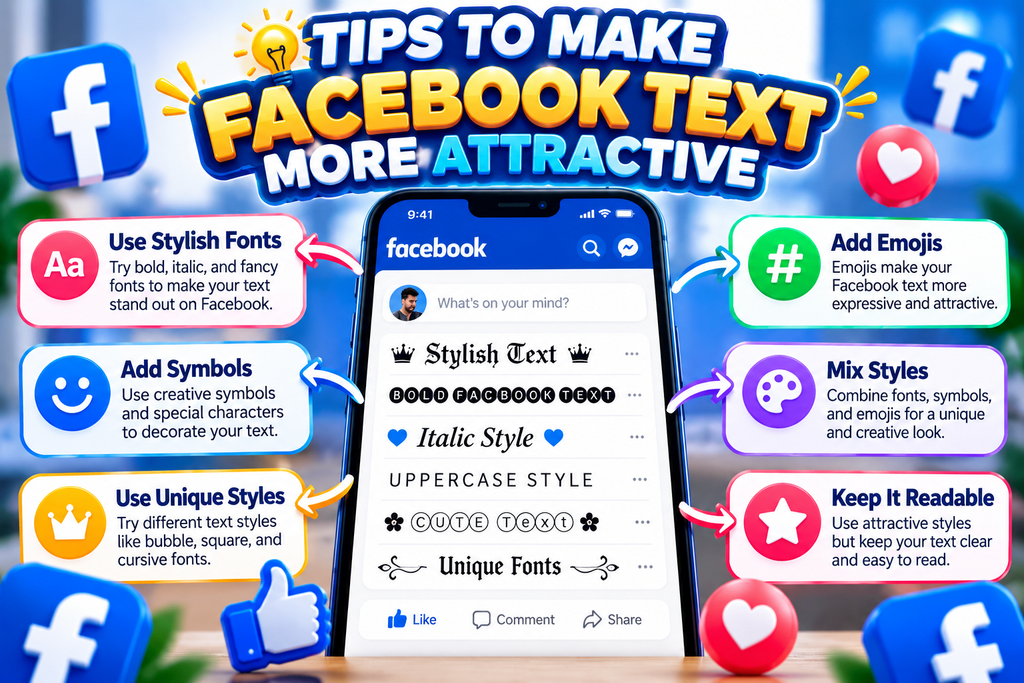
Make Facebook text attractive by balancing visual styling with moderation. In my testing, formats perform better when text decoration supports the message, while combinations of symbols and emojis remain controlled, familiar, and easy to scan.
For practical use case decisions, vary emphasis through styling rather than clutter. A clean opener, selective bold styles, and readable styles help Facebook content feel polished, especially when viewers move quickly through busy feeds today.
Also Read: Dominate With This Gaming Font Generator
Facebook Font Generator Vs Font Apps
Some apps offer deeper controls, yet browser access keeps comparisons immediate. In my testing, online font generators suit Facebook users who need quick generation, while no installation reduces friction across devices during everyday editing.
Apps can provide saved presets and broader typography controls, but generators excel at free copying and rapid experiments. For Facebook, I usually compare font variations, changing text, then keep only readable serif or sans-serif results.
Star Decorated Facebook Fonts
Star-decorated Facebook text looks polished when hearts and artistic Unicode are paired sparingly. I usually test several generated styles, because excessive symbols can reduce readability, especially when a short status carries the main message today.
For bios and captions, Facebook font styles can frame a phrase without changing its meaning. I favor short quotes and cleaner styles, using balanced styling so star symbols add character while words remain easy to scan.
Popular Directions For Facebook Fonts
Popular Facebook fonts usually move beyond one look: visual families include bold, script, circular, gothic, and decorative directions. I often recommend matching message tone with the intended length, especially when readers scan posts quickly today.
A practical generator can mix decorative styles, framed layouts, and controlled combinations without overwhelming readers. For branding, consider professional context; for casual posts, attractive symbols, stars, or cute accents can create stronger visual identity personally.
Professional Use Of Facebook Fonts
Professional Facebook typography works best when clarity leads design. For Facebook profile text, restrained text styles can strengthen intros, while page descriptions and page headlines remain readable, polished, and consistent across posts for business pages.
In client work, I prefer browser generators because fast generation supports style reuse during campaigns. online generation also keeps workflows simple, avoiding a separate app when teams need quick edits from shared devices before publishing.
Long-Form Facebook Posts
Long-form Facebook posts need readable emphasis rather than decoration. In professional context, I usually combine font styles, short post openers, and serif accents so important ideas remain clear while decorative choices stay controlled for readers online.
Before publishing, test the same message across visible text areas, because extended posts may behave differently than headlines. A character-based generator can improve presentation, but accessibility, consistency, and native readability should guide every formatting decision.
Can I Download Facebook Fonts?
Most font apps do not create a downloadable Facebook font file. A character substitution tool converts your text into Unicode characters, so you usually copy the finished input text instead of installing software directly locally.
Some services may offer files, but these are different from the online text-styling process. For Facebook posting, downloading a font is rarely necessary; mobile applications mainly provide interfaces, previews, and copy-ready output for social publishing.
Why Do Fancy Facebook Fonts Look Different?
Fancy Facebook fonts look different because generators replace standard characters with Unicode alternatives, not installed typefaces. They can appear bold, cursive, boxed, or circular, depending on character design and rendering across platforms too, in practice.
From my testing, visual styling changes mainly through character shapes and spacing. script-like styles and gothic characters seem especially distinctive, while weird symbols or decorative forms may vary across devices, browsers, and Facebook interfaces too.
Are Facebook Fonts Safe To Use?
Facebook fonts are generally safe when they simply produce Unicode text, but my check is practical: inspect generated characters, avoid suspicious download, and test unfamiliar font styles before placing them in posts or profile text.
The bigger issue is not the font itself; it is where the text comes from. A trusted text converter should not request passwords or software installation, while normal Facebook fonts need only copied Unicode characters.
Can I Use Facebook Fonts On Instagram And WhatsApp?
Yes, fancy fonts created for Facebook can be copied into Instagram captions, bios, comments, and WhatsApp messages because generators typically create Unicode characters rather than downloadable typefaces. Still, compatibility depends on device and app support.
I have found that simple script-like styles and familiar symbols transfer more reliably than heavily decorative characters. Before posting, test your Twitter content, Tumblr, or Threads style in both apps, especially when sharing longer content.
Can I Use Facebook Fonts In Comments And Page Names?
Facebook comments can support decorative names made from Unicode characters, while page-name fields may enforce stricter standards. In my experience, comments permit creative styling more often, but recognizable wording remains important for clarity and moderation.
For page identity, I prefer restrained stylish text. page headlines, page descriptions, and group posts provide creative space, while featured snippets can simplify unusual characters; choose forms that stay readable and easy to understand today.
What Text Styles Work Best On Facebook Posts?
On Facebook posts, bold styles usually deliver clear emphasis, while cursive and gothic characters suit short statements when readability remains strong. I prefer small accents around keywords, not across every line, even today, consistently online.
For updates, heart decorated and Asian symbols add personality, while random ornaments may overwhelm longer passages. Practical directions and attitude captions benefit from restraint; examples and Cherokee styles should support meaning, not compete with it.
Should Facebook Profile Text Be Highly Decorative?
A profile should feel distinctive, not overloaded. In my testing, restrained decoration keeps names readable while subtle framed styles can add personality. Choose emphasis where identity matters, then let ordinary text carry the message comfortably.
Highly decorative profiles may attract attention briefly, yet excessive symbols can reduce clarity across devices. I usually recommend one expressive element, balanced spacing, and readable wording, especially when visitors scan a bio quickly at once.
Conclusion
From my publishing experience, Facebook profile text benefits from restraint, while page headers and page names can use framed styles carefully. The strongest use cases usually prioritize readable accents over decoration that overwhelms ordinary viewers.
A workflow starts when you paste text, browse, and test groups, forums, and videos. box and crazy effects suit short posts, while long-form Facebook posts require safety, trusted tools, executable software, and character-based generator checks.
Is A Facebook Font Generator Free To Use?
Yes, most Facebook font generators are free and work directly in a browser. You enter standard text, choose a Unicode style, copy the result, and paste it into your Facebook profile, posts, comments, or captions.
Do I Need To Download Software For Facebook Fonts?
You generally do not need to download anything. A Facebook font generator converts ordinary characters into Unicode variations, allowing you to copy styled text directly. This makes the process convenient across phones, tablets, and computers.
Can Facebook Fonts Be Used On Other Platforms?
Yes, Facebook fonts can often be used on Instagram, WhatsApp, TikTok, Discord, and other platforms that support Unicode text. However, appearance may vary because each platform, device, or operating system handles Unicode characters quite differently.
Why Do Some Facebook Fonts Appear As Boxes Or Symbols?
Some decorative characters may appear as boxes, blank spaces, or question marks when a device or platform does not support them. Testing styled text before publishing helps confirm readability and consistent results for your audience.
Which Facebook Font Styles Are Best For Professional Content?
For professional Facebook content, simple bold, italic-like Unicode, or lightly decorative styles are usually easier to read. Avoid excessive symbols in important messages, because clarity, accessibility, and quick understanding should remain more important than decoration.


