


Kawaii Font Generator 🎀
Transform your plain text into adorable aesthetic unicode fonts and decorate with cute Kaomojis instantly!
A kawaii font generator turns text into cute Unicode styling for profiles, captions, and usernames. I find special characters, kaomoji, and stylized text useful when cute aesthetic fonts add personality without installing a font file.
The result relies on Unicode characters, not a downloadable typeface. That makes copy-paste text practical across social media, while decorative symbols, bubble text, and heart styles can shape identity using outline styles for messages today.
Table of Contents
What Is a Kawaii Font Generator?
A kawaii font generator transforms ordinary text into stylized text by replacing letters with cute Unicode and special characters. Rather than requiring font installation, it creates copy-paste text for a decorative profile on supported platforms.
I usually view the result as a practical character conversion, not a newly installed design. Users can test several looks quickly, compare legibility, and keep whichever version fits their intended online identity and audience comfortably.
What “Kawaii” Means In The Context Of Typography
In kawaii typography, cute-looking design combines rounded forms, playful spacing, expressive symbols, and gentle proportions. That approach makes ordinary language feel friendly and visually personal, especially across usernames, captions, comments, and profiles online for audiences.
The term also describes a mood rather than one technical font category. In practice, kaomoji and simple copy actions can add sweetness, while paste behavior lets the style travel across digital conversations without installed typeface.
Also Read: PLS Donate Text Generator
How Does A Kawaii Font Generator Work?
A kawaii font generator transforms ordinary text through Unicode characters, stylized alphabet forms, and decorative symbols, producing cute text for profiles and messages. A workflow checks preview output before copy-paste text reaches devices and platforms.
Behind the scenes, the tool maps input letters toward styles such as full-width, bubble fonts, cursive, circle fonts, or sparkle, then returns generated text. Unicode support, character counting, and rendering explain platform restrictions during use.
Unicode Blocks Used In Kawaii-Style Text
Unicode versions define which character mappings a kawaii generator can access, while current standards determine newer symbols. In practice, Unicode coverage matters because hearts, stars, circles, and decorative marks may come from different blocks and versions.
From experience, reliable output depends on rendering support across devices. Common special Unicode characters, Unicode symbols, full-width characters, and circle characters can create distinct kawaii effects, but unsupported blocks may display differently across platforms.
How To Use The Kawaii Text
Open the browser, enter normal characters, and choose a style conversion. JavaScript performs character substitution, creating Unicode alternatives and a generated result. Check the stylized text before copying, because character mapping determines how letters appear.
Once satisfied, copy the result as copy-paste text and test the Unicode text. Paste the copied text into your profile, caption, or message, then verify spacing and appearance on the target platform before publishing carefully.
What Kawaii Font Styles Can These Generators Produce?
These generators can produce bubble text, outline letters, heart accents, star decorations, and symbol-decorated text. They also create aesthetic combinations using Unicode letters, kaomoji, rounded shapes, and playful spacing, making short profile names feel distinct.
I find cute typography, hand-drawn looks, bubble letters, script, cartoon, and girly treatments useful in bios and usernames. Decorative options add flowers, ornamentation, readability concerns, or hearts, while bold and pretty variations suit gaming tags.
Symbol-Decorated Kawaii Text
Symbol-decorated kawaii lettering combines symbol-decorated forms with heart, star, and outline details, creating accents for avatars and messages. In practice, I find restrained combinations look cleaner, especially when decorations reinforce mood without overwhelming legibility.
Symbol decoration can also pair aesthetic circle patterns with kaomoji, while Unicode letters add variation. I usually test each combination before publishing, because alignment and emphasis may shift when characters render differently elsewhere.
Where Can You Use Kawaii Generated Text?
Kawaii generated text works best where personality matters more than formal typography. I often see TikTok, Instagram, and Discord profiles use decorative text and Unicode styling to create recognizable identity within their profile presentation online.
Gaming spaces offer another practical use. Roblox and Twitter may impose different platform rules, username restrictions, or character limits, so I recommend checking device compatibility before copying styles. This test prevents broken symbols and displays.
What Are The Actual Kawaii Fonts?
In practice, I find actual kawaii fonts easiest to recognize through rounded letters, soft rounded typefaces, playful forms, balanced proportions. In Japanese design culture, they reinforce a visual language through cute typography and approachable expression.
The technical distinction matters: many kawaii fonts online are Unicode copy-paste text, not an installable typeface. Real typefaces contain original letterforms in .ttf or .otf files, while generators transform characters for quick social sharing everywhere.
Free Kawaii Fonts On Google Fonts
Google Fonts supports font discovery when you want playful font styles without obscure downloads. Explore handwritten fonts, rounded or cheerful typefaces, then test how each performs in web typography before choosing on websites and projects.
A good pick should balance cute fonts with readable construction, especially across mobile screens. I usually compare sans-serif options with handwriting and bubble effects, checking license terms, consistency, and whether the chosen typeface fits branding.
Kawaii Fonts On DaFont And FontSpace
DaFont and FontSpace are useful starting points when browsing cute fonts, but their libraries feel different. I usually compare font categories, previews, and file options before choosing a typeface for a specific design project today.
FontSpace often makes discovery easier through kawaii kids, handmade, birthday, and brush categories, while DaFont encourages broader browsing. Check font licensing carefully, especially when commercial use matters, then install compatible files for your chosen workflow.
How Do Kawaii Fonts Perform On Social Media Profiles?
On social profiles, kawaii text works best when visual styling supports profile identity and profile aesthetics without replacing ordinary wording. I’ve found aesthetic identity and discoverability improve when decorative characters remain readable, recognizable, and relevant.
Across Instagram, TikTok, and Discord, Unicode styles can strengthen profile differentiation, while searchability depends on preserving useful searchable keywords. Kawaii styling, K-pop, anime, and cutecore references can signal community interests without overwhelming information or navigation.
What Makes A Kawaii Font Generator Good Or Bad?
A good generator offers distinct styles, visual diversity, and dependable output quality without flooding users with near-duplicates. I judge style selection by whether results feel different, readable, and useful for cute aesthetics in kawaii projects.
A strong tool also respects mobile usability, responsive design, and Unicode version coverage. From experience, font support matters as novelty: new characters should render consistently on modern devices, while platform compatibility prevents rendering failures reliably.
What Are The Limitations Of Kawaii Font Generators?
Kawaii generators have practical limits: unsupported Unicode may create missing characters or boxes across a browser, device, or application. Character support and compatibility vary, so previews can misrepresent the final text after copying and posting.
Real typefaces remain outside some workflows: special Unicode characters may trigger username rules, while outputs lack font files or an installable font. For website SEO, decorative Unicode can reduce search visibility when text replaces it.
Accessibility Problems With Unicode Kawaii Text
Unicode text can reduce readability when decorative characters replace familiar letterforms. In practice, assistive technology may announce unusual symbols poorly, forcing readers to decode sequences individually. This matters most for menus, instructions, and essential navigation.
I test device support before publishing kawaii text, because missing glyphs can become boxes or question marks. Limited typographic control and reliance on font files can undermine accessibility when encoded characters remain unfamiliar across platforms.
Why Kawaii Generator Text Hurts Website SEO
Using kawaii text styles throughout a website can weaken search indexing when website content becomes decorative Unicode rather than ordinary text. Search engines may still read characters, but unusual forms can reduce clarity around keywords.
From practical SEO testing, I prefer readable HTML for copy and reserve special characters for decoration. When underlying characters, titles, headings, or navigation become stylized, users may understand them while search indexing gains reliable context.
What Is The Difference Between A Kawaii Font Generator And A Kawaii Font Maker?
A generator mainly transforms entered words into decorative Unicode generator output, while a font maker builds an original font for installation. The difference matters when choosing speed, permanence, and how your kawaii typography works across platforms.
In practice, I use a browser tool for quick copy-paste Unicode, but font creation tools suit projects needing font files. A maker develops reusable letterforms through a longer design workflow, requiring more technical control.
Tools For Making Original Kawaii Fonts
For original kawaii lettering, I usually separate a quick font generator from serious font creation tools. A font maker lets designers draw characters, refine character styling, adjust spacing, and build an original typeface for projects.
Then I open the result inside design software and compare it with nearby font libraries, checking kerning, repeated letters, symbols, and export behavior. In practice, this extra pass catches inconsistencies that one-click generators often hide.
TextStudio: Kawaii Text Effects And Design Uses
TextStudio is useful for editable effects beyond Unicode output, especially in visual branding. I test pastel, glossy effects, 3D effects, and image-based text because each treatment changes how kawaii text reads in finished designs online.
For social graphics, I prefer cute lettering with stickers or logos when the design needs a playful focal point. TextStudio can support graphic designs, while font tools remain better for installable typefaces and repeated editing.
FontSpace Kawaii Font Categories
On FontSpace, kawaii browsing becomes easier when you filter by downloadable fonts, font directories, and typeface downloads, then compare rounded, bubble, cartoon, script, and girly styles for the mood you need before downloading each option.
In my own font research, category labels matter less than the actual preview: a cute category may hide mixed aesthetics. I check free fonts, licensing notes, and font libraries before choosing a usable kawaii style.
Random Fonts / Kawaii Face Fonts
Random font combinations work well for kawaii face designs when playful letterforms meet rounded forms, bubble shapes, and soft edges. I often test patterns because tiny changes can make an expression feel cuter, warmer, or livelier.
Some fun and happy styles resemble tiny faces, especially when stars or doodles frame short text. A kawaii treatment can combine familiar symbols with expressive spacing, creating nicknames that remain readable while feeling distinctly playful.
Also Read: Mirror Font Generator
Are Kawaii Fonts Actually Fonts?
Kawaii fonts are often not real fonts technically; many tools produce copy-paste Unicode, text output, or downloadable kawaii fonts. My tests show the distinction affects font installation, especially when moving lettering between devices and apps.
True typefaces support graphic design, Photoshop, Canva, Figma, .ttf, and .otf files for editing. Generators instead transform characters into Unicode results, which can copy differently because they rely on character support, not traditional typeface files.
Can I Use Kawaii Text On Any Platform?
Kawaii text can appear on Discord, Instagram, TikTok, YouTube, and other social profiles, but compatibility is not universal. I always test Unicode text on different devices because character interpretation and rendering can change unexpectedly quickly.
For usernames and online identity, copied styles often work where Unicode is accepted, while a font file may require installation. For dependable results, check mobile usability, desktop display, and character rules before publishing anywhere publicly.
Is A Kawaii Font Generator Free?
A kawaii font generator is often free because it converts typed characters into ready-to-copy styles rather than building installable files. Many browser tools offer free access, while downloadable options may follow separate licensing terms today.
For everyday profiles, posts, and experiments, free generators usually provide enough text output without registration or software. When creating commercial artwork, check whether related commercial use rights apply, especially with downloadable kawaii fonts online today.
What Kawaii Text Styles Can I Generate?
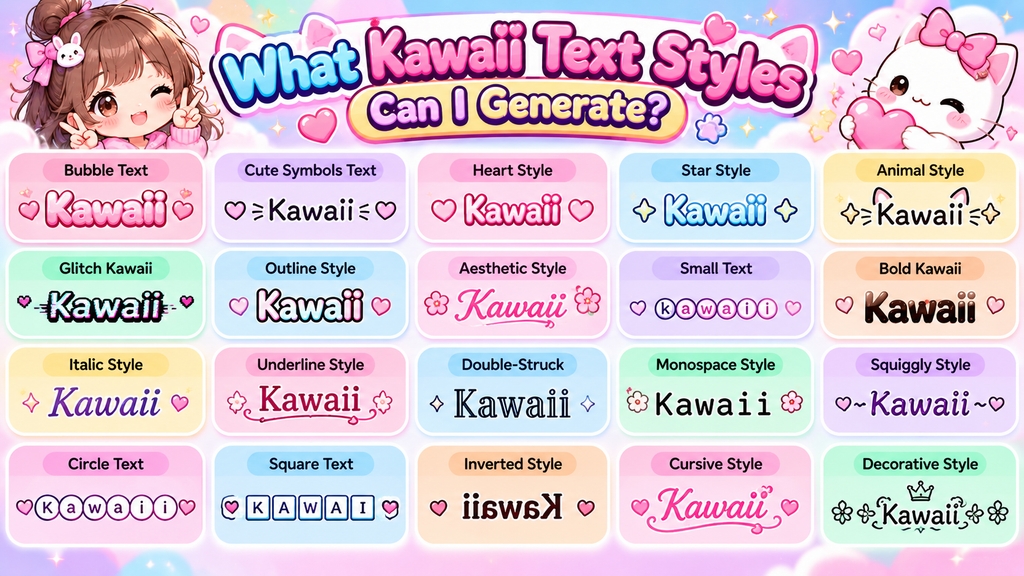
A good generator goes beyond one cute look, letting you test outlined, squared, monospace, and gothic variations alongside softer decorative treatments. I often compare spacing first, because kawaii styling can change character rhythm online identity.
Other generators layer effects such as underline, strikethrough, and overline with randomized styles for playful bios or names. For shorter text, I check visual balance and avoid overuse because extra marks can reduce clarity, especially in gaming.
Why Do Some Kawaii Fonts Show As Boxes Or Question Marks?
Boxes or question marks usually appear when a device lacks glyph support for certain Unicode blocks. A character set mismatch, outdated font rendering, or missing letter variants can prevent intended kawaii symbols from displaying correctly.
I usually test unusual styles across browsers and phones before publishing them. Unicode-range coverage matters, while preview accuracy can reveal unsupported characters early. Substituting simpler symbols often preserves the kawaii look without creating unreadable output.
Can I Use Kawaii Text In My Username?
Yes, kawaii text can work well in a username when the platform accepts Unicode characters. I usually recommend checking character count, readability, and platform support before settling on decorative lettering for your account during signup.
For public accounts, a playful username can strengthen online identity and fit gaming communities or profile decoration. Still, keep a plain alternative nearby, because unusual symbols may reduce recognition when people search or mention you.
Will Kawaii Fonts Hurt My Website’s SEO?
Kawaii text does not automatically damage SEO. The real issue starts when decorative Unicode code points replace important words, making keywords, text semantics, and website content harder for search engines during search indexing and retrieval.
From my own content testing, plain HTML remains safer for critical copy, while kawaii styling works around headings, buttons, or decorative labels. Keep keyword strings readable and preserve normal text whenever search visibility matters most.
Are Kawaii Fonts Accessible To Screen Readers?
Screen readers may struggle with Unicode decorations because they pronounce characters individually or inconsistently. In accessibility work, I treat critical information as standard text, while text alternatives preserve meaning for users relying on assistive technology.
For inclusive design, test accessibility across browsers and devices before publishing. Screen readers are not the only concern: unusual symbols can interrupt navigation, reduce comprehension, or create confusing pronunciation when decorative Unicode dominates content.
What’s The Difference Between A Generator And A Font Maker?
A Unicode generator creates styled text output from existing characters, while a font maker builds original letterforms. In practice, the generator needs no installation, but font design requires tools, planning, and technical control today online.
A generator focuses on fast results for everyday posting, whereas a font maker develops assets for graphic design. My testing shows generator outputs favor convenience; makers involve a learning curve, capabilities, cost, and operating systems.
Which Kawaii Font Generator Is Best For Gaming Usernames?
For gaming usernames, I usually favor a generator with strong style variety, dependable copy reliability, and user experience. A good tool should create readable kawaii text that survives profile testing across popular games and devices.
From practice, the best choice is rarely the fanciest interface; it is the generator quality. Test symbols, spacing, and visibility before saving one name, because each game applies different Unicode support rules during username creation.
Can I Download Kawaii Fonts For Photoshop Or Canva?
FontSpace listings may offer files marked personal use, but licensing determines commercial use. Photoshop supports installed fonts directly, while a generator typically produces Unicode text that behaves differently from actual font files on your computer.
In Canva, font uploads are supported on eligible plans and accept OTF, TTF, and WOFF files. A Unicode generator result can be copied into a design, then export the finished artwork for sharing online easily.
What Are The Main Kawaii Font Styles Available For Download?
Downloadable kawaii styles come in rounded, playful families rather than one typeface. I separate cute aesthetic fonts, bubble text, M PLUS Rounded 1c, Nunito, and Comfortaa, because each creates a softer personality for different designs.
For decorative projects, I look for pastel faces, candy finishes, glossy effects, 3D text, rainbow styles, stickers, logo design, and visual branding options. Check licensing and format before choosing downloadable files for professional work online.
Conclusion
The generator pairs visual language, cute culture, and adorable aesthetics with letter variants, Enclosed Alphanumerics, bubble-like characters, and short phrases when users enter text, choose a style, preview sizing, and copy all quickly online today.
On social media, aesthetic branding, and visual identity, K-pop, anime, Tumblr, and Twitter fit gaming usernames, while gothic, outlined, squared, monospace, strikethrough, and overline provide style; accessibility, screen readers, text alternatives, and critical information require care.
What Is A Kawaii Font Generator?
A Kawaii Font Generator is an online tool that transforms ordinary text into cute, playful, and decorative Unicode styles. It can create attractive text for social media profiles, usernames, captions, gaming names, messages, and creative posts.
Is A Kawaii Font Generator Free To Use?
Yes, many Kawaii Font Generators are completely free and work directly in your browser. Usually, you can enter your text, select a preferred style, copy the result, and paste it wherever supported without installing software.
Can I Use Kawaii Text In Usernames?
Kawaii text can often be used in usernames, but compatibility depends on the platform. Some websites and games accept many Unicode characters, while others restrict certain symbols or decorative letters, so testing your chosen username is recommended.
Why Do Kawaii Characters Sometimes Appear As Boxes?
Boxes, question marks, or missing characters usually appear when a device, application, or font system does not support the Unicode characters being used. Trying another supported style or platform can resolve the display problem.
Are Kawaii Fonts Accessible To Screen Readers?
Not every Kawaii Unicode style works well with screen readers. Decorative characters may be interpreted differently or become difficult to understand. For important information, use standard text alongside decorative styling to maintain readability and accessibility.


[…] Also Read: Kawaii Font Generator […]